

If you are seeing a Serious Disk Error Writing Drive C:\ alert on your computer screen,then as you probably already suspect you’re computer has been infected with a rogue software.
The malicious software is known as Smart HDD,Data Recovery,S.M.A.R.T Virus or S.M.A.R.T Check and has changed your desktop background,hidden your files and shortcuts and it’s causing browsing redirects.
In addition the S.M.A.R.T Virus will display fake alerts, claiming that several hard drive errors were detected on your computer.In reality, none of the reported issues are real, and are only used to scare you into buying S.M.A.R.T Virus and stealing your personal financial information.
We strongly advise you to follow our S.M.A.R.T Virus removal guide and ignore any alerts that this malicious software might generate.Under no circumstance should you buy this rogue security software as this could lead to identity theft.
If you’ve got a S.M.A.R.T Virus infection , you’ll be seeing this screens :
![[Image: Smart-HDD.png]](http://malwaretips.com/blogs/wp-content/uploads/2012/05/Data-Recovery-Rogue.png "S.M.A.R.T Virus")
![[Image: Smart-HDD.png]](http://malwaretips.com/blogs/wp-content/uploads/2012/05/Data-Recovery-fake-alert.png "S.M.A.R.T Virus")
![[Image: Smart-HDD.png]](http://malwaretips.com/blogs/wp-content/uploads/2012/05/Data-Recovery-Rogue-alert.png "S.M.A.R.T Virus")
Registration codes for S.M.A.R.T Virus
As an optional step,you can use the following license key to register S.M.A.R.T Virus and stop the fake alerts.
Data Recovery Rogue: 08869246386344953972969146034087
SMART HDD Rogue: 15801587234612645205224631045976
Please keep in mind that entering the above registration code will NOT remove S.M.A.R.T Virus from your computer , instead it will just stop the fake alerts so that you’ll be able to complete our removal guide more easily.
Removal guide for S.M.A.R.T Virus
STEP 1 : Start your computer in Safe Mode with Networking
- Remove all floppy disks, CDs, and DVDs from your computer, and then restart your computer.
- Press and hold the F8 key as your computer restarts.Please keep in mind that you need to press the F8 key before the Windows start-up logo appears.
- On the Advanced Boot Options screen, use the arrow keys to highlight Safe Mode with Networking , and then press ENTER.
![[Image: Safemode.jpg]](//malwaretips.com/images/removalguide/safemode.jpg "Safe Mode with Networking screen")
- Log on to your computer with a user account that has administrator rights
![[Image: Safemode.jpg]](http://malwaretips.com/images/removalguide/safemode.jpg "Safe Mode with Networking screen")
STEP 2: Remove S.M.A.R.T Virus malicious proxy server
S.M.A.R.T Virus may add a proxy server which prevents the user from accessing the internet,follow the below instructions to remove the proxy.
- Start Internet Explorer
![[Image: S.M.A.R.T Virus- IE]](//malwaretips.com/images/removalguide/Ieicon.png "IE 9") and if you are using Internet Explorer 9 ,click on the gear icon
and if you are using Internet Explorer 9 ,click on the gear icon ![[Image: IE gear icon]](//malwaretips.com/images/removalguide/icongear.jpg "Gear Icon") (Tools for Internet Explorer 8 users) ,then select Internet Options.
(Tools for Internet Explorer 8 users) ,then select Internet Options.
![[Image: Internet-options-IE.png]](//malwaretips.com/images/removalguide/ie1.png "Internet Options in IE")
- Go to the tab Connections.At the bottom, click on LAN settings.
![[Image: Remove-proxy-server2.png]](//malwaretips.com/images/removalguide/ie2.png "Connections tab in Internet Explorer")
- Uncheck the option Use a proxy server for your LAN. This should remove the malicious proxy server and allow you to use the internet again.
![[Image: Remove-proxy-server3.png]](//malwaretips.com/images/removalguide/ie3.png "Uncheck the option Use a proxy server for your LAN")
![[Image: S.M.A.R.T Virus- IE]](http://malwaretips.com/images/removalguide/Ieicon.png "IE 9") and if you are using Internet Explorer 9 ,click on the gear icon
and if you are using Internet Explorer 9 ,click on the gear icon ![[Image: IE gear icon]](http://malwaretips.com/images/removalguide/icongear.jpg "Gear Icon") (Tools for Internet Explorer 8 users) ,then select Internet Options.
(Tools for Internet Explorer 8 users) ,then select Internet Options.![[Image: Internet-options-IE.png]](http://malwaretips.com/images/removalguide/ie1.png "Internet Options in IE")
![[Image: Remove-proxy-server2.png]](http://malwaretips.com/images/removalguide/ie2.png "Connections tab in Internet Explorer")
![[Image: Remove-proxy-server3.png]](http://malwaretips.com/images/removalguide/ie3.png "Uncheck the option Use a proxy server for your LAN")
If you are a Firefox users, go to Firefox(upper left corner) → Options → Advanced tab → Network → Settings → Select No Proxy
STEP 3: Run RKill to terminate known malware processes associated with S.M.A.R.T Virus.
RKill is a program that attempts to terminate any malicious processes associated with S.M.A.R.T Virus ,so that your normal security software can then run and clean your computer of infections.
As RKill only terminates a program’s running process, and does not delete any files, after running it you should not reboot your computer as any malware processes that are configured to start automatically will just be started again.
- While your computer is in Safe Mode with Networking ,please download the latest official version of RKill.

- Double-click on the RKill iconin order to automatically attempt to stop any processes associated with S.M.A.R.T Virus.
![[Image: run-rkill-1.png]](//malwaretips.com/images/removalguide/rkill1.png "RKILL ICON")
- RKill will now start working in the background, please be patient while the program looks for various malware programs and tries to terminate them.
![[Image: run-rkill-2.png]](//malwaretips.com/images/removalguide/rkill2.png "RKILL Command prompt")
IF you receive a message that RKill is an infection, that is a fake warning given by the rogue. As a possible solution we advise you to leave the warning on the screen and then try to run RKill again.Run RKill until the fake program is not visible but not more than ten times.
IF you continue having problems running RKill, you can download the other renamed versions of RKill from here. - When Rkill has completed its task, it will generate a log. You can then proceed with the rest of the guide.
![[Image: S.M.A.R.T Virus rkill3.jpg]](//malwaretips.com/images/removalguide/rkill3.png "RKILL LOG")
![[Image: run-rkill-1.png]](http://malwaretips.com/images/removalguide/rkill1.png "RKILL ICON")
![[Image: run-rkill-2.png]](http://malwaretips.com/images/removalguide/rkill2.png "RKILL Command prompt")
![[Image: S.M.A.R.T Virus rkill3.jpg]](http://malwaretips.com/images/removalguide/rkill3.png "RKILL LOG")
WARNING: Do not reboot your computer after running RKill as the malware process will start again , preventing you from properly performing the next step.
STEP 4: Remove S.M.A.R.T Virus malicious files with Malwarebytes Anti-Malware FREE
- Please download the latest official version of Malwarebytes Anti-Malware FREE.
- Install Malwarebytes’ Anti-Malware by double clicking on mbam-setup.
![[Image: malwarebytes-installer.png]](//malwaretips.com/images/removalguide/mbam1.png "Malwarebytes Anti-Malware Installer")
- When the installation begins, keep following the prompts in order to continue with the installation process. Do not make any changes to default settings and when the program has finished installing, make sure you leave both the Update Malwarebytes’ Anti-Malware and Launch Malwarebytes’ Anti-Malware checked. Then click on the Finishbutton. If Malwarebytes’ prompts you to reboot, please do not do so.
![[Image: install-malwarebytes.png]](//malwaretips.com/images/removalguide/mbam2.png "Install Malwarebytes Anti-Malware")
- Malwarebytes Anti-Malware will now start and you’ll be prompted to start a trial period , please select ‘Decline‘ as we just want to use the on-demand scanner.
![[Image: decline-trial-malwarebytes.png]](//malwaretips.com/images/removalguide/mbam3.PNG "Decline trial period in Malwarebytes Anti-Malware")
- On the Scanner tab,please select Perform full scan and then click on the Scan button to start scanning your computer for any possible infections.
![[Image: malwarebytes-full-system-scan.png]](//malwaretips.com/images/removalguide/mbam4.png "Perform a Full System Scan")
- Malwarebytes’ Anti-Malware will now start scanning your computer for S.M.A.R.T Virus malicious files as shown below.
![[Image: malwarebytes-scanning.png]](//malwaretips.com/images/removalguide/mbam5.png "Malwarebytes Anti-Malware scanning for S.M.A.R.T Virus")
- When the scan is finished a message box will appear, click OK to continue.
![[Image: malwarebytes-scan-finish.png]](//malwaretips.com/images/removalguide/mbam9.png "Malwarebytes when the scan is finished")
- You will now be presented with a screen showing you the malware infections that Malwarebytes’ Anti-Malware has detected.Please note that the infections found may be different than what is shown in the image.Make sure that everything is Checked (ticked) and click on the Remove Selected button.
![[Image: malwarebytes-scan-results.png]](//malwaretips.com/images/removalguide/mbam6.png "S.M.A.R.T Virus infection scan results")
- Malwarebytes’ Anti-Malware will now start removing the malicious files.If during the removal process Malwarebytes will display a message stating that it needs to reboot, please allow this request.
![[Image: malwarebytes-reboot-prompt.png]](//malwaretips.com/images/removalguide/mbam10.png "Reboot prompt from Malwarebytes")
![[Image: malwarebytes-installer.png]](http://malwaretips.com/images/removalguide/mbam1.png "Malwarebytes Anti-Malware Installer")
![[Image: install-malwarebytes.png]](http://malwaretips.com/images/removalguide/mbam2.png "Install Malwarebytes Anti-Malware")
![[Image: decline-trial-malwarebytes.png]](http://malwaretips.com/images/removalguide/mbam3.PNG "Decline trial period in Malwarebytes Anti-Malware")
![[Image: malwarebytes-full-system-scan.png]](http://malwaretips.com/images/removalguide/mbam4.png "Perform a Full System Scan")
![[Image: malwarebytes-scanning.png]](http://malwaretips.com/images/removalguide/mbam5.png "Malwarebytes Anti-Malware scanning for S.M.A.R.T Virus")
![[Image: malwarebytes-scan-finish.png]](http://malwaretips.com/images/removalguide/mbam9.png "Malwarebytes when the scan is finished")
![[Image: malwarebytes-scan-results.png]](http://malwaretips.com/images/removalguide/mbam6.png "S.M.A.R.T Virus infection scan results")
![[Image: malwarebytes-reboot-prompt.png]](http://malwaretips.com/images/removalguide/mbam10.png "Reboot prompt from Malwarebytes")
STEP 5: Double check your system for any left over infections with HitmanPro
- This step can be performed in Normal Mode ,so please download the latest official version of HitmanPro.
- Double click on the previously downloaded file to start the HitmanPro installation.
![[Image: hitmanpro-icon.png]](//malwaretips.com/images/removalguide/hpro1.png "HitmanPro Installer")
NOTE : If you have problems starting HitmanPro, use the “Force Breach” mode. Hold down the left CTRL-key when you start HitmanPro and all non-essential processes are terminated, including the malware process. (How to start HitmanPro in Force Breach mode – Video) - Click on Next to install HitmanPro on your system.
![[Image: installing-hitmanpro.png]](//malwaretips.com/images/removalguide/hpro2.png "HitmanPro installation process")
- The setup screen is displayed, from which you can decide whether you wish to install HitmanPro on your machine or just perform a one-time scan, select a option then click on Next to start a system scan.
![[Image: hitmanpro-setup-options.png]](//malwaretips.com/images/removalguide/hpro3.png "HitmanPro setup options")
- HitmanPro will start scanning your system for malicious files. Depending on the size of your hard drive, and the performance of your computer, this step will take several minutes.
![[Image: hitmanpro-scanning.png]](//malwaretips.com/images/removalguide/hpro4.png "HitmanPro scanning for S.M.A.R.T Virus")
- Once the scan is complete,a screen displaying all the malicious files that the program found will be shown as seen in the image below.After reviewing each malicious object click Next.
![[Image: hitmanpro-scan-results.png]](//malwaretips.com/blogs/wp-content/uploads/2012/02/rsz_hpro5.png "HitmanPro S.M.A.R.T Virus scan results")
- Click Activate free license to start the free 30 days trial and remove the malicious files.
![[Image: hitmanpro-activation.png]](//malwaretips.com/images/removalguide/hpro6.png "Activate HitmanPro free license to remove detected infections")
- HitmanPro will now start removing the infected objects, and in some instances, may suggest a reboot in order to completely remove the malware from your system. In this scenario, always confirm the reboot action to be on the safe side.
![[Image: hitmanpro-icon.png]](http://malwaretips.com/images/removalguide/hpro1.png "HitmanPro Installer")
![[Image: installing-hitmanpro.png]](http://malwaretips.com/images/removalguide/hpro2.png "HitmanPro installation process")
![[Image: hitmanpro-setup-options.png]](http://malwaretips.com/images/removalguide/hpro3.png "HitmanPro setup options")
![[Image: hitmanpro-scanning.png]](http://malwaretips.com/images/removalguide/hpro4.png "HitmanPro scanning for S.M.A.R.T Virus")
![[Image: hitmanpro-scan-results.png]](http://malwaretips.com/blogs/wp-content/uploads/2012/02/rsz_hpro5.png "HitmanPro S.M.A.R.T Virus scan results")
![[Image: hitmanpro-activation.png]](http://malwaretips.com/images/removalguide/hpro6.png "Activate HitmanPro free license to remove detected infections")
STEP 6: Unhide your files and folders
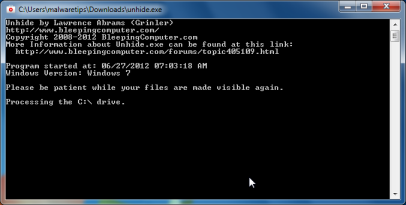
S.M.A.R.T Virus modifies your file system in such a way that all files and folders become hidden, to restore the default settings , you’ll need to run the below program.
- Download Unhide.exe, to unhide your files and folders.
- Double-click on the Unhide.exe icon on your desktop and allow the program to run.The whole process should not take more than 5 minutes to complete,and at the end this utility will generate a report.
STEP 7 : Restore your shortcuts and remove any left over malicious registry keys
S.M.A.R.T Virus has moved your shortcuts files in the Temporary Internet folder and added some malicious registry keys to your Windows installation , to restore your files we will need to perform a scan with RogueKiller.
- Please download the latest official version of RogueKiller.
- Double click on RogueKiller.exe to start this utility and then wait for the Prescan to complete.This should take only a few seconds and then you can click the Start button to perform a system scan.
![[Image: roguekiller-1.png]](//malwaretips.com/blogs/wp-content/uploads/2012/04/roguek-1.png "Click on the Start button to perform a system scan")
- After the scan has completed, press the Delete button to remove any malicious registry keys.
![[Image: roguekiller-2.png]](//malwaretips.com/blogs/wp-content/uploads/2012/04/roguek-2.png "Press Delete to remove the malicious registry keys")
- Next we will need to restore your shortcuts, so click on the ShortcutsFix button and allow the program to run.
![[Image: roguekiller-1.png]](//malwaretips.com/blogs/wp-content/uploads/2012/04/roguek-3.png "Click on the Start button to perform a system scan")
![[Image: roguekiller-1.png]](http://malwaretips.com/blogs/wp-content/uploads/2012/04/roguek-1.png "Click on the Start button to perform a system scan")
![[Image: roguekiller-2.png]](http://malwaretips.com/blogs/wp-content/uploads/2012/04/roguek-2.png "Press Delete to remove the malicious registry keys")
![[Image: roguekiller-1.png]](http://malwaretips.com/blogs/wp-content/uploads/2012/04/roguek-3.png "Click on the Start button to perform a system scan")
STEP 8: Get your desktop look back!
S.M.A.R.T Virus changes your desktop background to a solid black color,to change it back to default one follow the below instruction.
- Windows XP : Click on the Start button and then select Control Panel. When the Control Panel opens, please click on the Display icon. From this screen you can now change your Theme and desktop background.
- Windows 7 and Vista : Click on the Start button and then select Control Panel. When the Control Panel opens, please click on the Appearance and Personalization category. Then select Change the Theme or Change Desktop Background to revert back to your original Theme and colors.
What’s next? Join our amazing community and build up your malware defenses !









Excellent instructions. You are fantastic. Thank you!
Hello, I went through all your steps and they were amazing, solved my problem right away. I have however only one issue left. Internet works 10 times slower after my virus and skype doesnt work. Starts signing in and then sais it has an error and closes down. Ive trying uninstalling and installing again but it doesnt work. Any clues what might be happening?
thanks again
Hello Carlota,
STEP 1 : Run a scan with Combofix
Download ComboFix from one of the following locations:
COMBOFIX DOWNLOAD LINK #1 (This link will automatically download Combofix on your computer)
COMBOFIX DOWNLOAD LINK #2 (This link will automatically download Combofix on your computer)
VERY IMPORTANT !!! Save as Combo-Fix.exe during the download.ComboFix must be renamed before you download to your Desktop
Additional notes:
STEP 2: Run a scan with ESET Online Scanner:
ESET Online Scanner Download Link (This link will automatically download ESET Online Scanner on your computer.)
Next, download Windows Repair All In One and install this utility.
Go to the Startup Repairs tab and click the Start button (bottom right)
Note: When asked if you would like to create a restore point. It is recommended just in-case something does not go as planned.
Note: Leave everything else unchecked
Yup I have it to but I think my case is worse! I started gatting attacked with all these pop ups. I can get to safemode with networking however after that my screen remains black and I get the following:
Detecting primary master: Maxtor 4g120J6
Detecting primary slave: none
Detecting secondary master: CR-48x97e
detecting secondary slave: hl-dt-stdvd-rom GDR8160b
SMART Failure Predicted on Primary Master: Maxtor 4g120J6
Warning (this is flashing): Immediatley back up your data and replace your hard disk. A failure may be imminent
It then Tell me to press F2 to continue, or F1 to enter set up
F2 just reboots my computer
F1 brings to the BIOS utility
I do not see anything wrong in bios but I am no expert. Can you help? This is an old CPU but still have items on their I hate to loose.
Hello Melanie,
Lets work in Normal Mode then:
STEP 1: Run a scan with Malwarebytes Anti-Malware in Chameleon Mode in Norman mode:
STEP 2: Run a scan with RogueKiller
RogueKiller Download Link (This link will automatically download RogueKiller on your computer)
STEP 3 Please perform a scan with HitmanPro as seen on the guide.
If you are having problems starting this program please use the ForceBreach mode as described in the guide.
STEP 4: Run a scan with ESET Online Scanner:
ESET Online Scanner Download Link (This link will automatically download ESET Online Scanner on your computer.)
Waiting for your reply to tell me how everything is running!
Good luck…
Hello Frank,
Did you run any cleaning tools while you were infected???
Hi, Stelian,
Many thanks a lot for your prompt reply. My labtop is using Norton360, when it was infected. I checked by Norton, I am not sure whether something is cleared, it only reminded me some malious file to fix.
I have checked your old answers to Bernie Mack who has similar problem, indeed I found in the user->myname->Appda->local->temp->smtmp folds, there are only two folds named “1” and “4”, there is no “2” or”3″. As you advised, I copy the content of fold “4” to the right location, I recover the destkop icons. But, when I copy and paste the content of “1” fold into the right location: ProgramData->Microsoft->Windows->StartMenu, it still does NOT work (all the programs in the start menu are empty). If I copy the whole fold “1” (including the content) to the StartMenu fold, then in the start menu, I got a “1” fold, in the Program Fold in “1” fold, the programs are not empty and could be linked. I could not understand why I copy only the content under the start menu fold, it does NOT work.
Thanks in advance really
cheers
frank
Hello Frank,
Can you please follow the steps from this post: http://malwaretips.com/Thread-Files-still-hidden-after-smart-hdd-removal-and-unhide-exe?pid=55462#pid55462
I can’t thank you enough! I followed step-by-step and was able to get things back to normal. I still have a folder for smtmp and File_Recovery_License that were part of the recovery process- the file for my hidden folders and the file the creepy fake SMART program gave me when I used your code to get the process started- I put them in my recycle bin, but do I need them? Can I just permanently delete them now that my files and folders are restored? Thanks again!
Hello Kath,
If everything is working,then you can delete those two files.
Stay safe!
Stelian
My hp laptop seams to have this or a similar virus. When I turn it on it goes to a black screen and says: 1720 SMART hard drive detects imminent failure failing attribute 5 – I hit f1 to continue and then I get popup windows title bar Microsoft windows and it states windows detected a hard disk problem – back up your files immediately and contact the computer manufacturer. Then it has two boxes to click start the backup process or ask me again later.
Is this a virus or a hard drive issue? The hard drive was replaced in May of this year.
Thanks in advance for any advice and/or help.
Melody
Hello Melody,
It’s not a hardware issue, this is how this virus behaves.You need to follow the guide from this page.
If you’ll have any problems ,you can just reply here and I’ll help you!
Good luck!
Stelian
Thank you so much for your quick response! I followed all of the steps mentioned in the first part before the replies start and I am still getting the black screen at startup and the window is still popping up. Is there something else I should try? The popup does look different than your examples at the top of the page. I didn’t try anything else mentioned throughout the replies as I am unsure what exactly I should try.
Thank you so very much
Lets fix your computer.Can you please run a scan with Combofix, ESET online scanner and post the logs here so that I can get an idea on what’s going on:
STEP 1 : Run a scan with Combofix
Download ComboFix from one of the following locations:
COMBOFIX DOWNLOAD LINK #1 (This link will automatically download Combofix on your computer)
COMBOFIX DOWNLOAD LINK #2 (This link will automatically download Combofix on your computer)
VERY IMPORTANT !!! Save as Combo-Fix.exe during the download.ComboFix must be renamed before you download to your Desktop
Notes:
STEP 2: Run a scan with ESET Online Scanner:
ESET Online Scanner Download Link (This link will automatically download ESET Online Scanner on your computer.)
NEXT,please run a scan with HitmanPro and RogueKiller as seen on the guide.
Waiting for your reply to tell me if your machine is ok and the logs.
Thank you!!!
Two questions before I start should I do these scans in normal modes and when I download something it goes directly to download folder and does not let me rename until it is downloaded – can I rename there and then put on desktop?
Thank U Thank u Thank u!!!!
Yes,you can do this scans while your computer is in Normal mode.And yes,you can re-name it and then copy this file on your desktop.
Good luck!
Sorry if this is a repeat reply – I had to change computers as the one in question is not acting right ( : The combo fix stayed on a blue screen and basically said it should only take 10 minutes but maybe longer if it is badly infected. Then it said ‘HANDLE’ is not recognized as an internal or external operable program or batch file.
It stayed on that screen for hours until I finally shut it down.
I did not run ESET scanner because I am unsure if it is safe.
Is it safe to run the ESET scanner?
Thank you.
Melody
Hello Melody,
Please delete any copy of Combofix that you have and then download an updated version and try to run a scan while in Safe Mode with Networking.
Next,please run the ESET Scan.
ComboFix 12-10-04.01 – Owner 10/04/2012 9:16.1.2 – x86 NETWORK
Microsoft® Windows Vista™ Business 6.0.6002.2.1252.1.1033.18.2999.2470 [GMT -4:00]
Running from: c:\users\Owner\Downloads\ComboFix.exe
AV: Microsoft Security Essentials *Disabled/Updated* {B140BF4E-23BB-4198-90AB-A51A4C60A69C}
SP: Microsoft Security Essentials *Disabled/Updated* {0A215EAA-0581-4E16-AA1B-9E6837E7EC21}
SP: Spyware Doctor *Enabled/Updated* {94076BB2-F3DA-227F-9A1E-F060FF73600F}
SP: Windows Defender *Disabled/Updated* {D68DDC3A-831F-4fae-9E44-DA132C1ACF46}
.
.
((((((((((((((((((((((((((((((((((((((( Other Deletions )))))))))))))))))))))))))))))))))))))))))))))))))
.
.
C:\DFR1997.tmp
c:\programdata\Roaming
c:\users\Owner\Documents\~WRD3824.tmp
c:\users\Owner\Documents\~WRL0462.tmp
c:\users\Owner\Documents\~WRL3768.tmp
c:\users\Owner\g2mdlhlpx.exe
.
.
((((((((((((((((((((((((( Files Created from 2012-09-04 to 2012-10-04 )))))))))))))))))))))))))))))))
.
Hello Melody,
It looks like Combofix and ESET got the hardcore part of this infection.How is your computer running?
We still have a malicious file that we need to remove.Can you please go to c:\windows\ADAFC0B4FC1545D9BAB3BC7A8829D0C4.TMP and delete this file?
NEXT,while your computer is in Normal Mode,please run a scan with Malwarebytes,HitmanPro,RogueKiller and Unhide as see on the guide.
Sorry Stelian – my stupid computer is still starting with a black screen that says 1720 SMART hard drive detects imminent failure and the popup microsoft window that gives the option to backup or ask again later. I just keep hitting the X at the top right.
The Malware scan took 7 hours and did not detect anything. Below are the results from the unhide process and the rogue killer did not find anything.
Hello Melody,
How old is this machine?
Your computer is malware free,and it really seems that your computer is experiencing a hardware problem.At this point,you’ll need to bring the machine to a local shop and get the hard drive fixed.
Okay – Thank you very much for your help! The Machine is 4 years old and the hard drive was replaced in May of this year. Oh well.
Thanks again.
Melody
Thanks so much for superb step by step instruction. Very easy to follow and the best thing is working 100%. Everything working and back as normal. Thanks for your help. God Bless You.
Thank you very very very much.
Thank you for good instruction.I get this virus and get rid of it without any problem.You are the man.
Thank you SO much…worked like a charm…
Great step-by-step information. Caveman can do it !!
Like the August 5 and July 19 posts, my computer (running XP) will not connect to the internet in safe mode. I followed the suggestions (using a usb stick), but they don’t seem to work. ComboFix (renamed) starts to produce a log, then freezes. Hitman Pro immediately says it has suspended 2 files, but then continually tries to update on the internet (no matter what the settings are). Rkill also says it has suspended some files, but doesn’t seem to affect anything else. Just for completeness, I also tried Kaspersky (continuously said there was an error requiring reboot), Malwarebytes (runs with 70 day old definitions, but there’s no way to get updates using a usb), ESET (requires internet), and Emisisoft (quarantined 2 files, but no way to update on usb). All these were tried in both normal and safe modes. Links to any log files are lost on every reboot, and I would lose too much data on a reformat. What’s the next logical step?
Hello Carl,
While in Normal Mode , can you connect to the Internet?
IF yes,please follow this steps:
STEP 1: Run a scan with Malwarebytes Anti-Malware in Chameleon Mode in Norman mode:
STEP 2: Run a scan with RogueKiller
RogueKiller Download Link (This link will automatically download RogueKiller on your computer)
STEP 3 Please perform a scan with HitmanPro as seen on the guide.
If you are having problems starting this program please use the ForceBreach mode as described in the guide.
STEP 4: Run a scan with ESET Online Scanner:
ESET Online Scanner Download Link (This link will automatically download ESET Online Scanner on your computer.)
Waiting for your reply to tell me how everything is running!
Good luck…
I am glad I found your website. I have followed all of your steps above and, I think I have removed all of the malware but now when I boot up. My desktop starts to load but after a while it shuts down giving me the fatal error blue screen then reboots. If left alone it will do this endlessly. Can you help me out? How can I fix this?
Hello Mike,
Can you please run a scan with Combofix,RogueKiller and ESET online scanner and post the logs here :
STEP 1 : Run a scan with Combofix
Download ComboFix from one of the following locations:
COMBOFIX DOWNLOAD LINK #1 (This link will automatically download Combofix on your computer)
COMBOFIX DOWNLOAD LINK #2 (This link will automatically download Combofix on your computer)
VERY IMPORTANT !!! Save as Combo-Fix.exe during the download. ComboFix must be renamed before you download to your Desktop
———————————————————–
———————————————————–
———————————————————–
Notes:
STEP 2: Run a scan with RogueKiller
RogueKiller Download Link (This link will automatically download RogueKiller on your computer)
STEP 3: Run a scan with ESET Online Scanner:
ESET Online Scanner Download Link (This link will automatically download ESET Online Scanner on your computer.)
Next,please run HitmanPro and Malwarebytes as seen on the guide.
Waiting for your reply to tell me if your machine is ok and the logs from this utilities.
Hi, got this STRANGE problem, according to SMART my disk has run for over 47 YEARS! I think this may be an indication that my SMART data is bad, it also has triggered the disk failure feature on the SMART HD so every time I boot, I get the DISK FAILURE SOON please backup. This hard drive came in an Ebay purchased laptop and the seller said it was a NEW drive when he installed it, however he had NEVER been able to get an OS on the laptop because it has a SATA drive and he couldn’t figure out how to boot it, I simply hooked up a USB floppy and installed the driver, however the HD immediately gave me that error. I have been using it for an external in one of those cheap carriers, however I decided to replace my regular HD with this one to try out Windows 8. Still every boot I get your hard drive is failing. I tried to turn off SMART in BIOS but it seems DELL doesn’t allow such things. I have used another program to turn it off after boot but I still get the error on booting. I am almost sure the disk is OK, it boots very quickly and I have never had any trouble except the smart warning, and I am well aware that this drive never existed 47 years ago.
Hello Jerry,
Did you follow the instructions from the article?
One of our work computers got hit by this Data Recovery Malware and your blog was an absolute lifesaver. Thank you for your wealth of knowledge and the ease of use for getting rid of this pest.
My, my, easy as pie. Thanks a stack, this really helped.
Thank you so much Stelian!!
Hi, i got the smart hdd and cannot even get to the internet in safe mode. everything is missing and i no longer get the messages to be able to input the the code to bypass. is there anything that can be done since i cant even connect to the internet at all?
Hello Steve,
Get a USB stick and copy on it Combofix, then transfer it to the infected computer and perform the following steps:
Please read and follow all the steps very carefully.
Download ComboFix from one of the following locations:
COMBOFIX DOWNLOAD LINK #1 (This link will automatically download Combofix on your computer)
COMBOFIX DOWNLOAD LINK #2 (This link will automatically download Combofix on your computer)
VERY IMPORTANT !!! Save as Combo-Fix.exe during the download. ComboFix must be renamed before you download to your Desktop
———————————————————–
———————————————————–
———————————————————–
Notes:
Next, please post the log back here and let me know how things are running.
Hi Stelian,
I tried but it has now moved to constantly auto re-booting. It just loops no matter what I do. I just found the original recovery disks and my question is if the disks are able to perform the recovery, will the virus still be there or will it be removed during the recovery process?
Heelo Steve,
If you format your PC then the virus will be gone…. :)
thanks! wish i would have found this before igto so bad. thanks for your help
Hi
The Hitman Trial is not showing up. I was wondering if it was taken down? Thanks.
Hello Will,
Is this your personal computer or a machine from work??Please note that HitmanPro doesn’t allow removal for the corporate computers….
Hello Hayley,
Did you run the registryfix.reg file??
Can you please run a scan with Combofix and ESET online scanner and post the logs here :
STEP 1 : Run a scan with Combofix
Download ComboFix from one of the following locations:
COMBOFIX DOWNLOAD LINK #1 (This link will automatically download Combofix on your computer)
COMBOFIX DOWNLOAD LINK #2 (This link will automatically download Combofix on your computer)
VERY IMPORTANT !!! Save as Combo-Fix.exe during the download. ComboFix must be renamed before you download to your Desktop
———————————————————–
———————————————————–
———————————————————–
Notes:
STEP 2: Run a scan with ESET Online Scanner:
ESET Online Scanner Download Link (This link will automatically download ESET Online Scanner on your computer.)
Next,please run RogueKiller,Unhide uility and Malwarebytes as seen on the guide.
Waiting for your reply to tell me if your machine is ok and the logs from this utilities.
YOU Rock! Thanks :)
Thank you, thank you, thank you!
Only issue was not being able to boot into safe mode with with F8 on my Dell Studio running Win7.
Instead I ran msconfig and chose it that way.
I was a bit nervous at downloading all the software you indicated,
Went through CNET downloads when I could and then took the leap of faith..
And now all back to normal, what a relief!!
Thank you soooo much.
Thank you!!!!!!! IT WORKED GREAT!!!THANK YOU!!!!!!!!!!!!!!!!
I’m not too sure what planet your from… but wherever it is i wanna live there!!!! Your thread is EXCELLENT, clear, concise, step by step with pics with explanations and at the end of the day it works. I went into such a panic thinking i was going to loose my data and then everything looked suspicious. Thanks for helping and being very very generous with your knowledge base. As soon as I ran Unhide and the Rogue utility everything was fine.
However, I did notice two things. (1) my desktop had a shortcut pointing to the original exe file which i deleted anyway and (2) my pinned programs never came back. Should i be concerned about the shortcut for the virus exe showing up on the desktop after everything was done? And is there a way to recall the missing pinned programs?
Hello,
This rogue software has moved your shorcuts in a folder in the Temporary Internet files called smtmp, so now we will need to copy them back to their original locations.
The smtmp folder will contain 4 folders and you’ll need to copy the content of this folders back to their original locations.
Windows XP: C:\Documents and Settings\All Users\Start Menu
Windows Vista and Windows 7: C:\ProgramData\Microsoft\Windows\Start Menu
Windows XP: C:\Documents and Settings\[your username]\Application Data\Microsoft\Internet Explorer\Quick Launch\
Windows Vista and Windows 7: C:\Users\[your username]\AppData\Roaming\Microsoft\Internet Explorer\Quick Launch\
Windows XP: It does not exist on Windows XP.
Windows Vista and Windows 7 C:\Users\[your username]\AppData\Roaming\Microsoft\Internet Explorer\Quick Launch\User Pinned\TaskBar
Windows XP : C:\Documents and Settings\All Users\Desktop
Windows Vista and Windows 7: C:\Users\Public\Desktop
Next,please run Unhide Non System Files
Thanks for the information. I followed the directions to the letter. But there were only 2 folders in that directory. # 1 and # 4. And those directories and subfolders everything was empty. I suspect the unhide program may have done the trick. So I deleted all the pinned shortcuts where they are normally stored and pinned them back manually. Considering everything you have done for me and all the other people on this site it was the least I can do. Felt like I was being a bit lazy.
Im going to run the Kaspersky, ESET and unhide hidden files apps you recommended to be on the safe side. I already download AVAST so I should be good to go. Interestingly enough I had Clamwin Installed and it didn’t catch this virus. So I was wondering how much better will Avast be and do I need to keep all the Avast, Hitman, Malwarebytes, Kaspersky, etc running simultaneously or would Avast be good enough?
Even with 16Gig of RAM and and 965BE I’m a stickler for resources (70 processes running at startup now!!!)
Will let you know if the other software found some leftover after the fact
Hello,
Hitman,Malwarebytes and the other tools that we’ve used are only on-demand scanners (tools that you can use to regularly scan your computer, which aren’t running real time)
Regarding Clamwin , Avast is way better than this product so my advise would be to stick with it.
Stay safe!
Thanks a million billion times. Your advice is truly priceless. Last question and this is just out of curiosity. When I had a problem like this before I used ComboFix and it worked like magic. This time I panicked so hard I forgot it was already on my hard drive and didn’t try to use it. I was wondering would it have been capable or have this virus evolved beyond what ComboFix can do?
Hello,
Combofix is a very powerful tool which is always updated so you need to download a fresh copy every time you need it….. :D
You just saved my hide…last week of the semester. Now time to set backup and restore points! Thank you!
I have booted into the safe mode with networking and my problem is I use Verizon’s usb modem for wifi. It will not connect while in the safe mode. I tried to remove Hdd while online and it seems to have hijacked any site that has anything to do with removal. I downloaded rkill from my my desktop computer and applied it to my laptop and waited. Saw a couple of blank screens but no report came up . Is there a way to download those programs to my flash drive and using them from my flash drive to my laptop?
Hello,
Lets try do this another way.Please follow the below steps…
STEP 1. While in NORMAL MODE,download HitmanPro and then start this program in ForceBreach Mode
1.Here are the direct download links for HitmanPro,
– http://dl.surfright.nl/HitmanPro36.exe (For 32bit)
– http://dl.surfright.nl/HitmanPro36_x64.exe (For 64bit)
2.Hold down the left CTRL-key when you start HitmanPro and all non-essential processes are terminated, including this rogue malicious process
Here is a video that explains with graphic details how to do this : http://www.youtube.com/watch?v=m6eRWTv2STk
3. Let HitmanPro scan and remove the detected infections.
STEP 2: While in NORMAL MODE,download/Run Rkill and then run a scan with Malwarebytes
1.Download any re-named version of Rkill (direct download links bellow):
RKILL DOWNLOAD LINK #1
RKILL DOWNLOAD LINK #2
RKILL DOWNLOAD LINK #3
2.Next,please perform a scan with Malwarebytes and then do a RogueKiller and Unhide.exe scan as seen on the guide
STEP 3. Run a scan with ESET Online Scanner
ESET Online Scanner Download Link (This link will automatically download ESET Online Scanner on your computer.)
Waiting for your reply to tell me how everything is working.. :) Good luck!
Hi…I am from India and i really scared when my system got SMART stupid issue..but thanks a lot for providing detailed steps…after following all the steps my ssystem is up and working fine nw…thanks dude