


An old Repeat.gg video tells you how to enter a tournament. You sign in instead to find a shutdown notice and a balance you haven’t collected.
The next question is simple: which part of that balance can you withdraw, and what should you do if the payment doesn’t reach you?
Overview
November 14 is the withdrawal date, not the final site closure
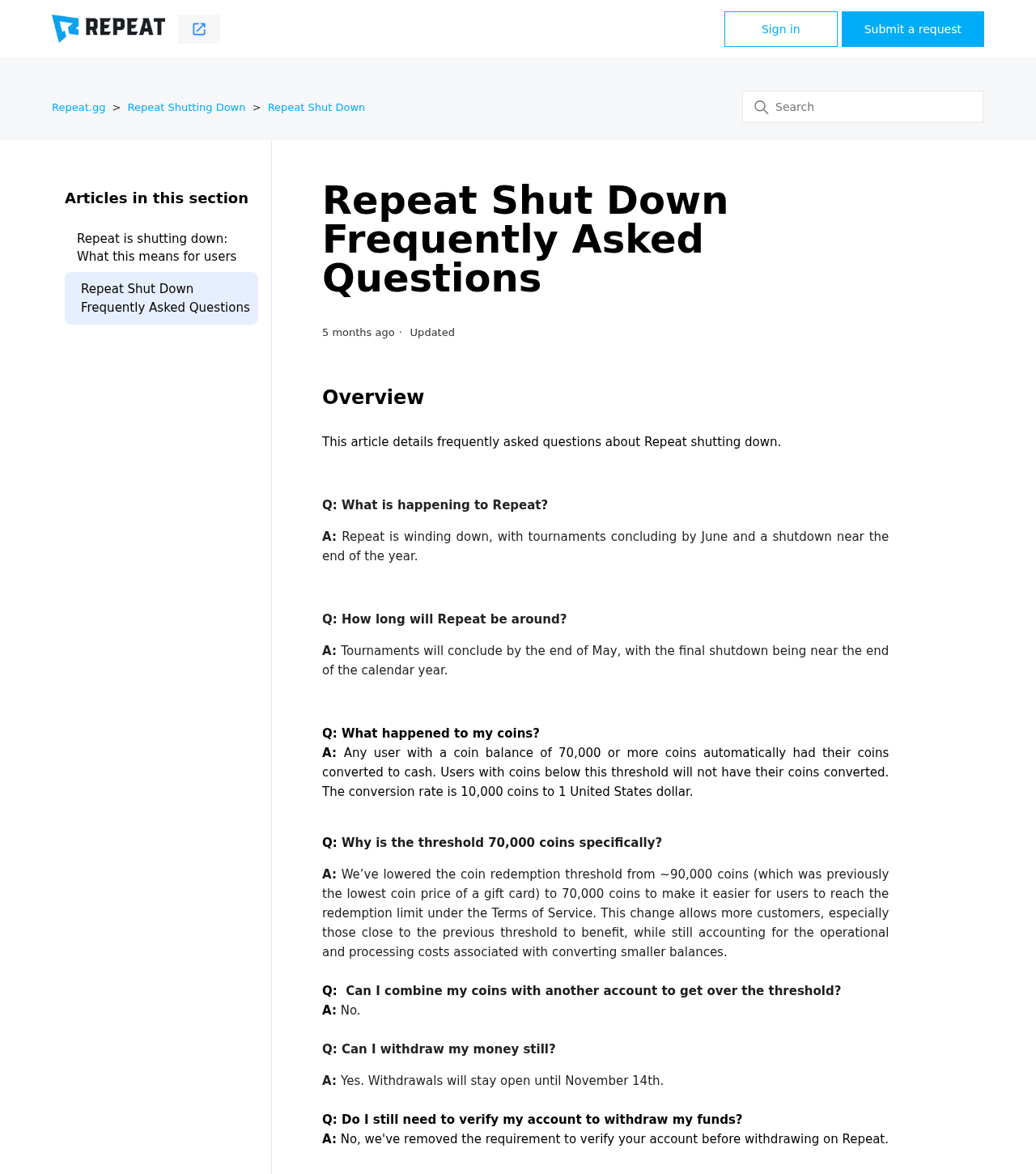
Repeat.gg is winding down its esports tournament platform. Its shutdown FAQ says withdrawals remain open until November 14, 2026. It describes the final shutdown separately, near year-end.
Don’t read a working login as an extension. Repeat didn’t specify a cutoff hour or time zone in that FAQ. If withdrawal is still available, start rather than waiting.
Cash and tournament coins aren’t the same balance
Repeat says it dropped the old $20 minimum for cash withdrawals. Your chosen payment method can still cost enough to make a small balance impossible to withdraw.
Coins followed a separate rule. Repeat says it automatically converted balances of at least 70,000 coins. Smaller balances didn’t convert, and players couldn’t pool coins.
For support, note whether the figure you’re disputing was displayed as cash or coins. The conversion rule doesn’t apply to cash already in the wallet.
The payout starts inside Repeat, not in a message
The official instructions start with your Repeat account. Tipalti handles payout setup. An unsolicited message promising to save an expiring balance is not part of the documented starting point.
Nothing here requires trusting a stranger with a code, sending a deposit to release winnings or transferring money into a PlayStation wallet.
- Check your cash balance and existing withdrawal history separately.
- Start from your own login. Do not hand an email code to a person offering assistance.
- Keep the withdrawal confirmation and check payout status before assuming the funds were sent.
- If the option has disappeared, contact official support. An exception after the deadline isn’t guaranteed.
How to Withdraw a Repeat.gg Cash Balance Safely
Step 1: Open your existing account and check the wallet
Use a known bookmark or type the original address yourself. Don’t sign in through a tournament link in an old video or a search ad that promises faster access.
In account settings, check the available cash balance. Then look for any earlier request so you know whether you’re dealing with a new or pending payout.
If you used more than one account, start with the one that earned the reward. Balances and confirmations belong to the account that submitted the withdrawal.
Step 2: Start the request from the official interface
Repeat’s withdrawal guide shows two entry points: a button in account settings and the withdrawal tab. The shutdown process is for the full cash balance, not a partial withdrawal.
Repeat says it may send a one-time code to the registered inbox. Enter it only in the prompt you opened yourself. The instructions say codes expire after ten minutes.
Removal of the old Repeat identity check does not remove the one-time code. One is about the old account verification process; the other confirms access to your inbox during withdrawal.
Step 3: Review the payout method and save both records
Repeat’s instructions say a withdrawal request generates a confirmation email. They then direct users to complete Tipalti setup and select a payout method where needed.
Read the confirmation against your own request. If you did not initiate anything, do not use an unexpected message as your entry point to payment setup.
Before accepting a payout method, review the fee, currency and destination shown to you. Save the Repeat request and the payment status separately so you can trace either stage later.
What Changed Between the Original Notice and the Current Instructions
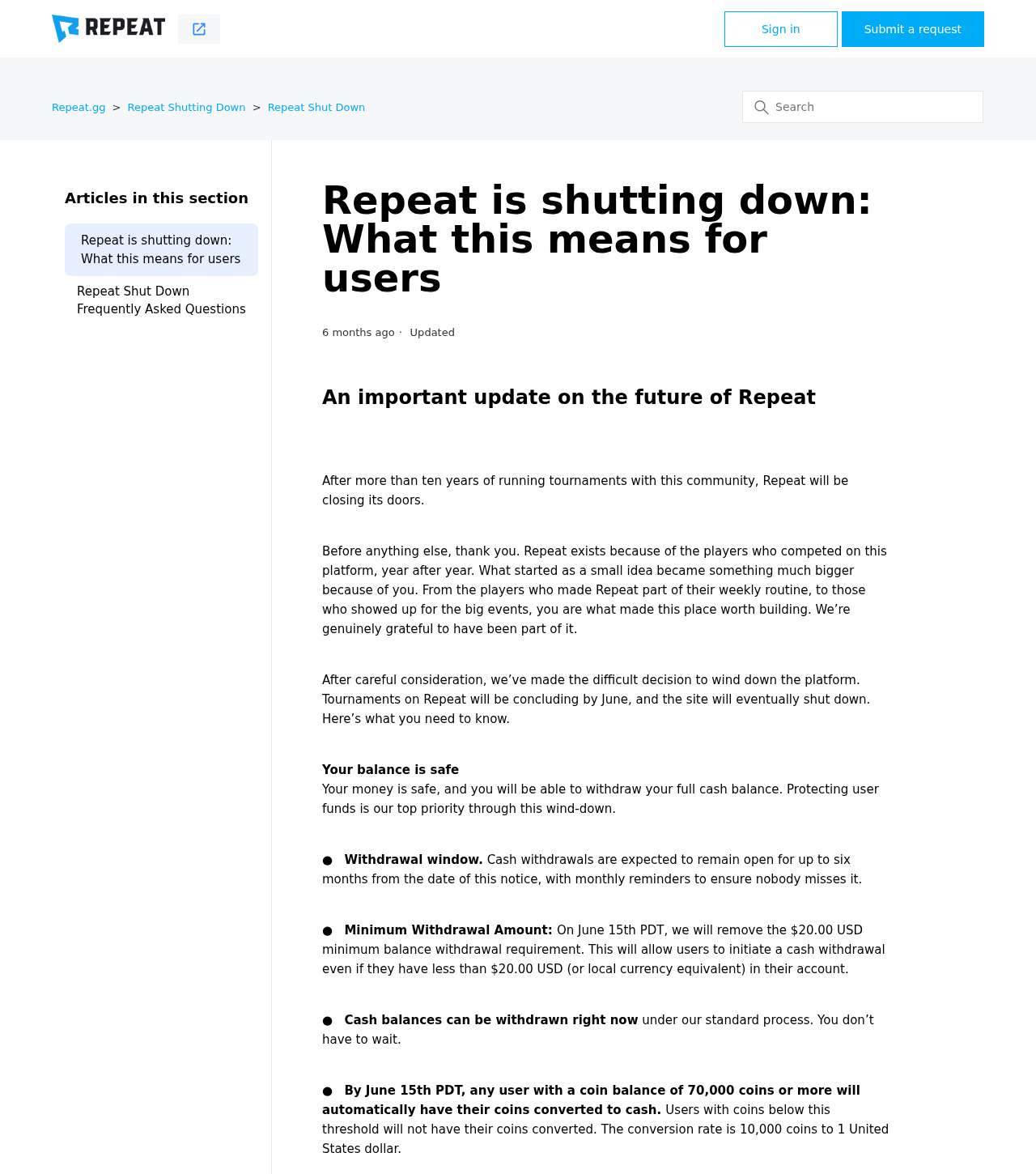
The May 13 shutdown announcement described a withdrawal period of up to six months. The later FAQ puts a specific November 14 date on that window.
Old reviews describe a platform that tracks tournament results and awards prizes. Those descriptions aren’t a guide to what you can do with an account during the shutdown.
Even older pages in Repeat’s own help center discuss account verification before withdrawal. The shutdown FAQ and the updated withdrawal guide explicitly say the old Repeat verification requirement was removed.
That newer guidance does not mean a payout provider can never ask for information needed to process a payment. Check any such request through your own verified payout session.
The FAQ says deposits are disabled during the wind-down and no new tournaments will be added. An instruction to deposit money to keep your balance active conflicts with that notice.
If two support pages give different instructions, start with the shutdown FAQ and the withdrawal guide it accompanies. If your account behaves differently, open a support request.
Which Balance Can You Actually Withdraw?
A cash balance of $12 used to sit below the $20 threshold. Under the shutdown rules, being below $20 no longer automatically stops a cash withdrawal.
That doesn’t mean $12 arrives in your bank. Check the net amount after processing and conversion. The balance may still be too small for the chosen method.
For coins, the key number is 70,000. At Repeat’s stated conversion rate, that threshold corresponds to $7 in cash before payout fees.
If you had 69,000 coins, don’t multiply them by the rate and assume you are owed $6.90. The conversion was conditional on meeting the threshold.
Do the same check if your account has both converted cash and winnings already held in cash. Use the actual wallet entry, not a total reconstructed from old screenshots.
If a conversion never appeared, save the previous coin total and current transaction view. Ask Repeat to identify the entry or explain why it didn’t qualify.
The FAQ doesn’t offer a workaround by transferring coins to another player. It also says Repeat cash can’t be moved into a PlayStation wallet or PSN account.
Why a Pending Withdrawal Isn’t the Same as a Failed One
Repeat says pending requests will keep processing during the wind-down. That’s different from promising that any one request will clear by the withdrawal deadline.
Repeat’s payment timing guide distinguishes submitting a withdrawal from Tipalti sending the funds. Estimates for delivery begin at the payout stage.
First check which stage you’re in. You might have a Repeat confirmation but haven’t finished payout setup, or the payment method may have been rejected.
A transaction marked sent is a different issue. Check the destination you selected and what your bank or payment app received. Keep timestamps and any reference number.
If you see a balance but no confirmation, check the account history before assuming you submitted anything. A screenshot of your balance isn’t a receipt.
Don’t create another account to retry. That can separate your support request from the original wallet and make it harder to identify the missing payment.
How to Handle a Small Balance or a Closed Button
Tipalti fees can depend on where you are, how you’re paid and whether there’s a currency conversion. The cheapest method for someone else may not be available in your account.
Compare only options the verified payout session actually shows. If none leaves enough to withdraw, the FAQ says a fee above your balance prevents withdrawal.
Do not confuse a fee disclosed in your verified payout setup with an advance payment demanded in a private message. Paying a stranger won’t change the provider’s fee calculation.
If the withdrawal button is absent, check whether you already submitted the full balance. Look at account history and the inbox tied to that account before concluding the window closed.
If the option is closed and there’s no request, save the account screen and contact official support. Ask what remains possible without assuming they can reopen it.
If the deadline is still ahead but you’re locked out, start recovering the original email account. Repeat’s FAQ directs readers who lost inbox access to their email provider.
Keep the date and time you saw the error, including your time zone. That helps support understand whether you were locked out, missing a code or trying after the cutoff.
Match the Problem to the Right Record
You submitted a withdrawal but received no email
Check the inbox connected to the Repeat account, including spam. A tournament handle and an email address aren’t interchangeable when you’re searching for a receipt.
Use the transaction history guide to look for an account record. Keep any reference that identifies the request instead of sending support only a screenshot of the tournament results.
If your wallet amount changed but you can’t see a corresponding request, record both screens. Ask support what transaction moved the balance before attempting another withdrawal.
Your payout was rejected or the account details changed
Look in the payout provider’s own portal for the rejection reason. Repeat’s withdrawal instructions say a deferred or rejected payment may need a different valid method.
Confirm whether the next step is fixing the current payment or starting a new request. Those actions aren’t interchangeable, especially once the original window closes.
Don’t copy banking details from an old confirmation into an unfamiliar form. Use the destination you verified and confirm it can receive the selected payment type.
Your cash balance is less than you expected
Work from the account’s records in order: the tournament award, any coin conversion, the full requested cash amount and the fee shown for the chosen payout method.
For example, a fee of $3 on a $7 converted balance would leave $4 before any other applicable conversion costs. That’s arithmetic, not a quote for any provider.
Repeat has an older fee explainer. Don’t assume a historical example is your live price. Compare the amount displayed for your own region, payment method and currency.
Someone contacts you about an extension
Ask yourself whether the message appeared in response to a request you made. If not, go to the help center on your own and check what Repeat actually announced.
A convincing message can quote the date and name the payout provider. Those are public details, not proof that the sender can see your account.
Save a copy of the message and don’t continue the conversation. No stranger needs your one-time code, password or a gift card to check a transaction.
Got a login alert you didn’t trigger? Open the account independently and check payout details as well as recent withdrawals. An altered destination can be easy to miss.
What to Do If a Withdrawal Is Missing or Someone Offers to Help
- Keep the transaction evidence. Save the balance, requested amount, date, confirmation and transaction reference. Include the displayed status and error if you have one.
- Check the payout setup. Follow Repeat’s official instructions from its help center. Confirm the selected payment method can receive funds and note any rejection.
- Open a ticket through official support. Use the help center’s request form. Give your username and transaction reference. Don’t include one-time codes or unmasked banking details.
- Separate an error from a recovery pitch. Do not pay a person offering to unlock your balance. Keep their message if you need to report it.
- Act if you exposed account access. Use the real service to secure the account and check for unfamiliar payout changes. Secure the associated inbox if its login was exposed.
- Contact the payment service if funds were diverted. Use contact details from your verified session or statement. Describe which payout or destination changed and preserve the support references.
Repeat’s help center leads to the support form. Start there rather than using a direct-message contact claiming to work for Repeat or PlayStation.
The FTC’s verification-code guidance explains why a code belongs only in the process you started. Reading a reminder doesn’t require handing that code to anyone.
Frequently Asked Questions
When was the last announced day for Repeat.gg withdrawals?
Repeat’s shutdown FAQ lists November 14, 2026. It doesn’t specify the cutoff hour. Check the live withdrawal screen and don’t count on access after that date.
Can I withdraw less than $20?
Repeat removed that minimum during the shutdown. The balance still needs to cover the fees of an available payment method.
Do I have to send an ID to withdraw?
Repeat removed its former account verification requirement. Never send ID to an unsolicited contact. Verify any separate payment-provider request through the official payout route.
What if I had fewer than 70,000 Repeat coins?
The published conversion rule excluded those balances. Check separately for cash already in the account. Repeat says you cannot combine coin balances across accounts.
Will a pending payment disappear when the window closes?
Repeat says pending requests continue through processing during the wind-down. Save your confirmation and ask support about your exact request if its status hasn’t progressed.
Can I transfer the balance to PlayStation instead?
No. The shutdown FAQ says there is no transfer to a PlayStation wallet or PSN account. It describes cash withdrawal as the available method.
The Bottom Line
If Repeat.gg still shows the withdrawal option, use your own account and check fees before proceeding. The November 14 cutoff matters more than whether you can still sign in.
If you already requested payment, save the confirmation and check the payout status. If the option has closed or the request stalled, use official support, not someone selling a recovery.

Reviews & discussion
0 commentsShare a firsthand experience, or ask a question.
Community reviews
repeat.gg
Moderated reader experiences, not an editorial verdict.
Start the conversation
Have a question or something useful to share? Add the first comment.