


A security alert can make you think first about the password you use most often. On a PC where you also keep wallet extensions or private notes, that’s one question.
Torg Grabber is a useful case for working out which details need attention first. What matters is what was available on the affected computer.
Overview
Torg targets more than the password list
Gen Digital researchers identified Torg Grabber as Windows information-stealing malware. Their analysis described browser data, cryptocurrency wallets and other locally available account material as targets.
A saved browser password isn’t the same as an active session, an exchange login or a wallet recovery phrase. They each need a response suited to how they work.
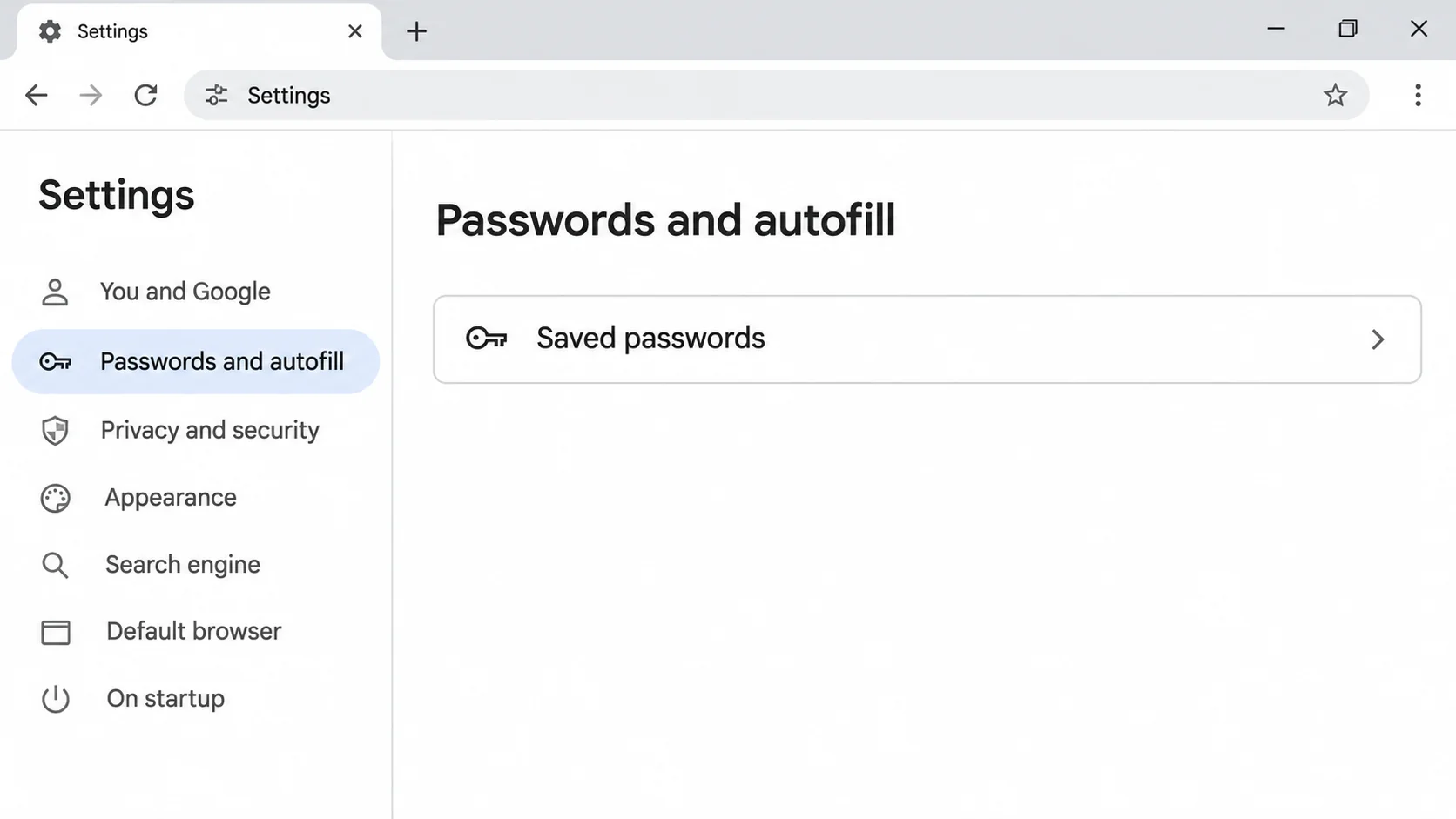
The browser settings image is an editorial reconstruction. It illustrates one place someone might review from a clean device, not a screenshot of Torg or a record of stolen data.
A ClickFix message isn’t a reliable diagnosis
Gen Digital documented delivery involving ClickFix, in which a web page presents outside instructions as a fix. Seeing such a message doesn’t establish that your Windows PC ran anything.
If you did run the instructions, preserve the time and what you remember.
A trusted responder can compare that record with the scanner output without asking you to repeat the action.
Don’t assume there is one message, browser or file associated with every copy. Researchers found variations, so start with the software and accounts actually used on your PC.
Different recovery secrets deserve different questions
The research described attempts to access wallet-related information and data linked to browser extensions. That describes capability, not proof that every wallet or password manager was compromised.
Ask whether sensitive information was present, unlocked, saved in a browser or stored somewhere the affected profile could reach.
Keep your answers in a private record without copying the secrets themselves.
The kind of access determines your next action:
- A browser password can be changed through the account provider once you are on trusted equipment.
- An account session may need to be ended explicitly even if a password was reset.
- A self-managed wallet phrase or private key is not an ordinary account password.
- A note or export containing sensitive data may need action even when the related app wasn’t open.
How the Reported Torg Delivery Worked
Step 1: The page presents a problem that looks routine
A stranger’s instructions can sound plausible while you are trying to download a file or finish a browser task. The page may imply that you cannot proceed without its fix.
A legitimate page error doesn’t require you to trust instructions from an unfamiliar origin. Restart the task from the service you meant to use rather than trying the offered action.
If the problem persists, ask the service through its verified support channel. Don’t decide the fix is safe just because a page calls it a standard diagnostic procedure.
Step 2: The supposed fix moves outside the browser
The reported ClickFix route relied on the user acting on instructions from the page. It is not the same thing as an ordinary website merely displaying a warning.
Do not revisit the page to collect what it asked you to run. Save an existing screenshot or record the approximate time for support if you need to report it.
If a workplace computer was involved, tell the security team whether the instructions were displayed, copied or actually run. Those are different stages and help the team prioritize.
Step 3: Data on the Windows computer becomes a separate concern
Torg samples were designed to search for access material available to the affected device. That could include browser sessions as well as information associated with wallet or other extensions.
An encrypted browser or a familiar password-manager brand doesn’t answer whether a particular item was exposed. Ask what was present and what the responder can establish from the affected profile.
Don’t use a different browser on the same PC to manage recovery. The device remains the same even if you switch to a profile the warning never mentioned.
Step 4: Some consequences can continue away from the original PC
A service can continue honoring a stolen session after the PC goes offline. A wallet secret, once copied, is a different kind of problem from a browser infection.
Secure the service through a verified route on a separate device. Keeping the original PC offline gives you time to work through that list without feeding the same incident.
If there is an unexpected payment or wallet transfer, preserve its exact record rather than guessing which file it came from. The service can address what it can verify.
Which Information Should You Check First?
Start with the inbox and work accounts that matter most
An inbox can reset many other accounts. Review its recent access, recovery addresses and forwarding rules from a device you trust before working through lower-priority logins.
If it is a work mailbox, contact the administrator rather than collecting logs yourself. They may be able to revoke active access and check whether others were affected.
Tell them if the PC held a separate work-browser profile or remote-access tools. Don’t send an exported password list to explain which services you used.
Distinguish a wallet account from a wallet secret
An exchange account or custodial wallet has a provider you can contact to restrict access. A self-managed wallet generally depends on the secrecy of the information that controls it.
If a seed or private key might have been available, use the wallet provider’s documented incident guidance or contact someone qualified.
Never enter a secret into a page offering to verify exposure.
Save transaction details if anything moved, but do not share the recovery phrase with anyone. Disconnecting an extension or changing a website password does not change the original recovery secret.
Include notes and exported files in your exposure assessment
A note saved as a convenience may contain identifying information, a recovery code or a copy of a password. Think about both browser notes and files stored on the desktop.
If a credential also exists on paper, that’s not a reason to ignore a different electronic copy. Identify where the digital copy was stored without reopening the suspect machine.
If you need to rotate an exposed code, start from the provider’s verified settings. Check that a replacement recovery method works before discarding the old one.
What to Do if Torg Grabber Was Detected on Windows
-
Stop using the affected PC for account changes. Disconnect it from ordinary networks if there is credible evidence of execution, and use a separate trusted device.
For a managed PC, notify the responsible team before changing the device. Give them the alert and when you saw the related browser prompt, if any.
-
Protect primary email, identity and workplace access first. Change exposed passwords from the clean device and ask providers how to revoke unfamiliar sessions.
Check forwarding and recovery options in accounts that can unlock other services. Log which changes you made rather than repeatedly trying the old sign-in.
-
Review financial and wallet exposure separately. Contact the bank or exchange through an independently obtained channel if it recorded suspicious activity.
If you may have exposed a self-managed wallet secret, follow trusted wallet-specific guidance. Do not assume reinstalling its extension takes away someone else’s copy.
-
Preserve a usable detection and account timeline. Record what the security tool blocked, what you ran and the time of any verified unfamiliar sign-in or transfer.
Use private support channels for transactions and device details. Don’t post account numbers, backup keys, raw browser exports or the secret itself.
-
Review other services that were actually in use. Include messaging, VPN or remote-access accounts if they were available from the affected Windows profile.
Ask relevant owners how to close old sessions or reissue access before you restore the profile. Avoid reconnecting the PC merely to complete the inventory.
How to Remove Torg Grabber From Windows
Step 1: Start from the recorded finding
Open the history of the security product that raised the alert, if your incident plan allows. Determine whether it blocked an item before use or found something already active.
Don’t relaunch the download or repeat the page’s fix to fill a gap in your notes. A technician can assess the record you already have.
If an organization manages the PC, leave evidence collection and cleanup to its security team. Do not remove a corporate tool based on an unfamiliar name.
Step 2: Verify any unwanted application or extension before removing it
In Windows, open Settings > Apps > Installed apps and look for an item independently linked to the incident. Use its uninstall action if it is confirmed.
Check the browser’s extension list if it was involved. In Chrome, use Extensions > Manage Extensions, then remove only an unwanted entry you’ve identified.
Save the list of affected profiles for support. Do not enable old sync or sign into a wallet to test whether the extension still works.
Step 3: Use the verified scanner installer
Obtain the Malwarebytes installer for Windows on a clean device. Confirm where it came from before transferring it under your cleanup plan.
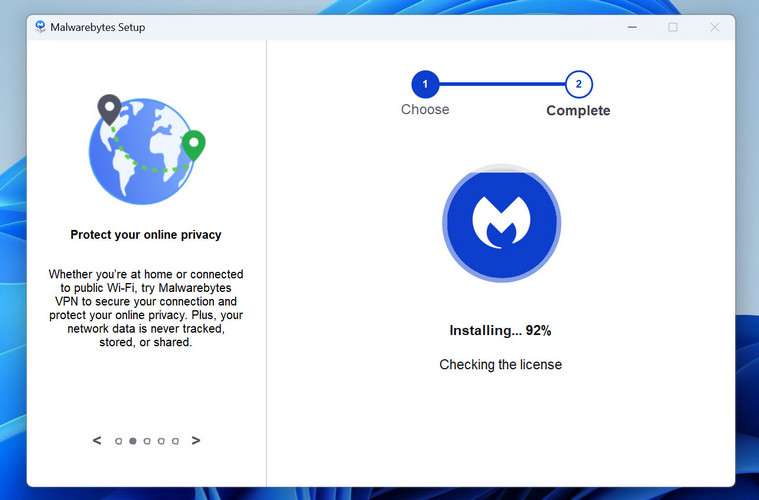
On the affected personal PC, run the verified setup file and use Windows to check the publisher when prompted. Don’t take the scanner from the original warning page.
If you need a network connection for setup, ask support how to proceed without returning to ordinary browsing. Never connect a protected backup just to move the installer.
Step 4: Review detections and action history
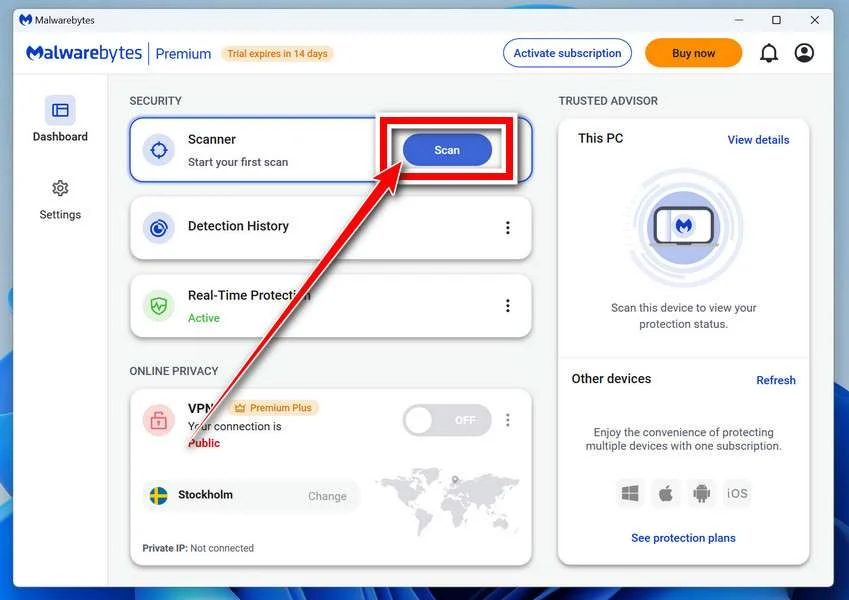
In Malwarebytes, find the Scanner card and choose Scan. When it finishes, check the identified items and quarantine confirmed threats.
If a restart is appropriate, check the scan history afterward and follow up on repeated or additional findings.
A detection limited to one file doesn’t settle the exposure of your accounts.
The optional Malwarebytes Premium offer is an affiliate link. A paid subscription is not necessary to report misuse or verify a wallet transaction.
Step 5: Rebuild or restore the browser only after the PC is trusted
Update Windows and the genuine browser after a responder clears the machine for ordinary connectivity. Check which profiles and extensions come back before relying on sync.
Use MalwareTips support or a trusted local technician if findings recur. A clean reinstall may be appropriate if you can’t establish what else ran.
Restore verified documents, not a whole unexplained browser profile or old installer bundle. Keep records of the first detection and any account change during recovery.
What to Verify Before Bringing Back Browser Sync
Once the machine is cleared, sign in to the genuine browser and review which categories it will synchronize. Don’t automatically accept a restore of every old extension and setting.
Start with the profile that contained the most sensitive access. Reinstall required extensions from known publishers, check permissions, and verify that no unwanted entry came back.
A browser can rebuild bookmarks without returning every saved password or saved session. Choose the data you need rather than restoring the entire old profile at once.
For a shared browser or workstation, let users review their own accounts instead of storing new credentials in a common note. Work administrators can help coordinate replacements.
If a note or file raised concern, record which credential you changed and when. The device cleanup log doesn’t have to contain the actual password, backup code or wallet secret.
If you find unexpected access after reinstalling an extension, stop and verify the publisher and the service’s own account history. Report the timing without assuming how the two findings relate.
Frequently Asked Questions
Does a Torg finding mean my wallet was emptied?
No, the finding alone doesn’t show a transfer. Check the actual transaction history from trusted equipment and report any movement you did not authorize.
Is Torg necessarily the same malware as Vidar?
Gen Digital reported that an early sample looked like Vidar but distinguished Torg in its investigation.
Use the exact finding and your own evidence rather than treating the names as equivalents.
Do separate browser profiles guarantee the other profile was safe?
The profiles share the same computer. Have a trusted responder assess what the affected system could access before assuming another browser profile was outside the incident.
Can I just close active sessions instead of changing passwords?
They address different forms of access. Review active sessions and change passwords you believe were exposed through each provider’s verified security controls.
Does a scan remove access to a copied wallet phrase?
A scan works on the PC, not on copies made before cleanup. Consult trusted wallet guidance from a clean device if the phrase may have been exposed.
Should I recover an exported password file from the old computer?
Do not reopen sensitive exports on an affected PC. Record that the file was present and ask a trusted responder what to preserve or rotate.
The Bottom Line
Don’t follow a browser page’s unexpected instructions to run a fix. If a Torg detection follows execution, disconnect the Windows PC and use another device for account and wallet recovery.
Complete the cleanup separately from the account response. Prioritize recovery email, sensitive sessions and any wallet secret the affected computer could reach.

Join the discussion
0 commentsShare your experience or ask a question about this article.
Your progress
Did these steps help?
Let us know how the guide worked for you.
Describe what you see and the step you reached. Keep passwords and other private information out.
Discussion
Start the conversation
Have a question or something useful to share? Add the first comment.