


A promise of affordable health coverage can feel like a lifeline when premiums are rising and enrollment rules seem confusing.
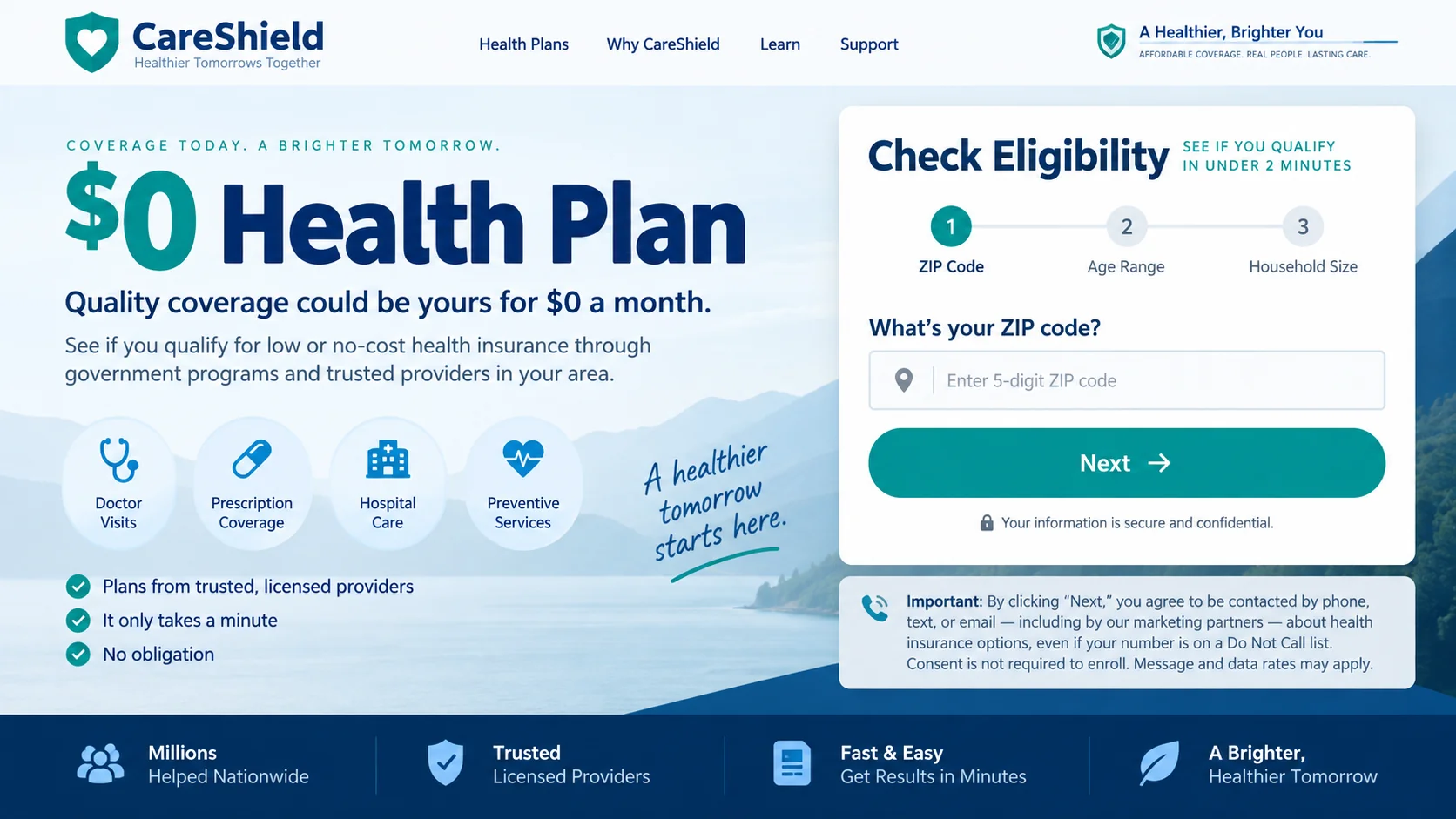
Wellbeing Bonus Boost appears during that vulnerable search, presenting a quick eligibility path wrapped in reassuring healthcare language.
Overview
What Wellbeing Bonus Boost promises
The promotion tells visitors they may qualify for a $0 health insurance plan or valuable premium assistance.
Its wording resembles messages connected with Affordable Care Act savings, government subsidies, and licensed insurance enrollment.
A short questionnaire makes the process appear easier than visiting an official marketplace or comparing policies directly.
The page may ask for a ZIP code, age, household details, insurance status, and contact information before showing any meaningful result.
What the website appears to do
The available evidence points toward a lead-generation funnel, not a government insurance exchange or transparent health-plan issuer.
Submitted details can be routed to marketers, brokers, call centers, or other partners that contact the visitor afterward.
That distinction matters because checking eligibility and selling a consumer’s contact lead are entirely different activities.
A visitor may believe an official benefits decision is underway while the page is actually identifying a valuable insurance prospect.
Why the offer deserves extreme caution
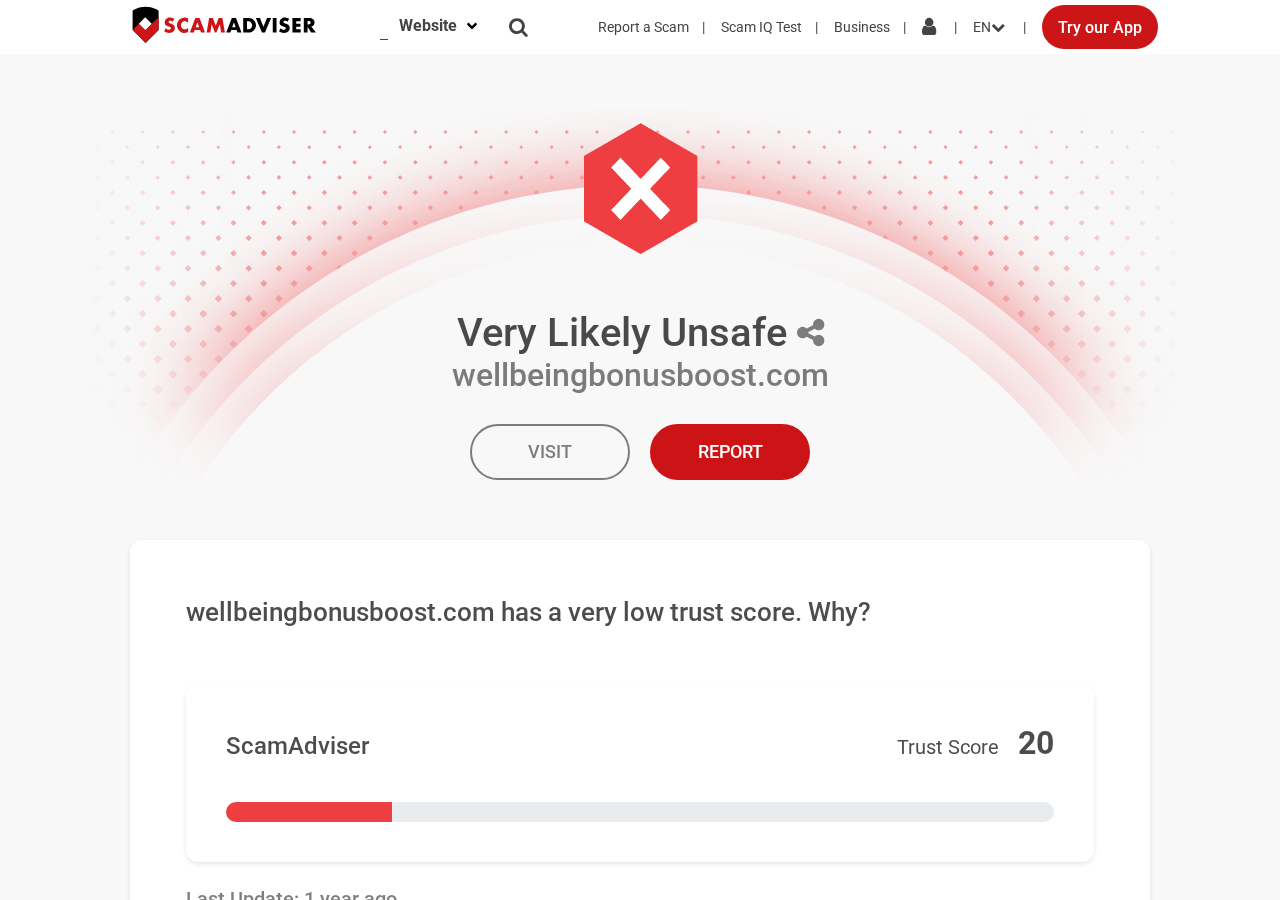
Independent reputation checks have rated wellbeingbonusboost.com as very likely unsafe and identified several risk indicators.
The domain does not become an official marketplace simply because it mentions premium tax credits or affordable coverage.
Government health benefits are not unlocked by surrendering a phone number to an unidentified advertising funnel.
Important warning signs include:
- No clear proof that Wellbeing Bonus Boost is a federal or state insurance marketplace.
- Broad $0-plan language presented before income, location, family size, or eligibility are properly evaluated.
- Personal details requested before the visitor can identify the exact insurer, policy, network, or deductible.
- Consent language that may authorize telephone calls, texts, emails, or communications from numerous marketing partners.
- Branding designed to feel governmental without showing a recognizable agency identity.
- No straightforward explanation of who receives the lead and how many organizations may respond.
- An urgent, simplified path for a decision that normally requires careful plan comparison.
The Difference Between Insurance Assistance and a Lead Form
A legitimate broker may request information to quote coverage, and receiving sales calls does not automatically prove criminal fraud.
The problem begins when the presentation hides the commercial purpose or creates a false impression of government affiliation.
Insurance leads are valuable because a consumer actively searching for coverage is more likely to answer a sales call.
A lead generator can earn money when it sells or transfers that consumer’s contact details to another business.
The visitor may then receive calls from several agents, vendors, or outsourced centers rather than one clearly identified company.
Some callers may offer real policies, while others may promote limited-benefit products, discount programs, or unrelated services.
The original form therefore creates a serious verification problem.
You cannot judge a policy until you know the insurer, monthly premium, deductible, network, exclusions, and total annual exposure.
The phrase “$0 health plan” also needs context.
Some eligible consumers can receive premium tax credits that reduce a marketplace plan’s monthly premium to $0.
That does not mean everyone qualifies, medical care becomes free, or deductibles and other costs disappear.
Eligibility depends on current rules and personal circumstances, not on a promotional page declaring that savings are available.
How the Wellbeing Bonus Boost Scam Works
Step 1: An advertisement leads with relief, not insurance details
The campaign reaches people through social media, search advertising, display banners, email, or recommendation-style pages.
Its strongest message is financial relief, often a $0 premium or immediate access to a health-insurance benefit.
The ad avoids complicated policy language because simplicity keeps more people clicking.
Someone worried about losing coverage may respond before asking who sponsors the offer.
Step 2: A quick eligibility quiz lowers the visitor’s guard
The landing page asks easy questions that resemble a preliminary government screening.
Each answer creates momentum and makes abandoning the form feel like leaving a nearly completed application.
Progress bars, check marks, timers, and availability messages can strengthen that effect.
However, answering a few general questions cannot establish the full terms of a regulated insurance policy.
Step 3: Contact details become the real objective
The form eventually requests a name, telephone number, email address, mailing area, and other identifying information.
A consent paragraph may allow calls using automated technology, even when the number appears on a do-not-call registry.
Consumers often overlook this paragraph because the larger page keeps attention fixed on the promised savings.
Pressing the final button can therefore authorize marketing contact rather than submit an official benefits application.
Step 4: The lead moves beyond the original website
Information may be shared with insurance marketers or partners whose names were not prominent when the form began.
The visitor can receive calls quickly, sometimes from multiple numbers and representatives using slightly different company names.
A caller may already know several answers from the form, which makes the conversation feel official.
That familiarity only proves data transfer. It does not prove that the caller represents a government agency.
Step 5: A caller turns confusion into a sales opportunity
The representative may say the consumer is “prequalified” and press for additional identity, income, household, or payment details.
Some calls may involve licensed agents selling real marketplace plans.
Others may promote short-term coverage, fixed-indemnity products, medical discount memberships, or plans with narrow benefits.
A rushed consumer may hear “health plan” and assume every essential service is covered.
Step 6: Cancellation and privacy problems appear later
If the consumer buys an unsuitable product, obtaining documents or canceling can become difficult.
If no purchase occurs, repeated marketing calls may continue because the contact record has already circulated.
People sometimes block one number only to receive another call from a different lead buyer.
The lasting harm can therefore be financial, medical, and personal, even without an immediate card charge.
How to Check a Health Coverage Offer Safely
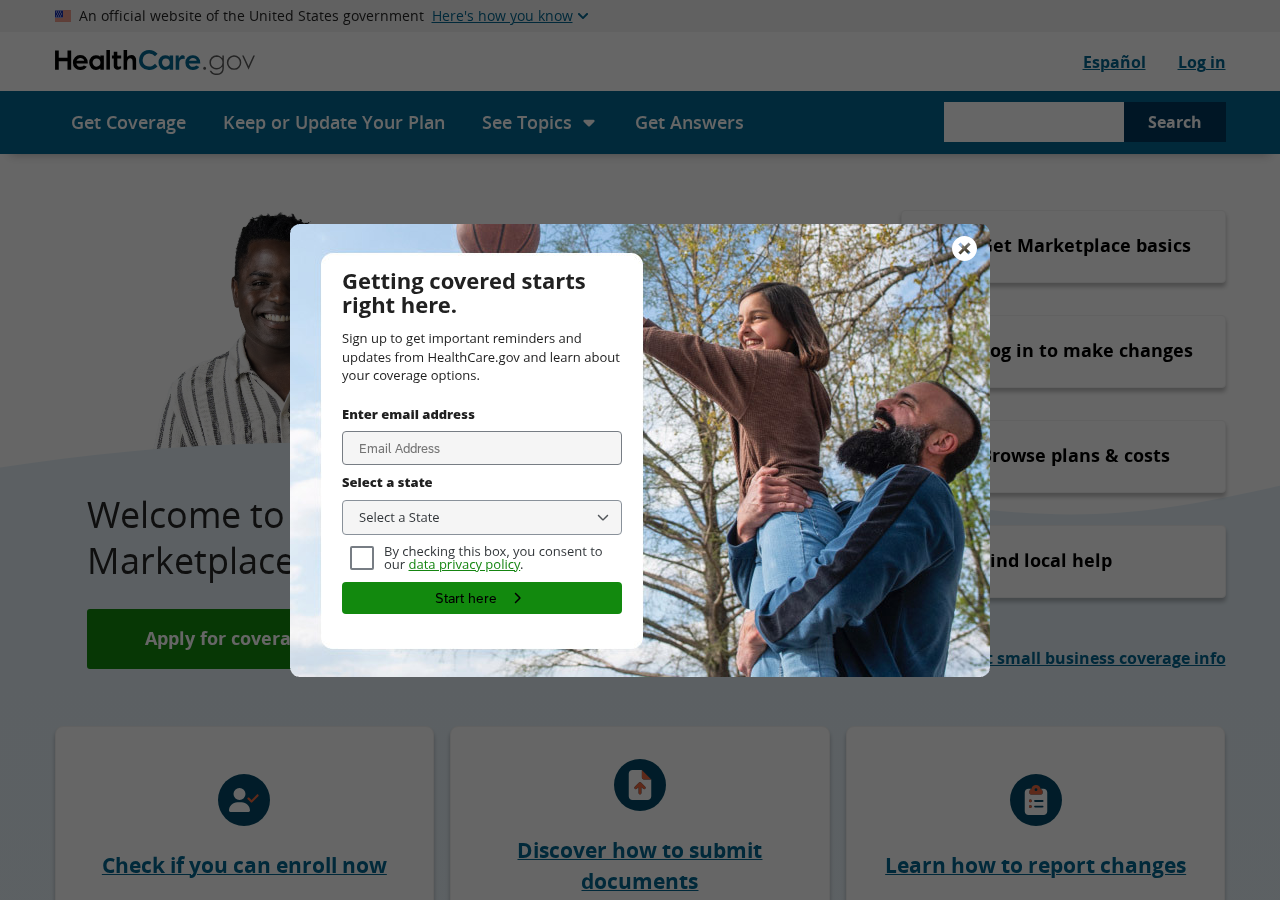
Start at HealthCare.gov or the official marketplace operated by your state.
Type the address yourself instead of following an advertisement, text message, or sponsored search result.
The official marketplace can explain enrollment periods, premium tax credits, Medicaid referrals, and certified local assistance.
It also lets you compare plan documents rather than accept a vague promise from an unknown caller.
Before discussing sensitive information, ask a representative for a full legal name, license number, agency, and callback number.
Verify those details through your state’s insurance department using contact information found independently.
Never let a caller define the verification method.
A dishonest operator can provide a convincing website, colleague, or fake directory entry that remains inside the same funnel.
Ask for the Summary of Benefits and Coverage before agreeing to anything.
Review the premium, deductible, out-of-pocket maximum, provider network, prescription coverage, exclusions, and effective date.
If the caller refuses to provide written documents, end the conversation.
Real coverage should survive careful reading and independent verification.
Why the $0 Message Can Be Misleading
A monthly premium is only one part of health-care spending.
A plan advertised at $0 may still include a deductible, copayments, coinsurance, prescription restrictions, and a limited provider network.
The quoted amount may also depend on estimated annual income and household information that must be reconciled later.
If those estimates are wrong, a consumer can face an unexpected tax consequence or lose part of the anticipated assistance.
Marketing pages rarely emphasize that complexity because a simple number attracts more responses.
The result can be technically possible language presented without the conditions needed to understand it.
That omission is especially concerning when no specific policy appears beside the promise.
A person cannot compare value until the insurer and full plan design are visible.
Limited-benefit products can create another source of confusion.
Some arrangements pay fixed amounts for selected events rather than covering care like comprehensive major-medical insurance.
Discount memberships may reduce certain prices but are not insurance and do not assume the same financial risk.
Ask the representative to state, in plain language, what type of product is being sold.
Then request that statement and all plan documents in writing before providing payment information.
Questions That Expose a Bad Insurance Pitch
A careful caller should welcome specific questions.
Evasive answers, repeated urgency, or demands to finish immediately show that verification may stop the sale.
Ask these questions before continuing:
- What is the complete legal name of the insurer underwriting this policy?
- What is your producer license number, and which state issued it?
- Is this Affordable Care Act compliant major-medical insurance?
- What is the monthly premium before and after any tax credit?
- What are the deductible and annual out-of-pocket maximum?
- Which hospitals, physicians, pharmacies, and medications are in network?
- Does enrollment create any separate membership or recurring service charge?
- Where can I read the Summary of Benefits and Coverage?
- Who collected my number, and which organizations received it?
Write down the answers without agreeing during the same call.
Verify the carrier and agent, then compare alternatives through the official marketplace.
A real enrollment opportunity will not disappear because you spent time confirming its terms.
Company, Address, and Fulfillment Checks
No named insurer means no policy to evaluate
A health-insurance page should identify the insurer or clearly explain that it operates as a broker or marketing service.
Without that identity, promises about coverage, savings, and eligibility cannot be checked against filed policy documents.
Do not accept a generic brand name as proof that an insurance carrier stands behind the offer.
A contact form is not a business address
Look for a verifiable legal entity, physical business address, telephone number, privacy contact, and state-license information.
Virtual mailboxes and lead-processing offices can appear impressive while revealing little about who controls the campaign.
If an address belongs to an unrelated tenant, shared office, or mailbox service, treat every claim more cautiously.
Telephone numbers can belong to rotating call centers
Insurance leads often move between vendors, so the displayed number may not identify the organization that collected the information.
Call the insurer using the number on its official website or state filing, not a number supplied inside the sales conversation.
A representative who discourages independent verification is signaling that the sale matters more than informed consent.
There is no fulfillment without policy documents
Unlike a physical product, insurance fulfillment means receiving a valid policy, identification card, coverage dates, and enforceable benefits.
A confirmation email, recorded call, or recurring card debit does not prove comprehensive medical coverage exists.
Confirm enrollment directly with the named insurer before canceling any existing policy or relying on new benefits.
What Information May Be at Risk
A basic lead form may expose only contact details, but later calls can collect far more.
Scammers may request a Social Security number, Medicare number, bank details, card information, or copies of identity documents.
Each additional item allows more serious misuse.
- A phone number and email can trigger sustained telemarketing, phishing, and impersonation attempts.
- A birth date and address can support identity-verification questions used by financial institutions.
- A Social Security number can enable credit fraud, tax fraud, or synthetic-identity applications.
- Medicare details can be used for unauthorized plan changes or fraudulent medical billing.
- Payment information can fund direct charges or recurring memberships.
- Medical details can make future scams unusually personal and convincing.
Do not assume that silence means the data was deleted.
Lead lists can remain active, be resold, or reappear under new campaign names months later.
What to Do if You Have Fallen Victim to This Scam
- Stop communicating through the advertisement and do not provide any additional identity, insurance, or payment information.
- Contact the named insurer through its official website and confirm whether a real application or policy exists under your name.
- Call your card issuer about unauthorized charges, replace the card when advised, and request blocks against future merchant attempts.
- Ask your state insurance department to verify the agent and report misleading claims, unlicensed selling, or unsuitable coverage.
- Change passwords reused on the form, protect your email first, enable two-factor authentication, and remove unfamiliar recovery methods.
- Place a fraud alert or security freeze if you disclosed a Social Security number, birth date, or identity-document information.
- Document every call, number, email, consent screen, policy name, charge, and cancellation request before pages or messages disappear.
- Report deceptive insurance marketing to the FTC and submit unwanted calls through the appropriate national do-not-call complaint channel.
- Run a full Malwarebytes scan if you downloaded a file, installed an app, or allowed browser notifications during the process.
- Use AdGuard to reduce malicious advertising and redirects, while remembering that no blocker replaces checking the official marketplace address.
Is Your Device Infected? Run a Free Malware Scan
Slow performance, constant pop-ups, or strange behavior? These are classic signs of a malware infection. A quick way to check is to scan your device with Malwarebytes Free, one of the most trusted malware removal tools available. If you only visited a scam page and didn’t download or install anything, this scan is optional.
The free version detects and removes the most common threats, including:
- Adware — the cause of those annoying pop-ups
- Browser hijackers — unwanted redirects and changed homepages
- Trojans and spyware — hidden programs stealing your data
- Potentially unwanted programs (PUPs) — software you never asked for
👉 Select your device below — Windows, Mac, or Android — then follow the simple steps to download Malwarebytes, scan your system, and remove any threats it finds. The scan usually takes 5 to 20 minutes.
Run a Malware Scan with Malwarebytes for Windows
Malwarebytes is one of the most popular and trusted anti-malware tools for Windows — and it’s completely free for removing infections. It catches threats that many antivirus programs miss, including adware, browser hijackers, and trojans. Follow the steps below to scan your PC and remove what Malwarebytes finds.
Download Malwarebytes
Click the button below to download the latest version of Malwarebytes for Windows from the official source. The free version is all you need — it will scan your computer and remove adware, browser hijackers, and other malicious software at no cost.
Download MalwarebytesOfficial installer for Windows 11 and 10. Your download starts right away.Want real-time protection? See Malwarebytes Premium Malwarebytes Free for WindowsScans and removes malware at no cost
-
Install Malwarebytes
When the download finishes, open your Downloads folder and double-click the MBSetup file. If Windows shows a User Account Control pop-up, click “Yes” to allow the installation.

Follow the On-Screen Prompts to Install Malwarebytes
The setup wizard will walk you through a few quick screens:
-
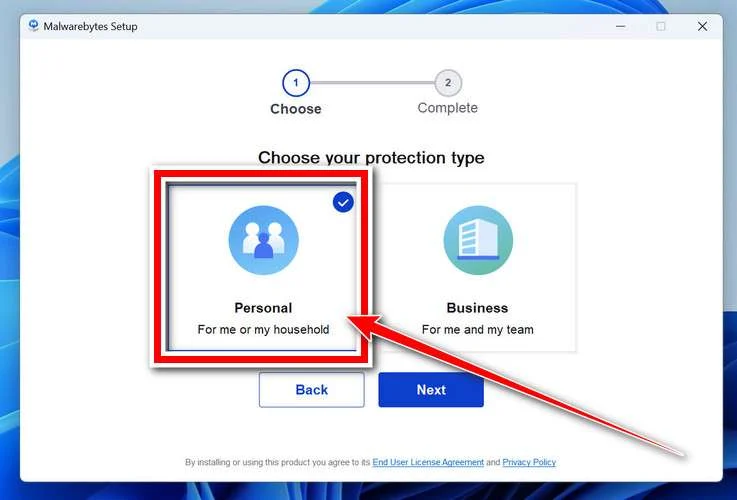
Choose where you’re installing the program — “Personal Computer” or “Work Computer” — then click Next.
-
Malwarebytes will now install on your device. This usually takes under a minute.
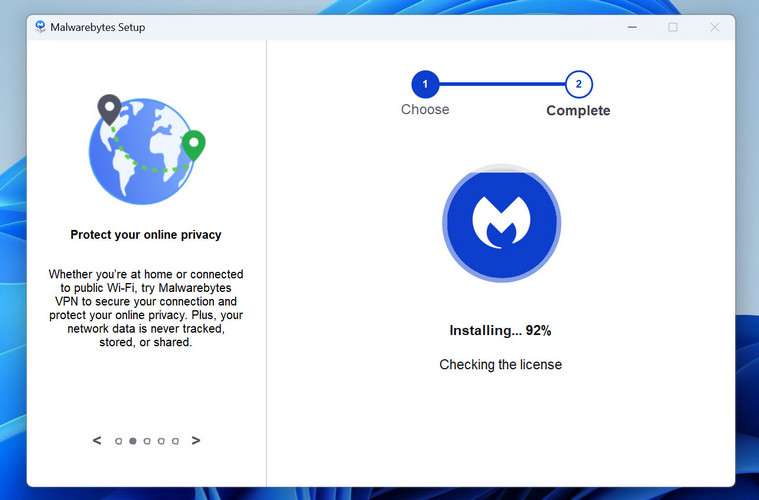
-
When installation is complete, the “Welcome to Malwarebytes” screen will open automatically.
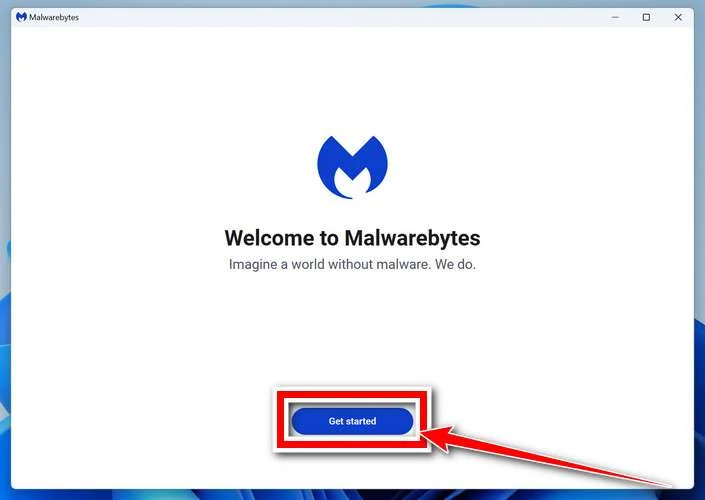
-
On the final screen, click Open Malwarebytes to launch the program.
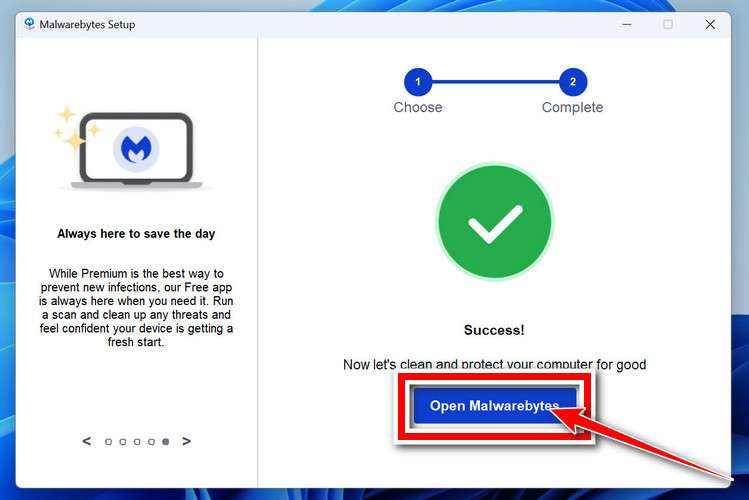
-
Optional: Check for rootkits with a Custom Scan
You don’t need to change any settings for a normal scan. The standard Threat Scan in the next step is enough for most problems, so you can go straight to it.
If you also want to check for rootkits, use a Custom Scan. In current versions of Malwarebytes, rootkit scanning is only available there:
- On the Scanner tile, click the three-dot menu and select Advanced Scan.
- Choose Custom Scan. In its options, check Scan for rootkits.
- Select your system drive (usually C:\) as the location to scan, then start the scan. It takes longer than a Threat Scan.
- When it finishes, review and quarantine the results as described in the steps below.
Rootkit scanning isn’t available on Windows devices with ARM processors.
Start the Scan
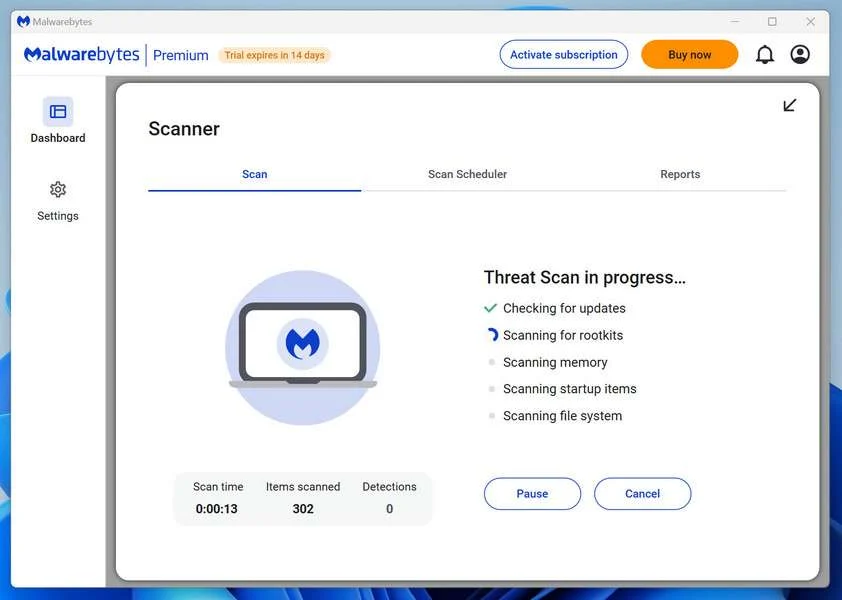
Click the blue Scan button. Malwarebytes will automatically update its virus database and start checking your computer for malware.
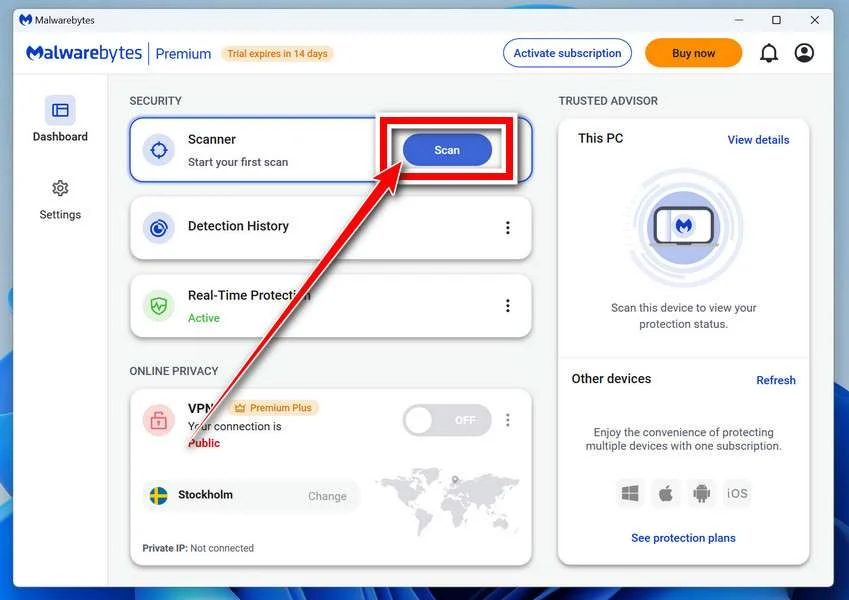
-
Wait for the Scan to Finish
The scan checks your entire system for browser hijackers and other malicious programs, so it can take 5 to 20 minutes depending on your computer. Feel free to do something else — just check back occasionally to see the progress.
-
Quarantine the Detected Threats
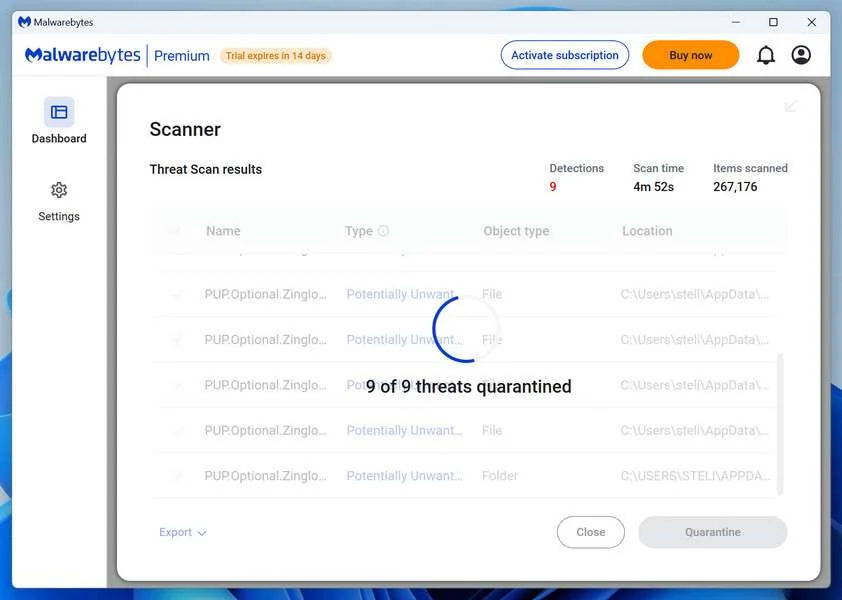
When the scan is done, you’ll see a list of everything Malwarebytes found — malware, adware, and potentially unwanted programs. Click the “Quarantine” button to remove all of them at once.
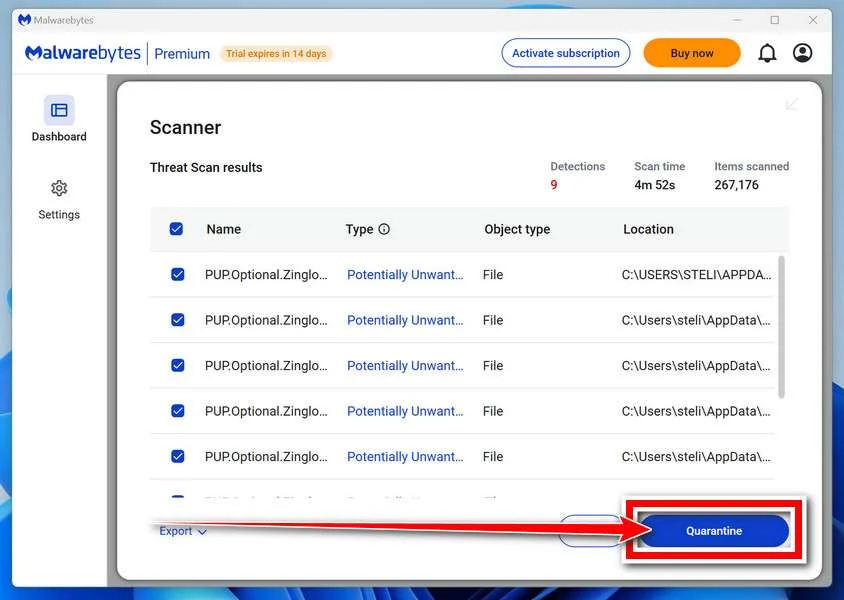
Malwarebytes will now remove the malicious files and registry entries and move them safely into quarantine.
-
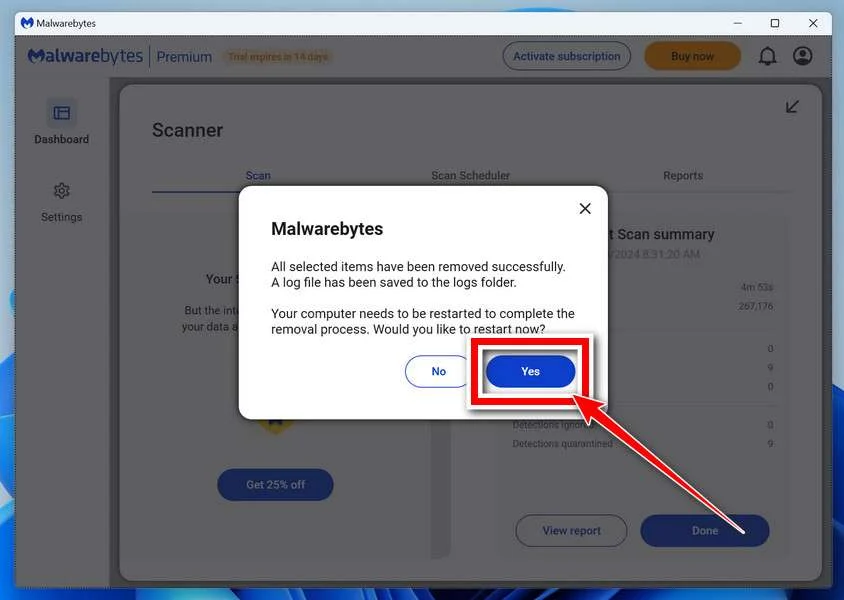
Restart Your Computer
Some threats can only be fully removed after a reboot. If Malwarebytes asks you to restart, click Yes. Once you’re logged back in, Malwarebytes has finished removing the threats it found.
When the scan is done, check whether the problems you noticed have stopped. If they continue, see the options below.
If you are still having problems with your computer after completing these instructions, then please follow one of the steps:
- Run a computer scan with ESET Online Scanner
- Ask for help in our Windows Malware Removal Help & Support forum.
Run a Malware Scan with Malwarebytes for Mac
Malwarebytes for Mac is a free on-demand scanner that removes the malware other security software tends to miss — adware, browser hijackers, and unwanted programs included. Cleaning an infected Mac with Malwarebytes has always been completely free, and it’s our go-to recommendation. Follow the steps below to scan your Mac and remove what Malwarebytes finds.
-
Download Malwarebytes for Mac
Click the button below to download the latest version of Malwarebytes for Mac.
Download MalwarebytesOfficial installer for macOS. Your download starts right away.Want real-time protection? See Malwarebytes PremiumMalwarebytes Free for MacScans and removes malware at no cost -
Open the Malwarebytes setup file
When the download finishes, open your Downloads folder and double-click the setup file to begin the installation.
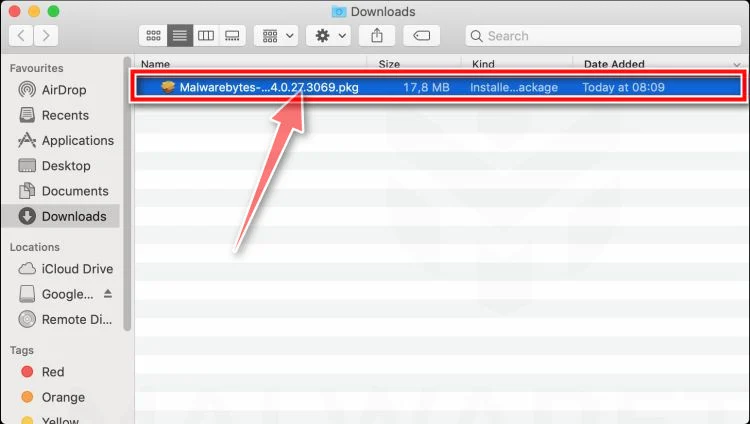
-
Follow the On-Screen Prompts to Install Malwarebytes
The Malwarebytes for Mac Installer will guide you through a few quick screens. Click “Continue” and keep following the prompts until the installation completes.
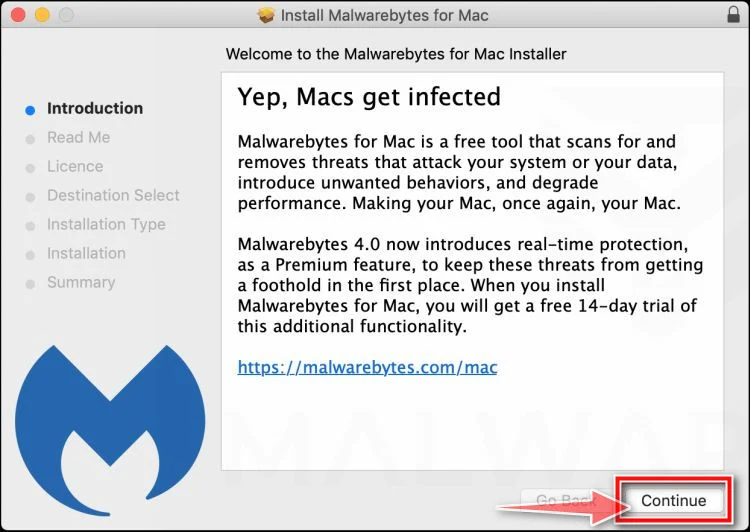
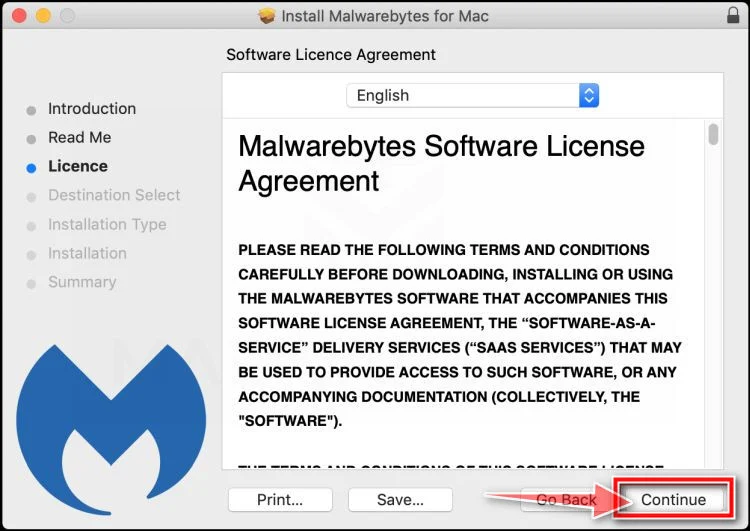
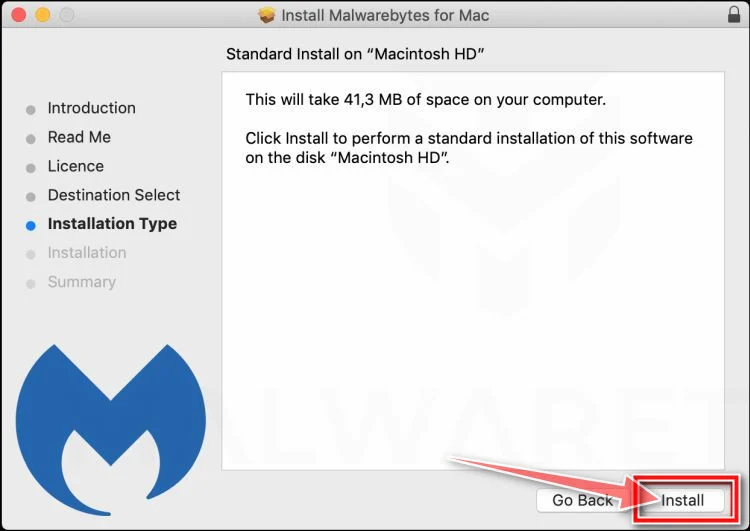
When the installation is complete, Malwarebytes opens to the Welcome to Malwarebytes screen. Click “Get started“.
Malwarebytes needs Full Disk Access to check your whole Mac. When it asks, open System Settings > Privacy & Security > Full Disk Access, turn on Malwarebytes (it may be listed as Malwarebytes Protection), and confirm with your password or Touch ID. Then return to Malwarebytes. On macOS Monterey and earlier, this setting is in System Preferences > Security & Privacy > Privacy.
-
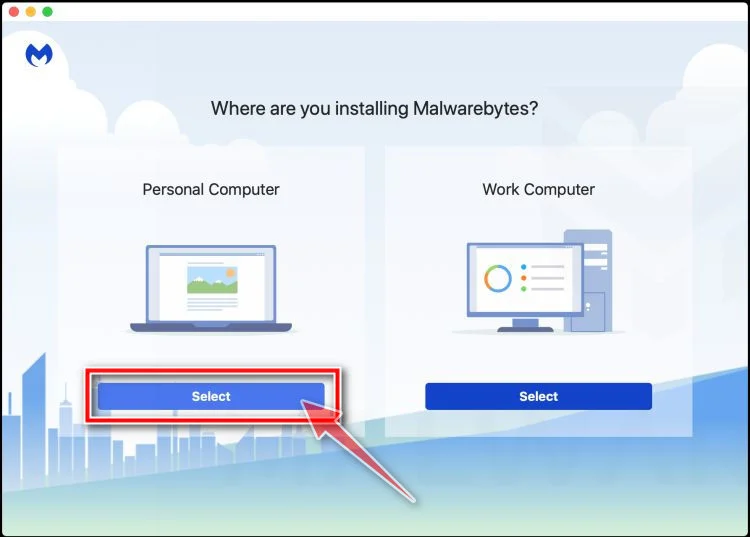
Select “Personal Computer” or “Work Computer”
Malwarebytes will ask what type of computer you’re installing it on. Click either Personal Computer or Work Computer, whichever applies.
-
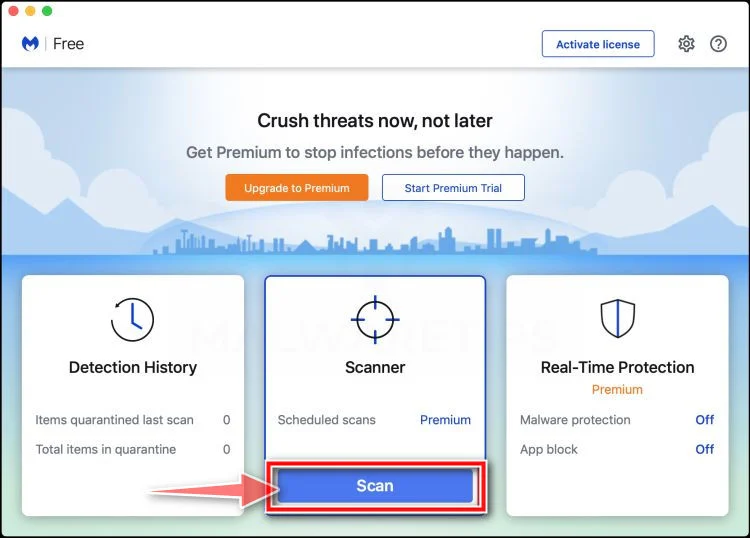
Start the Scan
Click the “Scan” button. Malwarebytes will automatically update its detection database and begin checking your Mac for malware.
-
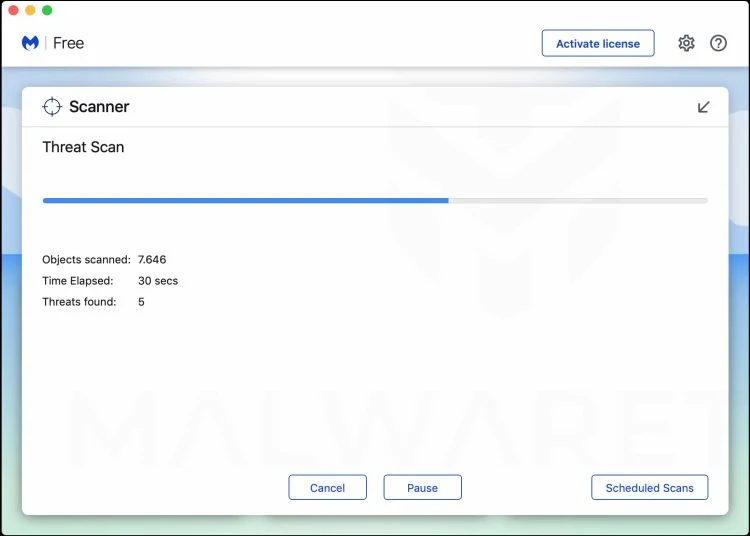
Wait for the Scan to Finish
Malwarebytes will scan your Mac for adware, browser hijackers, and other malicious programs. This can take a few minutes, so feel free to do something else — just check back occasionally to see the progress.
-
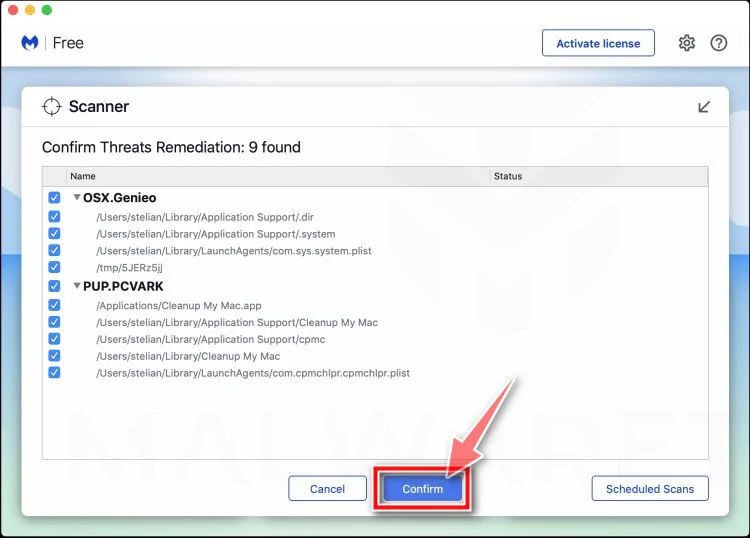
Quarantine the Detected Threats
When the scan is done, you’ll see a list of everything Malwarebytes found. Click the “Quarantine” button to remove all the threats at once.
-
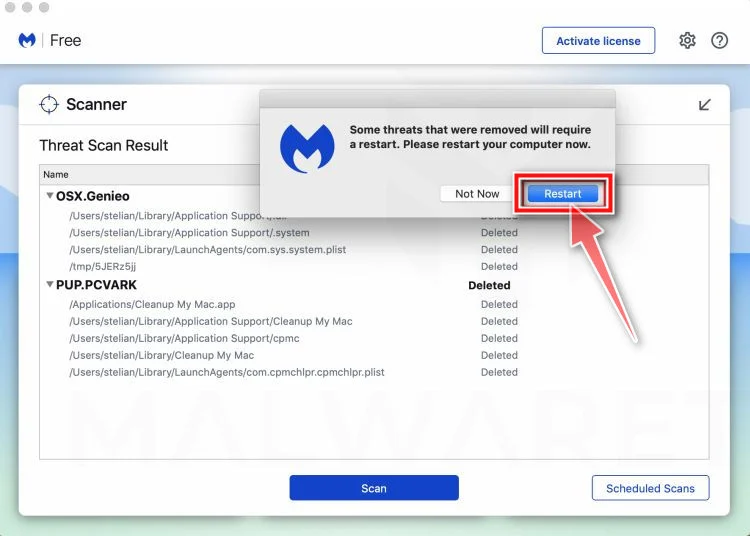
Restart Your Mac
Malwarebytes will now remove all the malicious files it found. Some threats can only be fully removed after a reboot — if Malwarebytes asks you to restart, allow it. Once you’re logged back in, check whether the problems you noticed have stopped. If they come back, save the scan report and ask for help in our forum.
If the problems you noticed continue after the scan, see the options below.
If you are still experiencing problems while trying to remove a malicious program from your computer, please ask for help in our Mac Malware Removal Help & Support forum.
Run a Malware Scan with Malwarebytes for Android
Malwarebytes for Android scans your phone or tablet for malware, adware, and potentially unwanted apps. The free version scans only when you start a scan. Real-time protection, which checks apps automatically, is part of the paid Premium version.
-
Download Malwarebytes for Android.
You can download Malwarebytes for Android by clicking the link below.
Get Malwarebytes for AndroidOpens Google Play in a new tab.Want real-time protection? See Malwarebytes Premium for AndroidMalwarebytes for AndroidScans your phone and removes malware at no cost -
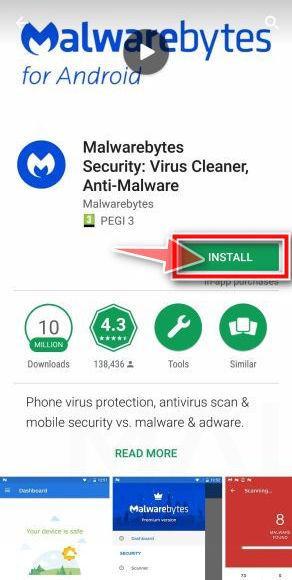
Install Malwarebytes for Android on your phone.
In the Google Play Store, tap “Install” to install Malwarebytes for Android on your device.
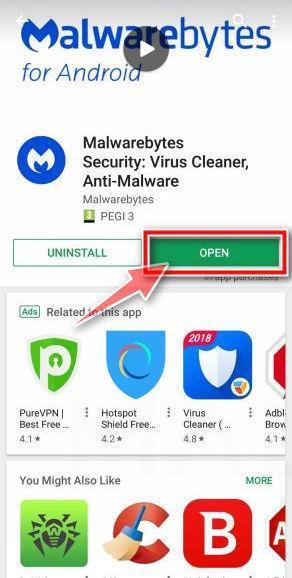
When the installation process has finished, tap “Open” to begin using Malwarebytes for Android. You can also open Malwarebytes by tapping on its icon in your phone menu or home screen.
-
Follow the on-screen prompts to complete the setup process
When Malwarebytes opens, it walks you through a short setup. Tap Get started and follow the prompts. If you see an offer for a trial or a paid plan, read it before you accept. You can skip it and keep using the free scanner.
Malwarebytes will ask for permission to access the files on your phone so it can scan them. Tap Allow, or turn on the permission in the Android screen that opens, then return to Malwarebytes.
-
Run a scan with Malwarebytes for Android
On the main screen, tap Scan now. In some versions, you open the menu, tap Scanner, and then tap Run a scan.
-
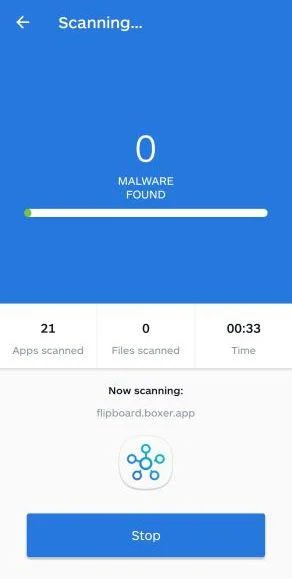
Wait for the Malwarebytes scan to complete.
Malwarebytes will now start scanning your phone for adware and other malicious apps. This process can take a few minutes, so we suggest you do something else and periodically check on the status of the scan to see when it is finished.
-
Remove the detected apps.
When the scan has been completed, you will see a list of the threats that Malwarebytes for Android has detected. Next to each detected item, tap the menu icon (three dots), then choose to uninstall the app or delete the file. Android then asks you to confirm. Tap OK or Uninstall to remove the app.
-
Restart your phone.
When the detected apps are removed, restart your phone if Malwarebytes asks you to. Then check whether the problems you noticed have stopped.
If the problems you noticed continue after the scan, see the options below.
If you are still having problems with your phone after completing these instructions, then please follow one of the steps:
- Ask for help in our Mobile Malware Removal Help & Support forum.
- Only as a last resort, reset your phone to factory settings. Read the warning below first.
- Back up your photos, videos, files, and messages, for example to your Google account or a computer.
- Make sure you know your Google account email and password. The phone asks for them after the reset. If you changed the password recently, Google recommends waiting 24 hours before you reset.
- On a Samsung phone, also make sure you know your Samsung account password.
- If you use an authenticator app for two-step verification, move your accounts to another device or save your backup codes first.
Stay Protected: Block Ads and Malicious Sites
No scan can prove a device is completely clean, so it helps to block threats before they reach you. Most infections start with a malicious ad or a fake download button — so blocking them at the source is your best defense.
We recommend AdGuard, which blocks malicious ads, phishing pages, and dangerous redirects before they can reach you.
👉 Download AdGuard and browse safely
Frequently Asked Questions
Is Wellbeing Bonus Boost an official government health website?
No evidence reviewed establishes it as HealthCare.gov, a state marketplace, Medicaid, Medicare, or another government enrollment portal.
Government-style language and a $0-plan promise do not create an official affiliation.
Can a legitimate health plan really cost $0 per month?
Yes, some eligible consumers may find marketplace plans with a $0 monthly premium after applicable tax credits.
Eligibility varies, and deductibles, copayments, networks, and uncovered services can still create substantial costs.
Why did several insurance agents call after I completed the form?
Your information may have been treated as a marketing lead and shared with participating buyers or partners.
That does not confirm every caller is fraudulent, but each caller must be verified independently.
Should I give a caller my Social Security or Medicare number?
Not until you have independently confirmed the organization, agent license, reason for collection, and secure method being used.
End unexpected calls and contact the insurer or government program through an official number.
How can I stop repeated marketing calls?
Revoke consent in writing when possible, block persistent numbers, and submit complaints through telecommunications and consumer-protection channels.
Keep records because callers may rotate numbers or company names.
Where should I apply for Affordable Care Act coverage?
Begin at HealthCare.gov, which will direct residents of state-based marketplaces to the correct official destination.
You can also locate certified local help without relying on an unsolicited advertisement.
Keep the application confirmation and insurer documents so you can verify effective dates before depending on the coverage.
The Bottom Line
Wellbeing Bonus Boost uses the emotional power of affordable healthcare while leaving critical questions about identity, affiliation, consent, and data sharing unresolved.
Treat the page as a risky lead-generation funnel, not proof of insurance eligibility.
Verify coverage through an official marketplace before disclosing information, accepting a plan, replacing existing insurance, or trusting an unexpected caller with sensitive medical or financial details.

Join the discussion
0 commentsShare your experience or ask a question about this article.
Community experiences
Did this happen to you?
Your experience could help someone recognize the same scam. Submit a private report for our team to review.
I experienced this tooReports are reviewed before publication. Sharing publicly is always your choice.
Discussion
Start the conversation
Have a question or something useful to share? Add the first comment.