Solved Adaptive Brightness On Battery Never Turns Off! Any Solutions?

Status
Not open for further replies.

Purshu_Pro

Level 29
Verified
Honorary Member
Forum Veteran
Describe the problem
Brightness Fluctuates automatically.
What have you tried?
Turning off under Power options.
Hello friends i have been trying to turn off the adaptive brightness in my PC, which is giving me a lot of headache and eye pain when i use my PC on its Battery. If it is plugged in the brightness stays constant and do not fluctuate, i'm trying to figure it out the cause, but unable to fix it though. Can some one help me fix it?
Thanks!
 
Windows 8 or 7 ?
So doesnt help if you change it in Windows or checked the Bios?
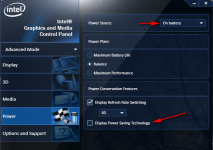
Did you try and adjust it through the intel graphics control panel?

324010.png
 
Upvote 0
You have done this in Windows 8

Type and run: services.msc
Find "Sensor Monitoring Service"
Right click and select properties
Select "disable" under "startup type"
reboot your computer

Do you have Intel graphics? Whatever graphics you have there should be a control panel with power options
 
Upvote 0
You have done this in Windows 8

Type and run: services.msc
Find "Sensor Monitoring Service"
Right click and select properties
Select "disable" under "startup type"
reboot your computer

Do you have Intel graphics? Whatever graphics you have there should be a control panel with power options
Let me try this.
I have AMD Radeon Graphics. So let me try even that also.
 
Upvote 0
I tried the above guided through "services.msc" command. But it didn't solve the problem. In my control panel, it only shows to adjust the screen brightness. There is no "adaptive brightness" configurations. During charging i do not experience any changes to my display. It happens only when my PC is running on battery.
 
Upvote 0
Did you try the power plan options via the control panel?

Click change power plan settings next to balanced or what ever is ticked

Click Change advanced settings

Scroll down to display and click the + sign

Then enable adaptive brightness click the +

Turn off for on battery

Can you take a screenshot of your Graphics control panels
 
Last edited:
Upvote 0
Thanks @jamescv7 and @exterminator20 . Finally stopped it. Now its stable and i can see it. Can i re enable the services which is disabled?
Which services to you want to enable again? Leave "Enable Vari Bright" unticked and any adaptive settings you changed when on battery in Windows. "Dimming" of the display when on battery or plugged in can be changed to whatever you want. It is a battery consumption feature but if your problem is gone I would leave those adaptive brightness settings as is. I do not care for adaptive brightness.
 
Upvote 0
Status
Not open for further replies.

Recently browsing

Members who viewed this thread in the last 5 minutes

Back
Top