
Troubleshooting Add/Remove Programs Prob
  • D Thread starter Deleted member 2913
  • Start date Start date
  • 6 Replies
  • 2,857 Views
D

Deleted member 2913

Describe the problem
Random
What have you tried?
Nothing
Win 7 64

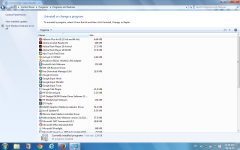
Add/Remove Programs is sometime normal & sometimes just 2 columns.

Attached is the screenshot

No malware on the system.
 

Attachments

  • SR.png
    SR.png
    192.8 KB · Views: 612
@yesnoo

Check Windows Explorer > View > Add Columns

Somehow some columns might have been deactivated... you can add them back.

Why your issue would happen - sometimes even legitimate softs mess with Explorer settings.

If this is not the issue, then at least you know it is something else.
 
Upvote 0
@yesnoo

Check Windows Explorer > View > Add Columns

Somehow some columns might have been deactivated... you can add them back.

Why your issue would happen - sometimes even legitimate softs mess with Explorer settings.

If this is not the issue, then at least you know it is something else.
Thanxx, columns were unticked.
Why it happens sometimes?
 
Upvote 0
Thanxx, columns were unticked.
Why it happens sometimes?

Not sure.

Some malwares will disable Hidden Folders - but I haven't seen any that disable specific columns - although, given the amount of malwares out there, it wouldn't surprise me if there were some that did...
 
Upvote 0
One of the possibilities is likely you accidentally scrolling the list of applications with the hotkey of 'ctrl' therefore automatically adjust the view list style.

I've never encounter that a program will automatically adjust the uninstall view pane. ;)
 
Upvote 0

Recently browsing

Members who viewed this thread in the last 5 minutes

Back
Top