Troubleshoot Add/Remove Programs Prob

  • Thread starter Thread starter Deleted member 2913
  • Start date Start date
D

Deleted member 2913

Thread author
Briefly explain your current issue(s)
Random
Steps taken to resolve, but have been unsuccessful
Nothing
Win 7 64

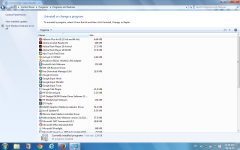
Add/Remove Programs is sometime normal & sometimes just 2 columns.

Attached is the screenshot

No malware on the system.
 

Attachments

  • SR.png
    SR.png
    192.8 KB · Views: 542
  • Like
Reactions: Logethica
@yesnoo

Check Windows Explorer > View > Add Columns

Somehow some columns might have been deactivated... you can add them back.

Why your issue would happen - sometimes even legitimate softs mess with Explorer settings.

If this is not the issue, then at least you know it is something else.
 
  • Like
Reactions: Exterminator
Upvote 0
@yesnoo

Check Windows Explorer > View > Add Columns

Somehow some columns might have been deactivated... you can add them back.

Why your issue would happen - sometimes even legitimate softs mess with Explorer settings.

If this is not the issue, then at least you know it is something else.
Thanxx, columns were unticked.
Why it happens sometimes?
 
  • Like
Reactions: Logethica
Upvote 0
Thanxx, columns were unticked.
Why it happens sometimes?

Not sure.

Some malwares will disable Hidden Folders - but I haven't seen any that disable specific columns - although, given the amount of malwares out there, it wouldn't surprise me if there were some that did...
 
Upvote 0
One of the possibilities is likely you accidentally scrolling the list of applications with the hotkey of 'ctrl' therefore automatically adjust the view list style.

I've never encounter that a program will automatically adjust the uninstall view pane. ;)
 
Upvote 0