
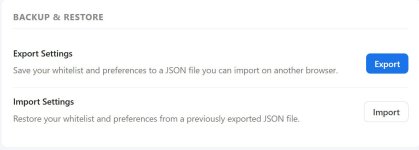
Settings -> GeneralIs there an import/export features of the settings for the whole extension something similar to uBO?


Open MalwareTips from your Home Screen or desktop. Follow discussions, find answers and pick up where you left off.
If you cannot find an install option, update your browser or use its bookmark option to keep MalwareTips close.
After installation, open the app and sign in. Enable push notifications in Preferences if you want alerts. On iPhone and iPad, push requires a Home Screen web app and iOS or iPadOS 16.4 or later.
Sign in to manage notificationsInstallation is optional. Your notification settings stay under your control.
 Thread starter
NoVirusThanks
Thread starter
NoVirusThanks
Settings -> GeneralIs there an import/export features of the settings for the whole extension something similar to uBO?

We've released a new v2.1 version:
So now there is also the block option "Block first-party iframes" that completes the block of 1P and 3P scripts and iframes (fully configurable):
View attachment 297871
@Sampei.Nihira
Try this new v2.1 version, and to block also 1P iframes just enable "Block first-party iframes" option.
Then if you have the "com" TLD on Blacklist -> TLDs list, and the 1P iframe is a "com" TLD, it should be blocked now.
@LinuxFan58
I have increased the limit to 1000 for now.
Eventually I can check if it is Chrome then set the limit to say 2500 or 5000 and keep it at 1000 for Firefox.
But let's wait a bit and see how fast the 1000 limit can be reached in case.
@SHvFl
The built-in blacklist and whitelist are fully local, the extension doesn't download any external list.
Currently, due to the nature of static rules and that are managed by us, they can't be edited. However, from the popup when you see "Built-in blocklist" for a specific domain you want to instead allow, you can just click on "Allow" to temporarily allow it for the session, or "Whitelist" to add it to the whitelist, and these allow rules will override our internal blocklist. If needed you can also disable our built-in rules entirely.
They are updated generally on every extension update.
Have wrote the other 3 suggestions in the todo list, will discsuss about them soon and update here.


Improved internal domain blacklist
Improved internal trusted domains list
Added "Most Blocked" tab on History page
Added button "Export CSV" on "Most Blocked" tab
Added button "Export Hosts Only" on "Most Blocked" tab
Added button "Export CSV" on "Recent History" tab
Added button "Export Hosts Only" on "Recent History" tab
Moved "Blocking" on its own menu

ext-twitch.tv
twitch.tvThank you. Confirmed it works but why didn't it show something blocked in the app or history when it happens?@SHvFl
I think it is caused because "supervisor.ext-twitch.tv" is a third-party iframe, and it then loads "extension-files.twitch.tv" that is considered a third-party script (of the iframe that loaded it, so it is blocked due to this).
Can you try to add these domains in the whitelist:
Code:ext-twitch.tv twitch.tv
Then reload the page, and see if that works fine, let me know.
extension-files.twitch.tv is there but when you whitelist it you do not get ext-twitch.tv and twitch.tv as blocked or anything. There is no indication something was blocked and it doesn't work. Maybe I am missing something.It was showed for me (I am in "Block by default" mode):
What blocking mode are you using?
aax-eu.amazon-adsystem.com | Built-in blocklist
assets.twitch.tv | First-party
dashboard.twitch.tv | Same host
extension-files.twitch.tv | Third-party blocked <---
k.twitchcdn.net | Built-in trusted
sb.scorecardresearch.com | Built-in blocklist
supervisor.ext-twitch.tv | First-party
supervisor.ext-twitch.tv | No block source matched
wb3bnc8np7tdnxj2sfbk0aa3vklulo.ext-twitch.tv | First-party
wb3bnc8np7tdnxj2sfbk0aa3vklulo.ext-twitch.tv | First-party iframeapwln3g3ia45kk690tzabfp525h9e1.ext-twitch.tv | Whitelisted
assets.twitch.tv | First-party
extension-files.twitch.tv | First-party
k.twitchcdn.net | Built-in trusted
s.amazon-adsystem.com | Built-in blocklist
supervisor.ext-twitch.tv | Whitelisted
www.gstatic.com | Built-in trusted
www.twitch.tv | Same host
Another thing I noticed if I whitelist ext-twitch.tv and twitch.tv when I reload in twitch it is still showing apwln3g3ia45kk690tzabfp525h9e1.ext-twitch.tv as blocked. Isn't that wrong as it it subdomain of ext-twitch.tv? I am pretty sure that is the extension that is loaded so I doubt it is blocked.
If I enable extension-files.twitch.tv then it is still not working. Actually, I enabled all below and it was not working. Only when I added the 2 domains it worked.
https://dashboard.twitch.tv/u/{username}/extensions/managehttps://www.twitch.tv/directory/category/hearthstoneImproved internal domain blacklist
Improved internal trusted domains list

 adguard.com
Is it blocked? Then whitelist it yourself. It's needed for cosmetic filtering. See:
Local.adguard.org and injections.adguard.org domains | AdGuard Knowledge Base
Users of AdGuard for Windows, Mac, and Android may notice that AdGuard adds a small script to every web page. It is loaded from either local.adguard.org or injections.adguard.org and helps AdGuard apply cosmetic filtering. When AdGuard is running, it processes requests for the script locally in...

Improved internal domain blacklist
Improved internal trusted domains list
Improved performance
Improved internal trusted domains list


Members who viewed this thread in the last 5 minutes
