Advice Request Best practices for setting up a new router: single vs multi-band SSID & firewall security level?

Please provide comments and solutions that are helpful to the author of this topic.
Some ISP are also strict with their equipments on Modem+Router.
There are times you need to do Mac Clone to get IP address on your personal router in case users ditch the provided one by ISP.
They do. If you are located anywhere in the EU that is illegal as EU regulation 2015/2120 applies to them. More specifically, article 3 which explicitly says:
1. End-users shall have the right to access and distribute information and content, use and provide applications and services, and use terminal equipment of their choice, irrespective of the end-user’s or provider’s location or the location, origin or destination of the information, content, application or service, via their internet access service.
2. Agreements between providers of internet access services and end-users on commercial and technical conditions and the characteristics of internet access services such as price, data volumes or speed, and any commercial practices conducted by providers of internet access services, shall not limit the exercise of the rights of end-users laid down in paragraph 1.
3. Providers of internet access services shall treat all traffic equally, when providing internet access services, without discrimination, restriction or interference, and irrespective of the sender and receiver, the content accessed or distributed, the applications or services used or provided, or the terminal equipment used.

The only catch? Your national regulator decides what the best model is; whether allowing you to completely ditch ISP router or just allowing you bridge mode. Croatian regulator HAKOM chose the second option. Despite that, there are instructions on local forums how to ditch the ISP equipment completely with disclaimer you're responsible for the consequences if ISP realizes you stopped using their equipment on your own.
 
They do. If you are located anywhere in the EU that is illegal as EU regulation 2015/2120 applies to them. More specifically, article 3 which explicitly says:


The only catch? Your national regulator decides what the best model is; whether allowing you to completely ditch ISP router or just allowing you bridge mode. Croatian regulator HAKOM chose the second option. Despite that, there are instructions on local forums how to ditch the ISP equipment completely with disclaimer you're responsible for the consequences if ISP realizes you stopped using their equipment on your own.
That's the thing. Regulators are likely not Tech peeps. They are mostly based on theory and not actual hands on. What's best on paper sometimes is not the best in real-world.
 
From what I understood about your situation @lokamoka820 , there are a few different things involved (ISP router, Archer C6 and repeater), so I think it helps to look at each topic separately:

1. Separate SSIDs (2.4 GHz / 5 GHz)
If your goal is to choose which devices connect to 2.4 GHz and which use 5 GHz, then using separate SSIDs makes sense. Otherwise, if everything is working well with a single SSID, I'd probably just leave it as it is and let the router handle the band selection.

2. DNS settings
If your ISP router doesn't allow you to change the DNS servers, there may not be much you can do on the router itself. In that case, the simplest solution is to configure your preferred DNS on Windows, Linux, or on the individual devices where you want to use it.

3. Firewall level
I'd probably keep the firewall set to Medium. It usually provides a good balance between security and compatibility. A higher setting doesn't always offer a noticeable security benefit, but depending on the router it may occasionally cause unnecessary connectivity issues.

4. Wi-Fi repeater
This is the only part I'm not completely sure about. What are you trying to achieve with the repeater? Do you simply want it to keep working with the new ISP router, or are you planning to use it together with your Archer C6 again? I think understanding your goal here would make it much easier to suggest the most suitable setup.📶🔧
 
That's the thing. Regulators are likely not Tech peeps. They are mostly based on theory and not actual hands on. What's best on paper sometimes is not the best in real-world.
I can't say for other countries, but HAKOM is autonomous, independent, non-profit legal entity with public authority. Here government doesn't regulate electronic communications, postal and railway services; this is regulated by HAKOM.

So as an independent and autonomous entity, they have to wage in user and ISP interests equally. Every time a new law is written, you as a citizen can enter discussion online using your eCitizen account and state your opinion freely. This was the case for router regulation too. People wrote what they'd like to see as part of the law just like ISPs did. I'd link the discussion here, but I lost the link and I don't feel like searching thousands of discussions. If I remember correctly, citizens said they want total control, ISPs answered it's not possible because they can't guarantee compatibility with user equipment with their own fiber equipment in residential buildings as well as traffic exchanges centers. Something like that was discussed, so as a middle ground, it was chosen they have to offer bridge mode if user wants.

Also if you have issues with the ISP and your complaints were denied, you go straight to HAKOM. Then they represent you in dispute with the ISP. In most cases, the dispute is resolved in user favor, though there were the cases ISPs were fined. Usually all complaints are resolved on first try before reaching HAKOM, because ISPs don't want this to go far. Not a good look if it all ends up in media. 🤷‍♂️
 
Last edited:
Unfortunately, that means the setting is there purely as a decoration. They probably couldn't hide it, just lock it behind the admin account.
They used to make the option grayed out in the previous routers from the same ISP, so I thought that things were different now that I have the option to change it, but it's pointless. In any case, I always change my DNS from my devices. Thank you for your assistance.
What brand is the router and extender? Every router will work with every extender, but you won't be able to get mesh network mixing two different brands (unless both support Wi-Fi EasyMesh standard).
The extender is a Nokia Wi-Fi beacon, and the router is an Orange Nokia.
Do you have mesh network currently?
No, I don't have a mesh network.
 
They used to make the option grayed out in the previous routers from the same ISP, so I thought that things were different now that I have the option to change it, but it's pointless. In any case, I always change my DNS from my devices. Thank you for your assistance.

The extender is a Nokia Wi-Fi beacon, and the router is an Orange Nokia.

No, I don't have a mesh network.
You can also change configs/DNS thru SSH. Not sure if Nokia got SSH enabled or it can be thru the GUI.
 
So, if I'm still understanding correctly, you'd like to connect your TP-Link Archer with this new router so you can change DNS, right?

You said:
I connected the repeater yesterday using the quick setup guide, and it is functioning, but I am unable to access its control panel to check its settings.
Some routers, including mine Asus have option to limit devices which have access to the web UI page. That is likely preventing you from visiting it when you're connected on TP-Link Archer. See if you can find anything similar in Nokia's web UI.

Screenshot_9.png

You can also change configs/DNS thru SSH. Not sure if Nokia got SSH enabled or it can be thru the GUI.
If they blocked ability to change DNS through web UI, then they also likely blocked SSH too. 🤷‍♂️
 
Last edited:
So, if I'm still understanding correctly, you'd like to connect your TP-Link Archer with this new router so you can change DNS, right?
I'm unsure whether to connect the TP-Link Archer router because the ISP maintenance worker told my family that there was no need to do so when he installed the new router because the signal was stronger, and it had already been used as an access point rather than a full router. My family members don't change their DNS settings; I'm the only one who does that.

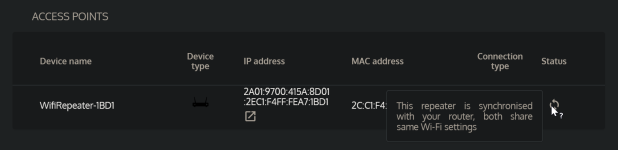
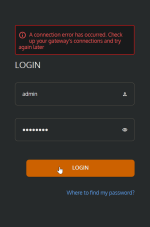
Regarding the extender/repeater, I thought I could use the username and password on the label to log in and configure it as I wanted, but it didn't have an IP address like the router, so I checked the IP that the router had automatically assigned and found it was 192.168.1.29. However, when I tried to enter the username and password, I got an error. I restarted the router, and now it has the IP 2A01:9700:415A:8D01:2EC1:F4FF:FEA7:1BD1. I tried again, but it gave me the following error. I'm not sure if it should have settings or if it's just to be connected and configured using its WPS button, as stated in the quick setup guide.

1785700193453.png1785700227075.png
Some routers, including mine Asus have option to limit devices which have access to the web UI page. That is likely preventing you from visiting it when you're connected on TP-Link Archer. See if you can find anything similar in Nokia's web UI.
It doesn't have any options other than the basics for a simple router, it is even less configurable than their previous router which was having more options than this one.
 
Last edited:
I'm unsure whether to connect the TP-Link Archer router because the ISP maintenance worker told my family that there was no need to do so when he installed the new router because the signal was stronger, and it had already been used as an access point rather than a full router.
If your signal is great, then there's no need for connecting an old router. The only thing you can do is set up DNS on your device (I'd recommend YogaDNS because of DoH3 and DoQ support).
My family members don't change their DNS settings; I'm the only one who does that.
You really should set up some kind of filtering DNS on their devices too. As far as I know, Egypt doesn't offer unlimited internet and filtering unnecessary stuff from the web could save you a lot of data included in plan.
Regarding the extender/repeater, I thought I could use the username and password on the label to log in and configure it as I wanted, but it didn't have an IP address like the router, so I checked the IP that the router had automatically assigned and found it was 192.168.1.29. However, when I tried to enter the username and password, I got an error. I restarted the router, and now it has the IP 2A01:9700:415A:8D01:2EC1:F4FF:FEA7:1BD1. I tried again, but it gave me the following error. I'm not sure if it should have settings or if it's just to be connected and configured using its WPS button, as stated in the quick setup guide.

View attachment 299185View attachment 299186

It doesn't have any options other than the basics for a simple router, it is even less configurable than their previous router which was having more options than this one.
What you have here is mesh network. When it says repeater automatically syncs settings with the router, this is 100% mesh network. The repeater probably doesn't have internal web UI because of it and pulls necessary information from the router itself. Any adjustments you make to Wi-Fi in the router itself, they will also be sent to the repeater.
 
Last edited:
If your signal is great, then there's no need for connecting an old router. The only thing you can do is set up DNS on your device (I'd recommend YogaDNS because of DoH3 and DoQ support).
Yes, it is much better now and far more stable, especially after splitting the bands. None of my family members complain about disconnections or video streaming stuttering anymore. On speed tests, my download and upload speeds increased by about 100–150 Mbps. Also, thanks for recommending YogaDNS. I was planning to manage DNS on Windows manually, but this looks more useful since it only needs to be configured once. Is the free version sufficient?
You really should set up some kind of filtering DNS on their devices too. As far as I know, Egypt doesn't offer unlimited internet and filtering unnecessary stuff from the web could save you a lot of data included in plan.
I'll try with them too, but most of them use mobile phones rather than desktops. Personally, I have the 1.1.1.1 app installed on my phone, so I'll recommend it to them. I live in Jordan, but it's not that different from Egypt; actually, the entire region is quite similar, just with different names.
What you have here is mesh network. When it says repeater automatically syncs settings with the router, this is 100% mesh network. The repeater probably doesn't have internal web UI because of it and pulls necessary information from the router itself. Any adjustments you make to Wi-Fi in the router itself, they will also be sent to the repeater.
Thanks for clarifying this for me, as it's my first time using it.
 
Is the free version sufficient?
More than enough. The only difference between free and pro version is pro lets you add multiple resolvers, multiple rules and ability to use it as a windows service. If you use one DNS server with default rule like me, then you're good with free version.
I'll try with them too, but most of them use mobile phones rather than desktops. Personally, I have the 1.1.1.1 app installed on my phone, so I'll recommend it to them. I live in Jordan, but it's not that different from Egypt; actually, the entire region is quite similar, just with different names.
Oh, sorry. I assume Jordan has unlimited internet unlike Egypt? Anyway, it's always a good idea to change DNS. If not for privacy, then for the sake of security. 🙂
Thanks for clarifying this for me, as it's my first time using it.
If you have any questions, feel free to ask. I was suspicious of YogaDNS at first because it's closed source. But it turns out many DNS services actually recommend it and NextDNS uses it as their official client. Privacy policy is also simply and clearly written so I had no reason not to trust it. Turns out it works better than Control D Setup Utility which gave me headaches and limited me to slow DoH.
 
So, if I'm still understanding correctly, you'd like to connect your TP-Link Archer with this new router so you can change DNS, right?

You said:

Some routers, including mine Asus have option to limit devices which have access to the web UI page. That is likely preventing you from visiting it when you're connected on TP-Link Archer. See if you can find anything similar in Nokia's web UI.

View attachment 299184

If they blocked ability to change DNS through web UI, then they also likely blocked SSH too. 🤷‍♂️

I tried so many routers and all of them work. But the thing that sepearates Asus from the rest is the freedom. It's like you can tweak it as much as you like.
You can change from Official Firmware to Merlin Firmware back and forth without issues. It's like changing undewear as easy as 1 2 3. And the ability of Enware.

Heck Asus even supports Merlin.
 
Oh, sorry. I assume Jordan has unlimited internet unlike Egypt? Anyway, it's always a good idea to change DNS. If not for privacy, then for the sake of security. 🙂
Yes, we have unlimited internet plans for home networks, likely because many people rely on mobile data and providers want to encourage home network usage. By the way, I just noticed something in my Windows network settings, but I'm not sure if it confirms whether the DNS on my router is working properly.

1785709745264.png
If you have any questions, feel free to ask. I was suspicious of YogaDNS at first because it's closed source. But it turns out many DNS services actually recommend it and NextDNS uses it as their own official client. Privacy policy is also simply and clearly written so I had no reason not to trust it. Turns out it works better than Control D Setup Utility which gave me headaches and limited me to slow DoH.
Thank you so much. I was using the DNS built into web browsers since that's my primary use case, but I considered switching to a Windows-level DNS service without knowing which software to choose. Tests show that Google and Cloudflare are the fastest for me, so I will mostly add Cloudflare to YogaDNS.
 
I also faced a similar issue when I tried 2.4 and 5 ghz combined. They are not as reliable for many devices. In our home, only my phone reliably auto-roams between 2.4 and 5ghz, other devices often don't auto switch. So I have a 2.4 ghz SSID for the family and a 2.4 & 5ghz combined SSID for my phone only.

How is AdGuard DNS's latency for you? If latency is not too high then I see zero reason not to try at least AdGuard DNS on the router. There are also ControlD with preconfigured Hagezi filters like Hagezi Pro which doesn't break anything. The amount of useless DNS queries sent by phones is quite high.
 
I also faced a similar issue when I tried 2.4 and 5 ghz combined. They are not as reliable for many devices. In our home, only my phone reliably auto-roams between 2.4 and 5ghz, other devices often don't auto switch. So I have a 2.4 ghz SSID for the family and a 2.4 & 5ghz combined SSID for my phone only.

How is AdGuard DNS's latency for you? If latency is not too high then I see zero reason not to try at least AdGuard DNS on the router. There are also ControlD with preconfigured Hagezi filters like Hagezi Pro which doesn't break anything. The amount of useless DNS queries sent by phones is quite high.
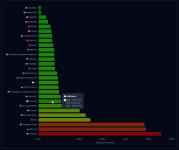
This is the DNS Speed Test website's result for my location.

1785713908419.png
 
View attachment 299192

Thank you so much. I was using the DNS built into web browsers since that's my primary use case, but I considered switching to a Windows-level DNS service without knowing which software to choose. Tests show that Google and Cloudflare are the fastest for me, so I will mostly add Cloudflare to YogaDNS.
Glad I could help!

What this means is you have manually put 1.1.1.1 and 1.0.0.1 as a DNS in Windows networking settings. Unencrypted means you're using insecure DNS over port 53. YogaDNS has massive benefit because it's supporting pretty much all DNS encryption standards. DoH3 and DoQ should be top priority for those that want fastest DNS. Unfortunately, you can't get these standards in Windows without an app.

Regular DoH in Windows and what is implemented in web browsers is terribly slow with high response times. Firefox being the worst offender. You can go to dnscheck.tools and right at the left bottom corner see how much it takes DNS to resolve a query. For me, Control D has pretty much equal response time as Cloudflare, despite having higher latency. They recently switched providers from NetActuate to DataCamp in Frankfurt which has better servers and are planning to switch to DataCamp globally in the next few weeks.

Screenshot_1.png

How is AdGuard DNS's latency for you? If latency is not too high then I see zero reason not to try at least AdGuard DNS on the router. There are also ControlD with preconfigured Hagezi filters like Hagezi Pro which doesn't break anything. The amount of useless DNS queries sent by phones is quite high.
I used to use only uncensored DNS like 1.1.1.1 and AdGuard on Android. As soon as I switched to ad blocking DNS (Control D), battery life really increased because due to amount of unnecessary connections being blocked. Sometimes AdGuard blocked some requests, but app was persistent and kept sending them every seconds which decreased battery life by a lot. DNS accepts request and then routes them to 0.0.0.0 which means app request is successful, it just doesn't get the response it hoped it will.

Hagezi Pro Plus also doesn't lead
This is the DNS Speed Test website's result for my location.

View attachment 299194
I expected Control D to be highest due to lack of the servers in the region. Would you mind going to controld.com/status and showing us where you're being connected?

You would definitely benefit from using Cloudflare Zero Trust with Hagezi Pro/Pro++ blocklist. You create your own Control D with hosted on Cloudflare infrastructure.
I find Cloudflare to be fastest followed by Google. Their massive and spreadout data centers surely helps.
Cloudflare is fastest, following Quad9, then there's Google. Quad9 uses very good provider with location through out the world.
 
This is the DNS Speed Test website's result for my location.

View attachment 299194
For benchmarking, this new tool can be used. It should be more reliable than dnsspeedtest.online in terms of latency since web based testing sometimes can have their own latency.
Run it like this after opening terminal into the same folder.

.\dnsbench.exe run --protocols dot,doh,doh3,doq --details --export json,txt,html --out reports
 
What this means is you have manually put 1.1.1.1 and 1.0.0.1 as a DNS in Windows networking settings. Unencrypted means you're using insecure DNS over port 53. YogaDNS has massive benefit because it's supporting pretty much all DNS encryption standards. DoH3 and DoQ should be top priority for those that want fastest DNS. Unfortunately, you can't get these standards in Windows without an app.
I haven't installed YogaDNS yet, and I haven't manually adjusted my device's DNS settings. The result below is entirely dependent on the router settings, which show that DNS changes are effective. 😊
I expected Control D to be highest due to lack of the servers in the region. Would you mind going to controld.com/status and showing us where you're being connected?
Control D Troubleshooting - Mon, 03 Aug 2026 14:52:27 UTC
-----------------------------------------------------------------
IPv4 ISP | 8376 (Orange Jordan, JO)
IPv6 ISP | 8376 (Orange Jordan, JO)
Using Control D | No
Resolver | N/A
DNS Protocol | N/A
Approx. DNS Latency | 78ms
DNS Host | cdg-h10
Proxy Authorized | No
Null Routed | No
Approx. Proxy Latency | 92.42ms
Proxy Host | ams-pxy51
You would definitely benefit from using Cloudflare Zero Trust with Hagezi Pro/Pro++ blocklist. You create your own Control D with hosted on Cloudflare infrastructure.
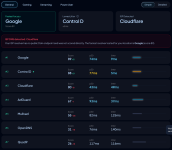
And this is my DNS speed test result based on the control D speed test.

1785770071032.png
For benchmarking, this new tool can be used. It should be more reliable than dnsspeedtest.online in terms of latency since web based testing sometimes can have their own latency.
Run it like this after opening terminal into the same folder.

.\dnsbench.exe run --protocols dot,doh,doh3,doq --details --export json,txt,html --out reports
Below are the test results.

1785771368104.png