Advice Request Best practices for setting up a new router: single vs multi-band SSID & firewall security level?

Please provide comments and solutions that are helpful to the author of this topic.
I didn't try restarting the router after changing the DNS, so perhaps that was the problem. I'll try again tonight.
It won't change the DNS on ISP-provided routers in Egypt (assuming ur in Egypt). I tried changing the DNS on Orange, Vodafone, And We routers and checking dnsleaktest.com always showed my ISP DNS.

Personally, I am using DoH on every single device that allows it. And you know what? Sometimes private DNS fails to connect on Android DoT. ISPs are very aggressive in Egypt.
 
I am mainly looking for malware protection, but I would also appreciate ad and tracking blocking as long as it doesn't break web pages.
If malware protection is your absolute priority, and ad blocking "if possible", I'd recommend you Cloudflare Zero Trust Free + Hagezi Pro++ blocklist in uBlock Origin.

1.1.1.2 will block malware out of the box. Cloudflare Zero Trust gives you ability to create your own DoH/DoT server and control over what will be blocked exactly. I used it briefy to test something, but since I only need ad blocking from DNS, I switched back to Control D.

Here's how I configured it.
Screenshot_4.png

I meant clear of errors at that point, as I had selected "Error Only" from the log dropdown menu. When I previously tested with Control D over HTTP/3, the log was immediately flooded with errors right after starting Windows. However, with Mullvad over HTTPS, the log remained clean of errors after restarting.
I set log to errors only now, we'll see how much errors I get surfing the web. 😁
I agree. After switching to Control D over HTTPS, as SeriousHoax recommended, I checked the logs and found similar errors upon waking my PC from sleep. While not identical, one error occurred during PC usage: "content-signature-2.cdn.mozilla.net - request timeout: server=Control D Malware Protection." This issue only appears with Control D.
Wait, the normal DoH works fine, but DoQ and DoH3 do not? May I ask what hostname did you use for DoQ and DoH3?
 
If malware protection is your absolute priority, and ad blocking "if possible", I'd recommend you Cloudflare Zero Trust Free + Hagezi Pro++ blocklist in uBlock Origin.
Thanks for the recommendation. I'll look into it, though it does seem a bit complicated. 😅
Wait, the normal DoH works fine, but DoQ and DoH3 do not? May I ask what hostname did you use for DoQ and DoH3?
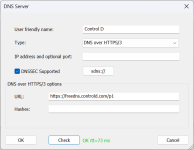
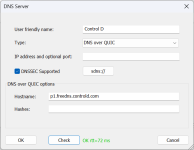
This is how I configured Control D during my tests.

1786484499601.png1786484544619.png
 
@lokamoka820 As a suggestion for your experiments and learning: a free and practical setup could be to use Quad9 Security for blocking harmful sites, and complement it with uBlock Origin together with HaGeZi lists (whichever you prefer among those available) in the browser. This way you get protection and ad‑blocking without making the configuration too complicated, while still being able to test other DNS services to compare stability. 🛡️✨
 
It won't change the DNS on ISP-provided routers in Egypt (assuming ur in Egypt). I tried changing the DNS on Orange, Vodafone, And We routers and checking dnsleaktest.com always showed my ISP DNS.

Personally, I am using DoH on every single device that allows it. And you know what? Sometimes private DNS fails to connect on Android DoT. ISPs are very aggressive in Egypt.
Looks like they simply have a DNAT rule in their server that redirect outbound port 53 traffic to their own DNS. I have the exact rule setup on my own router. This is why it's better to use your personal router than using ISP provided one. Though I don't know how strict they are about customers using their own router.
Thanks for the recommendation. I'll look into it, though it does seem a bit complicated. 😅

This is how I configured Control D during my tests.

View attachment 299364View attachment 299365
You may use Cloudflare DNS since that is the fastest for you and other DNS are giving you some troubles according to YogaDNS. Use AdGuard Home on your PC. Add DNS filter lists in AdGuard Home. Disable/uninstall YogaDNS before setting up AdGuard.

In Terminal, run:

winget install -e --id AdGuard.AdGuardHome

Then,

AdGuardHome.exe -s install

Then open,

127.0.0.1/3000 in your browser.

Keep everything default, setup your username and password.

In the dashboard configure your filters list, DNS provider (multiple providers with multiple protocols can be used), filter update intervals. You can configure for how many days you want to save logs, etc.

You will understand the dashboard once you look around.

Then change your Windows DNS to 127.0.0.1 for IPv4 and ::1 for IPv6. Make sure to set the IPv6 DNS whether you have IPv6 or not.

Now browse a website and check query logs in AdGuard Dashboard. You should see entries in the query logs if everything is working perfectly.

It will start automatically as a service on system startup. You won't have to do anything else. http://127.0.0.1 will be your AdGuard Dashboard address in the browser.

There should be YouTube videos regarding AdGuard Home on Windows which you can watch if needed.
Don't add too many filters. Hagezi Pro Plus alone is fine. If you use Cloudflare's Security DNS or Zero Trust then you will have malware protection from that as well.

BTW, Hagezi GitHub has been taken down by automated GitHub bot a couple of days ago 😑
His Gitlab mirror is is working:

 
Last edited: