Advice Request Best practices for setting up a new router: single vs multi-band SSID & firewall security level?

Please provide comments and solutions that are helpful to the author of this topic.
I didn't try restarting the router after changing the DNS, so perhaps that was the problem. I'll try again tonight.
It won't change the DNS on ISP-provided routers in Egypt (assuming ur in Egypt). I tried changing the DNS on Orange, Vodafone, And We routers and checking dnsleaktest.com always showed my ISP DNS.

Personally, I am using DoH on every single device that allows it. And you know what? Sometimes private DNS fails to connect on Android DoT. ISPs are very aggressive in Egypt.
 
I am mainly looking for malware protection, but I would also appreciate ad and tracking blocking as long as it doesn't break web pages.
If malware protection is your absolute priority, and ad blocking "if possible", I'd recommend you Cloudflare Zero Trust Free + Hagezi Pro++ blocklist in uBlock Origin.

1.1.1.2 will block malware out of the box. Cloudflare Zero Trust gives you ability to create your own DoH/DoT server and control over what will be blocked exactly. I used it briefy to test something, but since I only need ad blocking from DNS, I switched back to Control D.

Here's how I configured it.
Screenshot_4.png

I meant clear of errors at that point, as I had selected "Error Only" from the log dropdown menu. When I previously tested with Control D over HTTP/3, the log was immediately flooded with errors right after starting Windows. However, with Mullvad over HTTPS, the log remained clean of errors after restarting.
I set log to errors only now, we'll see how much errors I get surfing the web. 😁
I agree. After switching to Control D over HTTPS, as SeriousHoax recommended, I checked the logs and found similar errors upon waking my PC from sleep. While not identical, one error occurred during PC usage: "content-signature-2.cdn.mozilla.net - request timeout: server=Control D Malware Protection." This issue only appears with Control D.
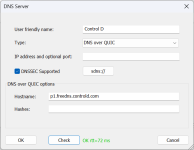
Wait, the normal DoH works fine, but DoQ and DoH3 do not? May I ask what hostname did you use for DoQ and DoH3?
 
If malware protection is your absolute priority, and ad blocking "if possible", I'd recommend you Cloudflare Zero Trust Free + Hagezi Pro++ blocklist in uBlock Origin.
Thanks for the recommendation. I'll look into it, though it does seem a bit complicated. 😅
Wait, the normal DoH works fine, but DoQ and DoH3 do not? May I ask what hostname did you use for DoQ and DoH3?
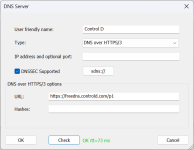
This is how I configured Control D during my tests.

1786484499601.png1786484544619.png
 
@lokamoka820 As a suggestion for your experiments and learning: a free and practical setup could be to use Quad9 Security for blocking harmful sites, and complement it with uBlock Origin together with HaGeZi lists (whichever you prefer among those available) in the browser. This way you get protection and ad‑blocking without making the configuration too complicated, while still being able to test other DNS services to compare stability. 🛡️✨
 
It won't change the DNS on ISP-provided routers in Egypt (assuming ur in Egypt). I tried changing the DNS on Orange, Vodafone, And We routers and checking dnsleaktest.com always showed my ISP DNS.

Personally, I am using DoH on every single device that allows it. And you know what? Sometimes private DNS fails to connect on Android DoT. ISPs are very aggressive in Egypt.
Looks like they simply have a DNAT rule in their server that redirect outbound port 53 traffic to their own DNS. I have the exact rule setup on my own router. This is why it's better to use your personal router than using ISP provided one. Though I don't know how strict they are about customers using their own router.
Thanks for the recommendation. I'll look into it, though it does seem a bit complicated. 😅

This is how I configured Control D during my tests.

View attachment 299364View attachment 299365
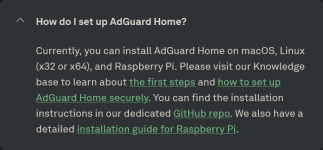
You may use Cloudflare DNS since that is the fastest for you and other DNS are giving you some troubles according to YogaDNS. Use AdGuard Home on your PC. Add DNS filter lists in AdGuard Home. Disable/uninstall YogaDNS before setting up AdGuard.

In Terminal, run:

winget install -e --id AdGuard.AdGuardHome

Then,

AdGuardHome.exe -s install

Then open,

127.0.0.1/3000 in your browser.

Keep everything default, setup your username and password.

In the dashboard configure your filters list, DNS provider (multiple providers with multiple protocols can be used), filter update intervals. You can configure for how many days you want to save logs, etc.

You will understand the dashboard once you look around.

Then change your Windows DNS to 127.0.0.1 for IPv4 and ::1 for IPv6. Make sure to set the IPv6 DNS whether you have IPv6 or not.

Now browse a website and check query logs in AdGuard Dashboard. You should see entries in the query logs if everything is working perfectly.

It will start automatically as a service on system startup. You won't have to do anything else. http://127.0.0.1 will be your AdGuard Dashboard address in the browser.

There should be YouTube videos regarding AdGuard Home on Windows which you can watch if needed.
Don't add too many filters. Hagezi Pro Plus alone is fine. If you use Cloudflare's Security DNS or Zero Trust then you will have malware protection from that as well.

BTW, Hagezi GitHub has been taken down by automated GitHub bot a couple of days ago 😑
His Gitlab mirror is is working:

 
Last edited:
Thanks for the recommendation. I'll look into it, though it does seem a bit complicated. 😅
It isn't really. It just looks complicated.

You register for Cloudflare account, in Cloudflare dashboard go to Zero Trust and create your "organization". Once you choose free plan it will ask you for credit card details; in the top right corner there's Cancel and exit option you can use. Credit card is necessary for new free plan which includes more locations and devices, if you don't add it you will be on legacy free plan which includes 3 different DNS servers.

Once you get into Zero Trust dashboard, go to Network in the left-side menu, then Resolvers & Proxies. Here you will create your own DoH/DoT server also known as "DNS location" by clicking on + Add new location. Feel free to copy my settings. On 3rd step, you'll get your own DoH/DoT addresses along with instructions for use. You can also use them in YogaDNS if you want.

Screenshot_2.png
Screenshot_3.png


Next step is choosing what you want blocked when using the resolver. Go to Traffic policies in left-side menu, then Firewall policies, + Add a policy and copy the settings from the screenshot. You can make it even more aggressive by clicking + Or then selecting Content Categories you want blocked.

Screenshot_4.png


That's it. Now you have your own Cloudflare DNS with aggressive malware protection. Basically more aggressive version of 1.1.1.2.
This is how I configured Control D during my tests.

View attachment 299364View attachment 299365
The only thing I miss here is bootstrap IP address which is 76.76.2.11 for Control D Free DNS.

Screenshot_6.png

Looks like they simply have a DNAT rule in their server that redirect outbound port 53 traffic to their own DNS. I have the exact rule setup on my own router. This is why it's better to use your personal router than using ISP provided one. Though I don't know how strict they are about customers using their own router.

You may use Cloudflare DNS since that is the fastest for you and other DNS are giving you some troubles according to YogaDNS. Use AdGuard Home on your PC. Add DNS filter lists in AdGuard Home. Disable/uninstall YogaDNS before setting up AdGuard.

In Terminal, run:

winget install -e --id AdGuard.AdGuardHome

Then,

AdGuardHome.exe -s install

Then open,

127.0.0.1/3000 in your browser.

Keep everything default, setup your username and password.

In the dashboard configure your filters list, DNS provider (multiple providers with multiple protocols can be used), filter update intervals. You can configure for how many days you want to save logs, etc.

You will understand the dashboard once you look around.

Then change your Windows DNS to 127.0.0.1 for IPv4 and ::1 for IPv6. Make sure to set the IPv6 DNS whether you have IPv6 or not.

Now browse a website and check query logs in AdGuard Dashboard. You should see entries in the query logs if everything is working perfectly.

It will start automatically as a service on system startup. You won't have to do anything else. http://127.0.0.1 will be your AdGuard Dashboard address in the browser.

There should be YouTube videos regarding AdGuard Home on Windows which you can watch if needed.
Don't add too many filters. Hagezi Pro Plus alone is fine. If you use Cloudflare's Security DNS or Zero Trust then you will have malware protection from that as well.

BTW, Hagezi GitHub has been taken down by automated GitHub bot a couple of days ago 😑
His Gitlab mirror is is working:

I wanted to do this myself, but it's to complicated and it works only on that one device (I use same protection on all of my devices).
 
Last edited:
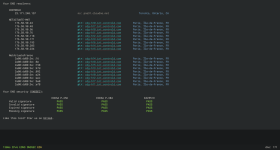
In that case, Control D probably acts up in your region. When using Control D, do you see NetActuate on dnscheck.tools or DataCamp addresses?
I tried NextDNS today, but I switched to Control D to respond to your question, and it was the best result I've had so far. I'm not sure if the results change based on the time of day.

1786549909314.png
 
I wanted to do this myself, but it's to complicated and it works only on that one device (I use same protection on all of my devices).
I am using OpenWrt firmware on my router where it's just a simple firewall rule to redirect port 53 which works for all devices connected to the router.
I experimented with and without it (the IP address) and got the same outcome.
When you put the IP address as bootstrap, a plain DNS request over port 53 is sent to use that IP address to obtain the IP address of your given DoH/DoT/DoQ address. If you don't give it, your router DNS will be used. Since your ISP intercept all port 53 outbound request and forward it to their own DNS, for you using or not using bootstrap address has no difference at all. Your ISP DNS will be used either way to resolve.
You will have to use 'dns stamp' to not have you DNS client send a port 53 query. AdGuard Home supports it, YogaDNS probably as well.
I tried NextDNS today, but I switched to Control D to respond to your question, and it was the best result I've had so far. I'm not sure if the results change based on the time of day.

View attachment 299382
This website send randomly generated null ip addresses to resolve your dns query time. The value that you see on bottom should be the average DNS query time for non-cached DNS queries. Queries that are cached on the DNS server should take less time. Usually equivalent to your DNS address ping.
If during peak hours, your ISP change their route then DNS query time can fluctuate. You will probably have to traceroute to be sure if they change the routing in peak hours.
 
I tried NextDNS today, but I switched to Control D to respond to your question, and it was the best result I've had so far. I'm not sure if the results change based on the time of day.

View attachment 299382
I assumed that was the case. When they used NetActuate in Frankfurt, I also had issues with DoQ and DoH3 as well. Latency and response time was sometimes going through the roof, but the regular DoH/DoT worked normally. As they changed provider to DataCamp, latency and response time massively improved so did DoQ and DoH3. When I asked them about this, turned out they were testing DataCamp server in Frankfurt and it proved to be more capable powerful than NetActuate servers combined. It was mentioned they will switch to DataCamp in all regions in the next few weeks.
 
  • Thanks
Reactions: lokamoka820
After three days of using the router, I discovered that all of my devices were using 2.4 GHz and none were using 5 GHz when I used a single SSID for both bands. I'm not sure if this is because the router is in the living room and the connected devices are in the other rooms, or if I need to split the bands as some advised and connect specific devices to 5 GHz if I want those devices to use it. However, I've read that 5 GHz isn't for long distances, and since our walls are made of cement, will 5 GHz work well in that scenario?
I ALWAYS split the bands due to that issue. Some older devices will suddenly constantly hop between frequencies thus generating lag and data spikes when streaming etc, especially at those devices where SNR is at eigenvalue for 2.4 Ghz and 5 Ghz.

Some routers allow you to define signal logic to a coupled SSID where 5 Ghz works up to SNR of X and beyond X 2.4 Ghz takes over. But I find that too fuzzy especially when signals are attenuated by a dynamic environment.
 
  • Thanks
Reactions: lokamoka820