Creators Update arrives early on the PC

Status
Not open for further replies.
When big releases are meant to happen they have to pass the iso early to the manufacturers so it makes sense to make an iso. Usually, they don't provide an actual iso and you have to go through hoops(esd) but i guess after their fail releasing the agent and the actual links by accident they though it's a good idea to give the iso to insiders as a release preview. MS is weird but what can you do. At least they made it easier this time.

The Creator's Update ISOs were mistakenly leaked by MS, people got the ISOs, MS took down the ISOs, then MS put the ISOs back up the next day. People that got the ISOs made download links.

Windows Defender on Creator's Update:

Memory usage goes even higher into the 600 - 700s of MBs, scans take a long time even on an SSD = 1 hr for Full System scan

The scan will completely finish, but ASE will continue to peg CPU at around 20 % and RAM at around 600 MB until system is rebooted

So it appears Creator's Update introduces more Windows Defender bugs than what is already there

Capture.PNG
 
Last edited by a moderator:
Creator's Update is mostly GUI stuff - like Control Panel is no longer available via WIN + X and command prompt has been replaced with powershell

Fortunately the powershell-cmd switch in win +x is still optional, you can switch it back here:

bd156e2e9aa842819103866c836da67f.png

I read somewhere that they will completely ditch cmd in the near future and they are preparing everybody for this switch. Maybe it's a good thing, powershell is much more powerful.
 
Fortunately the powershell-cmd switch in win +x is still optional,


Fortunately the powershell-cmd switch in win +x is still optional, you can switch it back here:

bd156e2e9aa842819103866c836da67f.png

I read somewhere that they will completely ditch cmd in the near future and they are preparing everybody for this switch. Maybe it's a good thing, powershell is much more powerful.

Powershell is a well-documented menace and should not be activated on home user systems.

Powershell has its uses for enterprise and the initiated user, but for inadequately protected\ill prepared consumers it does nothing except greatly increase risk and make their systems more vulnerable to attack.

Just because something is shipped with Windows doesn't mean that it should be or activated for the vast majority of users.
 
I have both Powershell and WD locked down like a catholic virgin.
My fear Jeff is Windows is going to throw a fit at update time seeing those two are
out of commission.

Very rarely - almost never - does a Windows Update use powershell or wscript. If they are disabled, then you re-enable them, proceed with the update, afterwards immediately re-disable. The block doesn't break anything permanently.

Microsoft guidance for enterprise customers is to disable it if it isn't needed - this is reflected in their guidance for Group Policy, AppLocker, Device Control, etc. So you are simply following Microsoft recommended best practice.
 
Powershell is a well-documented menace and should not be activated on home user systems.

Powershell has its uses for enterprise and the initiated user, but for inadequately protected\ill prepared consumers it does nothing except greatly increase risk and make their systems more vulnerable to attack.

Just because something is shipped with Windows doesn't mean that it should be or activated for the vast majority of users.

Every powerful stuff has to be used with adequate knowledge, indeed. Like a 1000HP Veyron, available for the general masses, but training is required. Home users, most of them, are exposing not just powershell, but other tools as well to the ill intentioned, like registry tools. But then again, limiting too much stuff would mean another closed ecosystem like OSX in the end, and that is not what Microsoft wants, and neither do I.

As for the enterprise, they know better when and where to disable stuff to get protected. Not just powershell, but every tool that could be a potential security breach. They use a completely different security strategy one would only understand if working with such environments.
 
Last edited:
Very rarely - almost never - does a Windows Update use powershell or wscript. If they are disabled, then you re-enable them, proceed with the update, afterwards immediately re-disable. The block doesn't break anything permanently.

Microsoft guidance for enterprise customers is to disable it if it isn't needed - this is reflected in their guidance for Group Policy, AppLocker, Device Control, etc. So you are simply following Microsoft recommended best practice.
Thanks Jeff, I will do that.
Thanks for the heads up.
 
Every powerful stuff has to be used with adequate knowledge, indeed. Like a 1000HP Veyron, available for the general masses, but training is required. Home users, most of them, are exposing not just powershell, but other tools as well to the ill intentioned, like registry tools. But then again, limiting too much stuff would mean another closed ecosystem like OSX in the end, and that is not what Microsoft wants, and neither do I.

I get that, but you and I both know that the typical person that purchases digital devices knows pretty much nothing except that you plug a device into an electrical outlet to charge the battery\power it and push a button to turn it on.

Disabling, restricting or otherwise limiting functionality on a system doesn't require a closed ecosystem; the functionality remains, it is just disabled or strictly controlled by default for the consumer. Consumers are better protected and go about their digital lives. Those consumers that want to use disabled stuff can enable it.
 
I get that, but you and I both know that the typical person that purchases digital devices knows pretty much nothing except that you plug a device into an electrical outlet to charge the battery\power it and push a button to turn it on.

Disabling, restricting or otherwise limiting functionality on a system doesn't require a closed ecosystem; the functionality remains, it is just disabled or strictly controlled by default for the consumer. Consumers are better protected and go about their digital lives. Those consumers that want to use disabled stuff can enable it.

Indeed. The ones that do know how to really protect themselves are working in the business, most of the users don't. But i'm sure MS has a very good reason to leave these enabled for everybody, i'm sure they know the risks their OS is taking by leaving all these stuff just hanging around. I mean even for marketing; they are constantly attacked by maIware and hackers, why allow the bad advertising coming from people, that their OS is such an easy target? Never did research on the subject of "why", it was natural to me to just disable stuff where they are not needed, leave enabled stuff where they are. But as long as i know MS mentality, they didn't disable stuff, they enforced security policies by other means and technologies. There must be a very good reason why.
 
  • Like
Reactions: JB007 and SHvFl
But i'm sure MS has a very good reason to leave these enabled for everybody, i'm sure they know the risks their OS is taking by leaving all these stuff just hanging around.

One reason is to ship a generic version of Windows that will meet the needs of virtually all global users from those that know nothing to the most advanced power user out of the box.

In any case, Microsoft's own recommended best security practices dictate the disablement of vulnerable processes that are not needed on any frequent basis. The rub lies in the fact that Microsoft leaves that onus entirely on the end-user to know or figure it out for themselves - which is something that is going to fly right past the vast majority of typical users.

Difficult problems with no easy answers = mostly an unwillingness to implement better policy-based protections. Who pays the consequences of all that in the end is typical user-land.
 
Last edited by a moderator:
One reason is to ship a generic version of Windows that will meet the needs of virtually all global users from those that know nothing to the most advanced power user out of the box.

In any case, Microsoft's own recommended best security practices dictate the disablement of vulnerable processes that are not needed on any frequent basis.

But the number of power users is lot less (and i'm talking about really advanced power users) than average users. And as you said, those users know how to enable stuff disabled by default for their needs, so it doesn't make sense to leave your OS vulnerable to 90% of the users, it has to be some other reason(s).

Obviously, disable what you don't use. But again, regular users don't even know about the existence of many tools bundled with Windows, let alone acknowledge the importance of disabling them for security reasons. So why leave them as they are (not disabled)? They have lots of tools to enable lots of stuff for the enterprise segment (like group policies), so enabling things wouldn't be a problem. I think we are missing something here.

I'm thinking about compatibility stuff with other third party software, though those can enable/disable stuff they need/don't use. On the other hand, i wouldn't agree with opening/enabling stuff in the OS without my knowledge by those third party software, just to make them work, they can take you by surprise. Maybe this is way too complicated to comprehend in just a few lines of debate as we do now, their experience is way above our knowledge.
 
Last edited:
But the number of power users is lot less (and i'm talking about really advanced power users) than average users. And as you said, those users know how to enable stuff disabled by default for their needs, so it doesn't make sense to leave your OS vulnerable to 90% of the users, it has to be some other reason(s).

Obviously, disable what you don't use. But again, regular users don't even know about the existence of many tools bundled with Windows, let alone acknowledge the importance of disabling them for security reasons. So why leave them as they are (not disabled)? They have lots of tools to enable lots of stuff for the enterprise segment (like group policies), so enabling things wouldn't be a problem. I think we are missing something here.

Economically and logistically it is in Microsoft's best interest to ship Windows as a generic "one-size-fits-all" OS and place the entire onus of risk mitigation on the end-user.
 
  • Like
Reactions: JB007
Economically and logistically it is in Microsoft's best interest to ship Windows as a generic "one-size-fits-all" OS and place the entire onus of risk mitigation on the end-user.

But it is, even with the stuff disabled. As you said, not a big deal for anybody to enable them, the functionality is still there. "One size fits all" doesn't fit the regular user in this case, they don't know about the risks they are taking leaving stuff enabled they don't know about at all... Eh, anyway, gtg, maybe we'll forum-chat later :) Have a great Sunday @Lockdown (and all MT members online)!
 
  • Like
Reactions: JB007
Question:

On 5th April, using the Windows upgrade tool, will I be able to create a bootable USB drive for a clean install?
 
#3 Blurry fonts

(maybe only on my machine,)

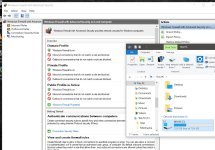
Issue: The text in the GUI of MS tools (Windows Firewall with Advanced Setting, Task Scheduler, etc...) are blurry unlike the rest of the system.

Fix: https://www.winhelp.us/change-screen-resolution-in-windows.html or reduce text size to 100% (but on my screen it becomes too small :confused: )
 

Attachments

  • font.jpg
    font.jpg
    295 KB · Views: 431
Last edited by a moderator:
  • Like
Reactions: SHvFl
#3 Blurry fonts

(maybe only on my machine,)

Issue: The text in the GUI of MS tools (Windows Firewall with Advanced Setting, Task Scheduler, etc...) are blurry unlike the rest of the system.

Fix: not at the moment
What is your windows scaling? Usually when i have this issue in any windows version since 8 it means windows decided to use some custom weird scaling. Try playing with that.
 
  • Like
Reactions: _CyberGhosT_
Status
Not open for further replies.