Creators Update arrives early on the PC

Status
Not open for further replies.
Just finished my first set of backups With Macrium Reflect and Aomei Backupper Pro. So far I like the new update. Everything seems to work okay, I had to uninstall EIS and reinstall but now it works fine. I tried lots of things but EIS but it would just not start but all is good now. :)
 
Last edited:
Hi @Exterminator , I've just reinstalled my Windows 10 Creators Update using MSDN ISO. And my brightness problem now gone. I think because there is a problem with Windows 10 Education. I reinstalled my Windows 10, but Pro version instead of Education version as before, and all things are great still now.
 
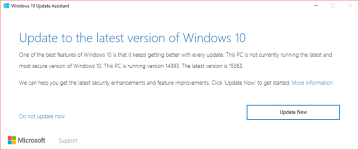
Windows 10 Upgrade Assistant - Confirmation for Creators Update - Users are NOT forced to install.
More Information

upload_2017-4-6_16-8-12.png

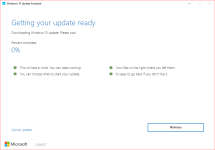
Users can choose when to update, cancel update and even revert builds if they don't like it.
upload_2017-4-6_16-12-4.png
 
  • Like
Reactions: SHvFl
I'm having problems with Chrome.

There is a GUI glitch: when you click on your name (near the minimize button) nothing happens.

And it's not getting uninstalled. Tried reinstalling many times, but to no avail.

May be, WD is deleting some stuff, but how do I view the quarantined items?

NOTE: I did a clean install of the update.
 
  • Like
Reactions: SHvFl
I'm having problems with Chrome.

There is a GUI glitch: when you click on your name (near the minimize button) nothing happens.

And it's not getting uninstalled. Tried reinstalling many times, but to no avail.

May be, WD is deleting some stuff, but how do I view the quarantined items?

NOTE: I did a clean install of the update.
Try using Chrome portable. I'm using it without problem
 
  • Like
Reactions: SHvFl
I'm having problems with Chrome.

There is a GUI glitch: when you click on your name (near the minimize button) nothing happens.

And it's not getting uninstalled. Tried reinstalling many times, but to no avail.

May be, WD is deleting some stuff, but how do I view the quarantined items?

NOTE: I did a clean install of the update.
It's not a WD issue, unless your syncing Adware with your Google account, but even so, Windows would notify before removal.

Try repairing the Chrome installation, or use the SRT utility.
Chrome Cleanup Tool
 
OK, manually downloaded and installed it yesterday evening via the official MS downloader; about two hours and then the last restart.
First of all I created a Macrium image of my last configuration, but I have to say no real problems.
Sandboxie 5.16 does not work anymore and I had to reinstall Adguard, because the right click menu got non-clickable items, but after reinstalling it, all is well.
MS Disc Cleaning tool has eliminated approximately 16 GB of Windows old files.
I have planned to create a clean installation but I have the doubt about any issues of my lifetime ZAL license on a new installation.:oops:
 
  • Like
Reactions: SHvFl and frogboy
I took a snapshot with RollBack Rx before, installed the update with no apparent issues. Took one after too since all seems fine. Gonna do my weekly Drive Cloner backup this PM but I'm glad this is working.
 
  • Like
Reactions: frogboy
I took a snapshot with RollBack Rx before, installed the update with no apparent issues. Took one after too since all seems fine. Gonna do my weekly Drive Cloner backup this PM but I'm glad this is working.
You manage to upgrade while in RX? you like play with fire lol.
 
  • Like
Reactions: Danielx64
You manage to upgrade while in RX? you like play with fire lol.

Yes and no, while I'm partially running a bit of risk, I did some personal research to see common things updated that can break RollBack during an update, there wasn't much here that made me worry. Also HDS claims new build is better prepared to handle updates, so I wanted to test it personally.
 
  • Like
Reactions: Deleted member 178
Yes and no, while I'm partially running a bit of risk, I did some personal research to see common things updated that can break RollBack during an update, there wasn't much here that made me worry. Also HDS claims new build is better prepared to handle updates, so I wanted to test it personally.
Mostly upgrades touch the MBR structure which is the main source of issues with RX.
 
  • Like
Reactions: JHomes
Yes and no, while I'm partially running a bit of risk, I did some personal research to see common things updated that can break RollBack during an update, there wasn't much here that made me worry. Also HDS claims new build is better prepared to handle updates, so I wanted to test it personally.

I do private build testing for HDS. HDS recommends uninstall of RX before any Windows upgrades like 1607 or 1703. Proceed at your own risk without doing so first. A system meltdown is sure to happen eventually. That is why HDS advises to uninstall RX products prior to any Windows "upgrade."
 
Last edited by a moderator:
OK, manually downloaded and installed it yesterday evening via the official MS downloader; about two hours and then the last restart.
First of all I created a Macrium image of my last configuration, but I have to say no real problems.
Sandboxie 5.16 does not work anymore and I had to reinstall Adguard, because the right click menu got non-clickable items, but after reinstalling it, all is well.
MS Disc Cleaning tool has eliminated approximately 16 GB of Windows old files.
I have planned to create a clean installation but I have the doubt about any issues of my lifetime ZAL license on a new installation.:oops:
If it helps my Zemana lifetime license is still working and I've performed 4 clean installs of Windows 10 since I've had the license.
 
OK, manually downloaded and installed it yesterday evening via the official MS downloader; about two hours and then the last restart.
First of all I created a Macrium image of my last configuration, but I have to say no real problems.
Sandboxie 5.16 does not work anymore and I had to reinstall Adguard, because the right click menu got non-clickable items, but after reinstalling it, all is well.
MS Disc Cleaning tool has eliminated approximately 16 GB of Windows old files.
I have planned to create a clean installation but I have the doubt about any issues of my lifetime ZAL license on a new installation.:oops:

What's your doubt about Zemana lifetime license? Installatioon on clean system is no problem.
 
Status
Not open for further replies.