CyberLock 9.0

  • Thread starter Thread starter danb
  • Start date Start date
  • Featured
Can you please list the steps to reproduce this bug?
1) The user has a file "C:\Path\file.exe"
2) The user scans it with CyberLock and quarantines it.
3) CyberLock creates a quarantine file "file.exe.voo" and adds a record to the database, where the ProcessName field is "file.exe".
4) The user has another file "C:\Path2\file.exe"
5) The user scans it with CyberLock and quarantines it.
6) CyberLock creates a quarantine file "file.exe1.voo" and adds a record to the database, where the ProcessName field is "file.exe".
7) When the user unquarantines the first file, everything works correctly.
8) However, when the user tries to unquarantine the second file, CyberLock attempts to unquarantine file.exe.voo instead of file.exe1.voo.
 
1) The user has a file "C:\Path\file.exe"
2) The user scans it with CyberLock and quarantines it.
3) CyberLock creates a quarantine file "file.exe.voo" and adds a record to the database, where the ProcessName field is "file.exe".
4) The user has another file "C:\Path2\file.exe"
5) The user scans it with CyberLock and quarantines it.
6) CyberLock creates a quarantine file "file.exe1.voo" and adds a record to the database, where the ProcessName field is "file.exe".
7) When the user unquarantines the first file, everything works correctly.
8) However, when the user tries to unquarantine the second file, CyberLock attempts to unquarantine file.exe.voo instead of file.exe1.voo.
Very interesting, thank you for catching that! It will be fixed in the next version.
 
Dear @danb,

I am currently running Windows 11 x64 (fully patched) with Cyberlock 9.05 and DefenderUI 2.05.

I have reported a few weeks ago a bug while trying to manage DefenderUI exclusion list, but after that I realized that I wasn't able to change any configuration from DefenderUI at all.

The first suspect was "Tampering protection", so I disabled it. No changes after reboot. The problem persisted.

After a lot of testing I figured out the problem. CyberLock is blocking DefenderUI Service from changing configurations via command line blocking.

I have attached my command lines from CyberLock 9.05 and you will be able to spot a few block rules for the actions I was trying to perform.

Best regards,

Bruno Eduardo

P.S.: I have tried three times to upload my file without success. Does anyone know why I can't upload my "deadly" .txt file?
 
Last edited:
Dear @danb,

I am currently running Windows 11 x64 (fully patched) with Cyberlock 9.05 and DefenderUI 2.05.

I have reported a few weeks ago a bug while trying to manage DefenderUI exclusion list, but after that I realized that I wasn't able to change any configuration from DefenderUI at all.

The first suspect was "Tampering protection", so I disabled it. No changes after reboot. The problem persisted.

After a lot of testing I figured out the problem. CyberLock is blocking DefenderUI Service from changing configurations via command line blocking.

I have attached my command lines from CyberLock 9.05 and you will be able to spot a few block rules for the actions I was trying to perform.

Best regards,

Bruno Eduardo

P.S.: I have tried three times to upload my file without success. Does anyone know why I can't upload my "deadly" .txt file?
Thank you for the logs! Are you running CyberLock with all default settings? I am running CyberLock 9.05 and DefenderUI Free 2.05 with default settings / Recommended for DefenderUI, and it is working great for me. Does anyone else have this issue?
 
Thank you for the logs! Are you running CyberLock with all default settings? I am running CyberLock 9.05 and DefenderUI Free 2.05 with default settings / Recommended for DefenderUI, and it is working great for me. Does anyone else have this issue?

I cannot confirm this issue. I am not running the recommended setting for DefenderUI 9.05, but I did set them that way as a test. I never had any issue changing DefenderUI setting using my settings or the recommended ones.
 
Thank you for the logs! Are you running CyberLock with all default settings? I am running CyberLock 9.05 and DefenderUI Free 2.05 with default settings / Recommended for DefenderUI, and it is working great for me. Does anyone else have this issue?
Dear @danb,

I am running with settings "aggressive (default)" in CyberLock and "aggressive" in DefenderUI and "tampering protection" off.

Best regards,

Bruno Eduardo
 
Last edited:
  • Like
Reactions: danb
Installed CL 9.05 over 9.04 last night. no issues seen. IIRC I used to see more 95% confidence than now as I'm seeing 90% confidence (not that it matters -- to me)
 
  • Like
Reactions: danb
can anyone confirm if the date layout is customisable for regions outside the US? as in DD/MM/YYYY instead of MM/DD/YYYY ? Thanks
 
  • Like
Reactions: danb
can anyone confirm if the date layout is customisable for regions outside the US? as in DD/MM/YYYY instead of MM/DD/YYYY ?
Hello,
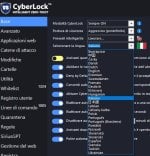
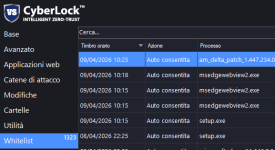
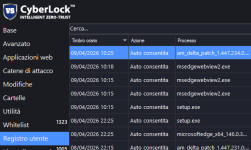
I'm on CyberLock 9.03 and I guess the date format depends on the language you've set in CyberLock settings because if I set "English" the date format in both whitelist and user log is MM/DD/YYYY. I'm Italian so if I set CyberLock language to Italian the date format is DD/MM/YYYY, as you can see from the attached screenshots

CyberLock languages.jpgCyberLock whitelist.pngCyberLock user log.png
 
I just upgraded and rebooted. The date layout is still the same MM/DD/YYYY and I checked all my windows region settings. They all appear correct. Does anyone know where the app get the regional layout from? If its the keyboard then that may be why as keyboards in Australia use the US layout. Not sure if thats it or not. If a setting to choose the timestamp format layout, that would be awesome.
 
  • Like
Reactions: danb
Does anyone know where the app get the regional layout from?
If in Australia the correct date format is DD/MM/YYYY, like here in Italy, then setting the CyberLock language to English doesn't solve the issue, unfortunately as you'll see the date format as MM/DD/YYYY instead. I think only Dan, CyberLock's developer, can answer your question.
 
Last edited:
It's in the correct format for me in the UK.
I see, so I was wrong because I though that setting CyberLock language to English will always showed the date format as MM/DD/YYYY, which is the correct date format for USA. You've set English but CyberLock has picked the correct date format DD/MM/YYYY for UK.
So, as user duskdevilza wrote, it could be that CyberLock shows the date format based on keyboard layout but, as I wrote above, I think only Dan can clarify this matter.
 
Last edited:
one thing I just realised just now when turning my pc on since upgrading to 9.0.5. All my settings got reset and the trial got reset as well. I had to re-register and reconfigure everything. timestamp date layout issue still remains though. Lets hope Dan is the man with the plan... Who am i kidding? Of course he is... He wrote the plan. hahahahahahaha.
 
one thing I just realised just now when turning my pc on since upgrading to 9.0.5. All my settings got reset and the trial got reset as well. I had to re-register and reconfigure everything. timestamp date layout issue still remains though. Lets hope Dan is the man with the plan... Who am i kidding? Of course he is... He wrote the plan. hahahahahahaha.
Sorry I did not see this earlier. Can you please tell me if any of the date formats work at all? Most or all of them should work, but if you let me know if some work and some do not, and what language you are using, this should be an easy fix. If none of them work, that would be good to know as well. Thank you!
 
Hey Guys!


Here are the latest versions of our software, there was a bug with the MaxxAudio driver, but it is fixed now, along with a couple of very minor updates, including a new digital signature.

CyberLock 9.06
SHA-256: 88022c6a929c7a95f36e90decbd2313c272ef46f02cb1be7466d63b62c5c301e

SiriusGPT 1.06
SHA-256: 0340739813f11b67a1234337087b99a73e81e7e1b18e4072b272d6e3a9911272

SiriusLLM 1.06
SHA-256: 0782e31416d9569f5896de4c4011ce952396de66c6bbd4fb1e0e8eb097587b5e

DefenderUI 2.06
SHA-256: 38dc09717a02b7c02e7446b5665a5ad80323e4d9ccdab842dca4bb787884bc6e

DefenderUIPro 2.06
SHA-256: 85c3a6fbd07e6c458090112b0321a2f1a0fdc0c523cae4554a6010a064023b11

DefenderUISilent 2.06
SHA-256: d2168681e3b7298b6171bc9c76cc8c5bf4bc2d2448ac23bdedba3bba49dcce15

DefenderUIARM64 2.06
SHA-256: 93830a10de909da63f00b506503085ae0f4ec1c6801c3161b58b445b2efaaf6f

WDAC Lockdown 2.06
SHA-256: 12a782db367dfbfd13d814a5d5bd23c59ed2e2c02ab11ca6806cfcbb6c248e81

Thank you guys!
 
Hey Guys!


Here are the latest versions of our software, there was a bug with the MaxxAudio driver, but it is fixed now, along with a couple of very minor updates, including a new digital signature.

CyberLock 9.06
SHA-256: 88022c6a929c7a95f36e90decbd2313c272ef46f02cb1be7466d63b62c5c301e
Nice one! I had to mark it as a safe download in Edget and ESET file guard had to cloud check the file but all fine.
 
Nice one! I had to mark it as a safe download in Edget and ESET file guard had to cloud check the file but all fine.
Thank you for letting me know! Yeah, we have a new code signing cert... and even though it is an EV cert, it is still getting flagged. Hopefully not for too much longer though ;).
 

You may also like...