Troubleshoot Dell Laptop running extremely slow

MChambers

Level 1
Thread author
Verified
Jul 26, 2017
15
52
29
Broomall, PA
Hi all, I have a Dell Inspiron I3 - 4500U CPU @ 1.70GHz - 400GB ram - 64 bit OS running Window 10 Home..

It takes my computer so long to start and then very long to do anything after that. Opening Firefox, Chrome, emails.. everything takes forever..
I am running Norton through my internet service provider, I have run CCleaner, Spybot... I have 374GB free on my harddrive...

This is driving me crazy..

Please help!!!
 
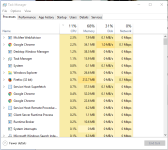
It's the cpu i guess if it's hitting 93%. Open task manager, sort cpu from high to low and show us what it's using it.
 

Attachments

  • Screenshot_1.png
    Screenshot_1.png
    49.1 KB · Views: 497
  • Like
Reactions: MWNu72 and SHvFl
Upvote 0
I'm having same specification laptop from acer. I agreed with @SHvFl
It could be a million reasons. High temperatures, bad drive, viruses, high ram usage and the list can go on and on and on.

Can you try and check your pc temperatures and if they are low to format so you can remove the possibility of a software issue?
And running two memory hunger application (chrome,firefox) slow down your system. Disable auto start services (which is you not need). I see in my pc 60% ram is used in fresh installed window.
 
Upvote 0
Click on the "startup" tab in task manager and attach a screenshot, so we can see what's loading just after boot.
Also post a screenshot of "This Pc" in Windows explorer (showing all the drives), so we can rule out free space problems in 'C' drive.
 
Upvote 0
Hi all, I have a Dell Inspiron I3 - 4500U CPU @ 1.70GHz - 400GB ram - 64 bit OS running Window 10 Home..

It takes my computer so long to start and then very long to do anything after that. Opening Firefox, Chrome, emails.. everything takes forever..
I am running Norton through my internet service provider, I have run CCleaner, Spybot... I have 374GB free on my harddrive...

This is driving me crazy..

Please help!!!

How old is the system ?

Clean install Windows and rebuild your system. If you already did that a couple of times and it did not resolve the problem, then look to hardware problems.

Clean installing Windows is the best advice you are going to get. Don't expect a precise solution to your problem as it could be anything. People will have you running in circles and in the end you will be no further along in fixing the system than you are at the moment.

Do you know how to do a clean install of Windows and rebuild it ?
 
Upvote 0
You mean 4 GB RAM and 400 GB hard drive space ?

How much RAM does the system have ? If RAM is 2 or less GB, then that right there could be a source of issues since Win10 doesn't play well on systems with low RAM - despite Microsoft saying it does.

Agreed ran into this recently with an employee who wanted me to look at her system. Told her it was time to upgrade.
 
  • Like
Reactions: MWNu72 and frogboy
Upvote 0