


The MalwareTips app
Your community, one tap away.
Open MalwareTips from your Home Screen or desktop. Follow discussions, find answers and pick up where you left off.
- Home Screen access
- Optional push alerts
- Your community
You're ready to explore.Explore what's new
Installation instructions
iPhone & iPad
- Open MalwareTips in Safari and tap Share. You may need to open the Page Menu first.
- Choose Add to Home Screen. If it is not listed, use Edit Actions to add it.
- Keep Open as Web App enabled if shown, then tap Add.
Android
- Open MalwareTips in Chrome or another browser that supports app installation.
- Open the browser menu and look for Install app, Install and create shortcut, or Add to Home screen.
- Choose Install and confirm. Wording varies by browser.
Desktop
- Chrome: use the install icon in the address bar, or the menu under Cast, save and share.
- Edge: open the menu, then More tools, Apps and Install this site as an app.
- Safari on Mac: choose Share or File, then Add to Dock. Firefox on Windows: look for the web apps button in the address bar.
If you cannot find an install option, update your browser or use its bookmark option to keep MalwareTips close.
Keep up with your conversations
After installation, open the app and sign in. Enable push notifications in Preferences if you want alerts. On iPhone and iPad, push requires a Home Screen web app and iOS or iPadOS 16.4 or later.
Sign in to manage notificationsInstallation is optional. Your notification settings stay under your control.
You are using an out of date browser. It may not display this or other websites correctly.
You should upgrade or use an alternative browser.
You should upgrade or use an alternative browser.
Serious Discussion Did Microsoft Defender change the way it responds to file downloads?
-
 Thread starter
nickstar1
Thread starter
nickstar1
- Start date
- 87 Replies
- 5,692 Views

Web browser does play a role in security, but it can't do anything else than to block access to malicious resource if configured properly.@Marko :)
I'm not blaming Firefox.
It's a fact.
Users who use any browser because they believe the browser plays almost no role in their security setup probably don't care.
For me, since I consider the browser a fundamental component of my security setup, it matters more than it does to others.
First step is securing the network (using malware-blocking DNS), then it's securing the web browser (ad blocker, malware-blocking extension and Google Safe Browsing), and the last step is securing the system using antivirus software.
Web browser does play a role in security, but it can't do anything else than to block access to malicious resource if configured properly.
First step is securing the network (using malware-blocking DNS), then it's securing the web browser (ad blocker, malware-blocking extension and Google Safe Browsing), and the last step is securing the system using antivirus software.
Yes and no.
Antivirus software doesn’t always protect the operating system; otherwise, no one would have gotten infected in the past either.
And it’s still possible to protect the operating system even without real-time antivirus protection.
I used Windows XP from 2014 to 2021, without real-time antivirus protection, and never had any infection issues while performing my normal daily online activities.
Back when no one thought it was possible.


The issue with Firefox is known for years. It is not supported by Microsoft Defender "Block At Firtst Sight" feature.
Thank you, Andy. I just tried Brave, and received a notice

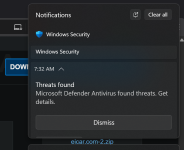
Brave is doing something with the file after download which looks to Defender like it's trying to open it so it immediately starts the scan and takes care of the malicious file. Firefox just downloads the file and that's why Defender isn't triggered, though it should be if there wasn't a bug in Defender.
Hence why I said following.Yes and no.
Antivirus software doesn’t always protect the operating system; otherwise, no one would have gotten infected in the past either.
And it’s still possible to protect the operating system even without real-time antivirus protection.
I used Windows XP from 2014 to 2021, without real-time antivirus protection, and never had any infection issues while performing my normal daily online activities.
Back when no one thought it was possible.
I also used PC for years without protection and never got malware.
Last edited:

I reported the issue to Microsoft since it’s also happening with Edge, though I have no idea why. If they want logs, I’ll provide them. I’m glad you mentioned this have they even tried to fix it, or is the Microsoft Edge problem something new?or years. It is not supported by Microsoft Defender "Block At Firtst Sight" feature.

Andy Ful
From Hard_Configurator Tools
Verified
Honorary Member
Top Poster
Developer
Well-known
Forum Veteran
You're wrongly blaming Firefox for this.
I do not blame anyone for this fact. However, it can be an issue for some Firefox users. Microsoft does not care about Firefox.
It is not a bug, and it follows from the differences when downloading files by Chrome-based web browsers and Firefox.
Last edited:
Andy Ful
From Hard_Configurator Tools
Verified
Honorary Member
Top Poster
Developer
Well-known
Forum Veteran
It seems that the issue is related to your computer configuration. I tested the EICAR download in Edge, and the file was correctly blocked by MD just after the download.I reported the issue to Microsoft since it’s also happening with Edge, though I have no idea why. If they want logs, I’ll provide them. I’m glad you mentioned this have they even tried to fix it, or is the Microsoft Edge problem something new?
Do the downloaded files have the Mark of the Web?
I am impressed with how quickly and efficiently MD took care of the EICAR file it flagged, when running "Start actions".
This is crazy why is it only happening to me? I’ve gone through every possible setting and configuration, and I have nothing left to try. i cannot get this it working they way it should.It seems that the issue is related to your computer configuration. I tested the EICAR download in Edge, and the file was correctly blocked by MD just after the download.
Do the downloaded files have the Mark of the Web?

Well, I have made the choice to go with my updated clean install of windows 11.
I am using nothing, other than MSD, and I might just leave it this way since Ai is perfecting the code, security, and usability at such a fast pace.
This pace of 100's of thousands of fixes by Ai, means no one else's code is an appropriate fit, or aligned any longer with Windows 11 changes that happen this fast, unless Bitdefender and Kaspersky have created or purchased the same Ai, Microsoft is using, and correcting their code at the same pace as Microsoft.
This fast pace to fix and secure, would seemingly, possibly not intentionally, push EVERY security product off the chessboard.
To do otherwise, with all these changes and improvements in my mind would be like using Kaspersky 2001
I am using nothing, other than MSD, and I might just leave it this way since Ai is perfecting the code, security, and usability at such a fast pace.
This pace of 100's of thousands of fixes by Ai, means no one else's code is an appropriate fit, or aligned any longer with Windows 11 changes that happen this fast, unless Bitdefender and Kaspersky have created or purchased the same Ai, Microsoft is using, and correcting their code at the same pace as Microsoft.
This fast pace to fix and secure, would seemingly, possibly not intentionally, push EVERY security product off the chessboard.
To do otherwise, with all these changes and improvements in my mind would be like using Kaspersky 2001
Attachments
Last edited:
I think most companies will adapt to the changes or at least find a way to keep up, but I believe GenDigital and other high-profile companies wont just throw in the towel. Windows Defender isn’t very promising at this point it feels clunky and slow to open compared to AVG, Avast, Norton, Malwarebytes, and Kaspersky.Well, I have made the choice to go with my updated clean install of windows 11.
I am using nothing, other than MSD, and I might just leave it this way since Ai is perfecting the code, security, and usability at such a fast pace.
This pace of 100's of thousands of fixes by Ai, means no one else's code is an appropriate fit, or aligned any longer with Windows 11 changes that happen this fast, unless Bitdefender and Kaspersky have created or purchased the same Ai, Microsoft is using, and correcting their code at the same pace as Microsoft.
This fast pace to fix and secure, would seemingly, possibly not intentionally, push EVERY security product off the chessboard.
To do otherwise, with all these changes and improvements in my mind would be like using Kaspersky 2001
Well, I have made the choice to go with my updated clean install of windows 11.
I am using nothing, other than MSD, and I might just leave it this way since Ai is perfecting the code, security, and usability at such a fast pace.
This pace of 100's of thousands of fixes by Ai, means no one else's code is an appropriate fit, or aligned any longer with Windows 11 changes that happen this fast, unless Bitdefender and Kaspersky have created or purchased the same Ai, Microsoft is using, and correcting their code at the same pace as Microsoft.
This fast pace to fix and secure, would seemingly, possibly not intentionally, push EVERY security product off the chessboard.
To do otherwise, with all these changes and improvements in my mind would be like using Kaspersky 2001
And I certainly wouldn't trust BD, even if they had AI, and though it has a good Behavior Blocker, the rest can be glitchy, overly processed, especially as the"new BD App" is being rolled out. The forum has not been filled with a lot of happy campers lately. With MD, I'm not anticipating any 3rd party glitches, especially with their lack of add-ons (bloat).
Granted, after the beta testing is done by the paid users, the BD App will improve over the next 6+ months.

though it has a good Behavior Blocker


I have a worse scenario; once MD did not detected the exe file after being downloaded and after being manually scanned, although it flags it on VT.
This as well as the issues in OP post are the two main reasons why no matter how many times i try to use MD for any ammount of time. it never lasts longer on the PC's int eh house than about a week.
its too buggy overall despite the excellent detection rates with all the setting in DefenderUI.
What bugs other than the file wasn't being detected on download? I will not be using hardening, other than some of the tweaks I did as I had don't want to deal with some of the benign hardening tool prompts I was getting (3 years ago). Otherwise, I agree with Marko's post. I'm 5 days into using MD, so I'm curiousThis as well as the issues in OP post are the two main reasons why no matter how many times i try to use MD for any ammount of time. it never lasts longer on the PC's int eh house than about a week.
its too buggy overall despite the excellent detection rates with all the setting in DefenderUI.
You guys do realize that malicious file saved in your Downloads folder isn't doing any damage unless it's being loaded into memory, right?
MD needs a dedicated quarantine subtab, not to search for among history entries.What bugs other than the file wasn't being detected on download?
What if I have erased history by one of the available scripts on Github, where can I find the quarantined files to restore?
MD needs a dedicated quarantine subtab, not to search for among history entries.
What if I have erased history by one of the available scripts on Github, where can I find the quarantined files to restore?
Thank you
So that is where a 3rd party AV does, can have its benefits, with its extend range of settings and options.Recently browsing
Members who viewed this thread in the last 5 minutes


