

The MalwareTips app
Your community, one tap away.
Open MalwareTips from your Home Screen or desktop. Follow discussions, find answers and pick up where you left off.
- Home Screen access
- Optional push alerts
- Your community
You're ready to explore.Explore what's new
Installation instructions
iPhone & iPad
- Open MalwareTips in Safari and tap Share. You may need to open the Page Menu first.
- Choose Add to Home Screen. If it is not listed, use Edit Actions to add it.
- Keep Open as Web App enabled if shown, then tap Add.
Android
- Open MalwareTips in Chrome or another browser that supports app installation.
- Open the browser menu and look for Install app, Install and create shortcut, or Add to Home screen.
- Choose Install and confirm. Wording varies by browser.
Desktop
- Chrome: use the install icon in the address bar, or the menu under Cast, save and share.
- Edge: open the menu, then More tools, Apps and Install this site as an app.
- Safari on Mac: choose Share or File, then Add to Dock. Firefox on Windows: look for the web apps button in the address bar.
If you cannot find an install option, update your browser or use its bookmark option to keep MalwareTips close.
Keep up with your conversations
After installation, open the app and sign in. Enable push notifications in Preferences if you want alerts. On iPhone and iPad, push requires a Home Screen web app and iOS or iPadOS 16.4 or later.
Sign in to manage notificationsInstallation is optional. Your notification settings stay under your control.
You are using an out of date browser. It may not display this or other websites correctly.
You should upgrade or use an alternative browser.
You should upgrade or use an alternative browser.
Troubleshooting EagleGet Free Downloader not working in Chrome
-
 Thread starter
prabath
Thread starter
prabath
- Start date
- 21 Replies
- 23,442 Views

Please try installing the EagleGet extension, from Chrome Web Store:
EagleGet Free Downloader
Related thread: EagleGet Problem
EagleGet Free Downloader
Related thread: EagleGet Problem
Upvote
0

Have you tried to reinstall it (EagleGet)?yes,i did.it already installed in chrome and i checked it but no download bar like idm for you tube in chrome browser.but it works in firefox.
Upvote
0

prabath
New Member
Please try installing the EagleGet extension, from Chrome Web Store:
EagleGet Free Downloader
Related thread: EagleGet Problem
i tried you tube .there is something about disabling NPALP. i think its not in chrome now.have u ever heard this.npalp.
i think extension is ok.
m no i think installation is ok.and it works well.only problem is not working for chorme youtubeHave you tried to reinstall it (EagleGet)?
Last edited by a moderator:
Upvote
0


prabath
New Member
you can use browser extension and media grabber for download from youtube.
View attachment 70970
View attachment 70971
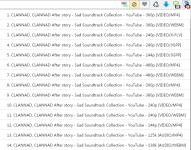
yap.but if there is a download bar its good.and is there any way to reduse versions of video file.i mean in youtube we can downlaod 480p,720p etc.but in extension there are so many versions
Upvote
0


D
Deleted member 2913
Tried Eagleget.
File download is fine.
Media download is not fine.
Internet Explorer - YouTube - Download bar didn't appear... atleast for few videos I tried.
Chrome - Previous Download bar was better & easy... current extension I dont like it.
It shows many media formats/duplicate formats.
Other downloaders gives 480p format. EG needs FFmpeg for 480p & other videos only to merge audio but didn't worked for me... i.e didn't merge but downloaded seperate video & audio file everytime I tried.
It would be good to have an option to show less/selected formats or not show videos only formats, etc...
File download is fine.
Media download is not fine.
Internet Explorer - YouTube - Download bar didn't appear... atleast for few videos I tried.
Chrome - Previous Download bar was better & easy... current extension I dont like it.
It shows many media formats/duplicate formats.
Other downloaders gives 480p format. EG needs FFmpeg for 480p & other videos only to merge audio but didn't worked for me... i.e didn't merge but downloaded seperate video & audio file everytime I tried.
It would be good to have an option to show less/selected formats or not show videos only formats, etc...
Upvote
0

Well we need to clarify that the monitoring feature of EagleGet is focused on direct downloads (if you click the link which Eagleget must popup), so for IE that extension is work but for some reasons you need to install separately or use manual media grabber.
Upvote
0
D
Deleted member 2913
I have tried EG previously on YouTube & download bar use to appear with both IE & Chrome.Well we need to clarify that the monitoring feature of EagleGet is focused on direct downloads (if you click the link which Eagleget must popup), so for IE that extension is work but for some reasons you need to install separately or use manual media grabber.
Since EG updates are often I think they have changed something like Chrome shows EG icon now next to address bar & on YouTube if the video is playing Chrome icon shows available formats... this new extension works on Chrome but I preferred old download bar on the video itself.
On IE I dont know if download bar function is not available now & no icon like in Chrome too.
Upvote
0

Tried Eagleget.
File download is fine.
Media download is not fine.
Internet Explorer - YouTube - Download bar didn't appear... atleast for few videos I tried.
Chrome - Previous Download bar was better & easy... current extension I dont like it.
It shows many media formats/duplicate formats.
Other downloaders gives 480p format. EG needs FFmpeg for 480p & other videos only to merge audio but didn't worked for me... i.e didn't merge but downloaded seperate video & audio file everytime I tried.
It would be good to have an option to show less/selected formats or not show videos only formats, etc...
You have to download FFMpeg from here (not the whole installer from website) and then set the path to the executable as shown.

The duplicate formats (as you mentioned) for the same quality consists of videos in different formats encoded in Youtube. So it's not actually duplicate formats.
It works fine for me on IE, although it doesn't support Microsoft Edge browser (if yo're using Win10). Make sure that in the Manage add-on section EagleGet is enabled.
The old download bar was removed on Chrome because many users reported that the floating download bar was actually preventing them from watching the video's without distractions. I personally feel the extension model to download videos' is much better. Isn't that how most extensions now show the status, like uBlock (how many ads are blocked) and the like
Upvote
0
D
Deleted member 2913
For FFmpeg I did the same as you have mentioned.You have to download FFMpeg from here (not the whole installer from website) and then set the path to the executable as shown.
The duplicate formats (as you mentioned) for the same quality consists of videos in different formats encoded in Youtube. So it's not actually duplicate formats.
It works fine for me on IE, although it doesn't support Microsoft Edge browser (if yo're using Win10). Make sure that in the Manage add-on section EagleGet is enabled.
The old download bar was removed on Chrome because many users reported that the floating download bar was actually preventing them from watching the video's without distractions. I personally feel the extension model to download videos' is much better. Isn't that how most extensions now show the status, like uBlock (how many ads are blocked) and the like
For duplicates - Do you mean 720p (Video Dash MP4) & 1280*720 (Video Dash MP4) are not duplicates?
Add-on was enabled but no download bar on YouTube in IE.
I didn't like the new EG extension model in Chrome. I personally prefer the download bar compared to the new model.
Upvote
0
For FFmpeg I did the same as you have mentioned.
For duplicates - Do you mean 720p (Video Dash MP4) & 1280*720 (Video Dash MP4) are not duplicates?
Add-on was enabled but no download bar on YouTube in IE.
I didn't like the new EG extension model in Chrome. I personally prefer the download bar compared to the new model.
Here is the download bar for me on Win 10 and IE 11. Try re-installing EagleGet making sure you re-set the preferences this time in one of the wizard windows during installation.
I haven't got any such duplicates, may be you are using an older add-on version. Are you using EagleGet 3.8 addon version in Firefox.

Upvote
0
D
Deleted member 2913
@jackuars,
I tried EG 2 times & both the times didn't get the download bar in YouTube on IE. Had tried 8-10 videos. Could be that download bar doesn't appear on all the videos... does it appears on all the videos for you?
What is the EG addon version in IE on Win 10 for you?
I will try 1 more time & see....
I tried EG 2 times & both the times didn't get the download bar in YouTube on IE. Had tried 8-10 videos. Could be that download bar doesn't appear on all the videos... does it appears on all the videos for you?
What is the EG addon version in IE on Win 10 for you?
I will try 1 more time & see....
Last edited by a moderator:
Upvote
0
Recently browsing
Members who viewed this thread in the last 5 minutes
You may also like...
-

-
 Software Review Download Sentinel Reviews
 -

-

-
