
Shadowra
Level 42
Verified
Top Poster
Content Creator
Malware Tester
Well-known
High Reputation
Forum Veteran
You have free timeDo you think it as a good idea to announce that ?
Yep


Open MalwareTips from your Home Screen or desktop. Follow discussions, find answers and pick up where you left off.
If you cannot find an install option, update your browser or use its bookmark option to keep MalwareTips close.
After installation, open the app and sign in. Enable push notifications in Preferences if you want alerts. On iPhone and iPad, push requires a Home Screen web app and iOS or iPadOS 16.4 or later.
Sign in to manage notificationsInstallation is optional. Your notification settings stay under your control.
You have free time

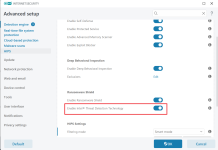
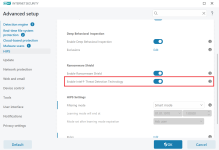
It's only one setting that alows you to enable or disable it. Setting is only available if your processor supports TDT.can we see some screenshots of that intel tdt settings
Eset has always consumed few resources and this version 16.0.21.0 works very lightMight just be me, but version 16.0 (according to my task manager), has gotten much lighter on resources.
Anyone else seeing this?
Peace


That's kinda what I'm seeing as well. In the last few versions, it's gotten lighter and much more responsive. Even with edge running in 3 windows, Outlook open, I have yet to see V16.0 run over 80 mbs, which is impressive. In the past, V10 or 12, I recall 100-120 mbs. Nice work ESET. Thanks @micasayyo for the reply.Eset has always consumed few resources and this version 16.0.21.0 works very light
Nothing really changed, it works just as the previous version worked.What is your experience so far? Does it work without problems?

I talked about it in the forum and Marcos says, it's there to indicate that you have opened a supported browser. If you open an unsupported browser, it won't show the green frame. It could be useful in that scenario, but I also think that there should an option to permanently disable it so that it doesn't show the border even if a supported browser is opened.After disabling this setting, the green border no longer appears. And yes, even if I disable the last option shown on the image (Browser's green frame) it still shows whenever a new browser window opens.
I really didn't like the part where he said "Secure all browsers" will be the only option in the future. I hate it when third party applications start meddling with browsers and then stuff stops working and nobody knows why. SSL scanning is already intrusive enough, now the entire browser is running in a sandbox. Ugh...I talked about it in the forum and Marcos says, it's there to indicate that you have opened a supported browser. If you open an unsupported browser, it won't show the green frame. It could be useful in that scenario, but I also think that there should an option to permanently disable it so that it doesn't show the border even if a supported browser is opened.
Edit: Just saw, you discussed in the ESET forum as well less than an hour ago.

Here’s what Marcos said regarding thisVersion 16.0.22.0
- Information displayed for W7, W8, W8.1 users that they are running on old OS

 www.wilderssecurity.com
It should be possible to disable the application status in the Application statuses setup. However, v16.0 is the latest which will run on the said old Windows operating systems because of signing requirements set by Microsoft.
Yeah, seems like a risky approach in terms of breaking browser functions. But no such issue has been reported by anyone yet in this short period of time. We'll see how it goes when all users start receiving the update.I really didn't like the part where he said "Secure all browsers" will be the only option in the future. I hate it when third party applications start meddling with browsers and then stuff stops working and nobody knows why. SSL scanning is already intrusive enough, now the entire browser is running in a sandbox. Ugh...


I tested this new version of eset and I hated it, this green frame is very annoying every time I open the browser, even clicking close there is no option to disable it, I had to uninstall and go back to Norton 360Just got the new update on the official release channel. Nothing really changed, but now there is an obnoxious green frame around the browser window. Despite disabling it in EIS settings, it shows up every time you open a new browser window. It's terrible.
interesting, you & cofer123 find green frame annoying and obnoxious, but on my pc, browser opens and the green frame is barely visible?? (fwiw)I tested this new version of eset and I hated it, this green frame is very annoying every time I open the browser, even clicking close there is no option to disable it, I had to uninstall and go back to Norton 360
The switch is only visible if the ITDT function is supported. If the switch is not present in the GUI, the function is unavailable for that hardware.ESET here was still not showing update available this morning, so I manually checked for update, and ESSP updated to 16.0.22.0 with a reboot. I'm pretty sure my cpu does not support intel threat detection hardware based tech, but is there a switch or indicator in settings to enable or tell you whether it is available and running. I looked and did not find that. If not, why not??
Another annoyance: if you open the browser through remote desktop (which I do a lot) then this shows up every time:I tested this new version of eset and I hated it, this green frame is very annoying every time I open the browser, even clicking close there is no option to disable it, I had to uninstall and go back to Norton 360
Yes I see you are 100% correct! I have white space only in that location under enable ransomware shield. My preference would be some text: enable ITDT: is not available.The switch is only visible if the ITDT function is supported. If the switch is not present in the GUI, the function is unavailable for that hardware.
there is release date of version 16?
View attachment 270275
Members who viewed this thread in the last 5 minutes


