Battle Firefox vs. Brave vs. Vivaldi

Which browser—Firefox, Brave, or Vivaldi—is your favorite?

  • Firefox

    Votes: 38 45.2%
  • Brave

    Votes: 35 41.7%
  • Vivaldi

    Votes: 11 13.1%

  • Total voters
    84
Compare list
Firefox vs. Brave vs. Vivaldi
Platform(s)
  1. Any platform
@Marko :) ’s analysis is spot on because it avoids the "best browser" trap and focuses on the real trade-offs: standards, privacy, and control.

I agree that Firefox offers a unique level of internal customization thanks to about:config, though it’s also worth recognizing that Vivaldi leads the way in UI/interface personalization. In that sense, each plays in its own field: Firefox as a deep-tinker lab and Vivaldi as a visual design workshop.

Ultimately, it’s about choosing our tool based on our priorities:

  • Firefox: The laboratory for those who want total control over the engine.
  • Vivaldi: The workshop for those who live in their browser and need visual productivity.
  • Brave: The 'out-of-the-box' balance for privacy and Chromium speed.
⚙️ 🎨 ⚖️
Firefox surpasses Vivaldi even in UI customization. Vivaldi just lets you change predefined UI elements. Firefox UI is based on CSS and with a little bit of CSS knowledge, you could technically completely change the UI and if you like, make Firefox look exactly like Chrome.
If we consider it "the best browser for user x", it would make more sense; what fits me does not necessarily fit everyone else.

I have my unique taste of browsers; I'm currently using a browser not used by most, or even may by no members at all, but I like it, regardless of how percentage of MT users are preferring browser y or z.

I will not eat sushi because many people say its taste is good.
Absolutely! Some might not prioritize ad blocking or privacy like I do. That's alright.
 
Fair point, @Marko :) ! You're absolutely right that Firefox has no limits if you have that kind of advanced knowledge.

However, for those of us who aren't experts in coding or CSS, Vivaldi is a great option because it gives you all those visual tools 'ready to use' without needing to touch a single line of code. It’s the perfect balance for someone who wants to customize everything easily!⚙️;)
 
@Marko :) ’s analysis is spot on because it avoids the "best browser" trap and focuses on the real trade-offs: standards, privacy, and control.

I agree that Firefox offers a unique level of internal customization thanks to about:config, though it’s also worth recognizing that Vivaldi leads the way in UI/interface personalization. In that sense, each plays in its own field: Firefox as a deep-tinker lab and Vivaldi as a visual design workshop.

Ultimately, it’s about choosing our tool based on our priorities:

  • Firefox: The laboratory for those who want total control over the engine.
  • Vivaldi: The workshop for those who live in their browser and need visual productivity.
  • Brave: The 'out-of-the-box' balance for privacy and Chromium speed.
⚙️ 🎨 ⚖️

And if your using an AV's browser security/extension, which one isn't going to slow your browsing down (example, w/o having to disable https scanning).
 
Good point, @Jonny Quest . In my experience, Brave tends to handle antivirus overhead most smoothly since it’s quite lightweight out of the box.

Vivaldi can sometimes feel a bit heavier due to its many visual features, and in Firefox, security scanning can occasionally be more noticeable. That said, it really depends on each person's setup, so other perspectives are definitely just as valid! 🏎️💻
 
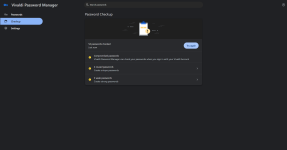
There are some questions in Vivaldi that I was unable to find answers for. For instance, how did the browser password checkup function? Is it a local or server-side check?

2026-03-06 01.35.39 password-manager dbe194738fb5.png
 
This thread is becoming like every previous one where we talked about web browsers and that is finding the BEST web browser.
No kidding!
Ultimately, it’s about choosing our tool based on our priorities:

  • Firefox: The laboratory for those who want total control over the engine.
  • Vivaldi: The workshop for those who live in their browser and need visual productivity.
  • Brave: The 'out-of-the-box' balance for privacy and Chromium speed.
I hadn't casted a vote until today and I chose Firefox.

Though I prefer Chrome for some reason I can't explain precisely. :unsure: Maybe "sleekness" as @Halp2001 mentioned.
I will not eat sushi just because many people say its taste is good.
I'll have yours then! :LOL: :LOL: :LOL:
 
And what I did was take a Windows video snip of it happening as I refreshed the webpage with that missing post Like option, then slowed the video down in VLC and took a snapshot of it.
fyi I reloaded the page and the Like etc appeared in a post where it had been missing...!! (in my fav firefox)
 
Thank you so much, @Khushal. This guy introduced me to the world of privacy for the first time, and it's a pleasure to watch this video now.

I only watch the sections about the browsers that interest me; I estimate that each browser will take about five minutes, which is not bad.
After looking at the video briefly I found I feel much the same but not fond of the Zen browser at all, I have tried a couple of times but can't get on with it :rolleyes:
 
After looking at the video briefly I found I feel much the same but not fond of the Zen browser at all, I have tried a couple of times but can't get on with it :rolleyes:
I installed Zen after watching the video and am using it now, but it didn't offer me any advantages over Firefox for my use case, especially since Firefox now has built-in vertical tabs.
 
For ANDROID

I have replaced the Quetta browser, which no longer meets my needs, with Vivaldi and Brave browsers in my OPPO Find N6 fold phone

Let me just go through briefly why I chose Vivaldi (main) and Brave (backup)

Edge browser

CANNOT import favorites(bookmarks) from a html file. Needs to sync the favorites from the PC/laptop Edge browser. Not using the Android Edge since I'm not using the Windows Edge

Firefox browser

- Secure and privacy-oriented
- Can strengthen FF by accessing Preferences through its about:config
- Can install extensions
- Can import bookmarks from a html file
- Does not support split view (multi windows) for a fold phone
- Support multi-tabbing but not stacked tabbing

Brave browser

- Secure and privacy-oriented
- Can access flags using chrome://flags
- Can import bookmarks from a html file
- Supports split view (multi windows) for a fold phone. However, Brave does NOT support split view by OPPO ColorOS (and some One+ and RealMe phones which use ColorOS) even though the feature can be enabled in the browser.
- Support multi-tabbing but not stacked tabbing. Only grid view supported. Multi-tabbing not supported on the front screen, only on the inner screen
- Very easy to import bookmarks and bookmarks are automatically arranged into their respective groups in the bookmark bar
- Bookmark bar not display on the front screen, only the inner screen. Need to go to Bookmark Folder to look for the bookmarks
- No extension support

Vivaldi browser

- Secure and privacy-oriented but not as great as Brave/Firefox browsers
- Can access flags using chrome://flags
- Can import bookmarks from a html file
- Supports split view (multi windows) for a fold phone
- Support multi-tabbing and stacked tabbing
- Multi-tabbing and stacked tabbing supported on the front and inner screens
- No extension support
- Not easy to deal with bookmarks. Bookmarks are imported into a 'Imported Bookmarks' folder. Need to extract to individual group. If any folder in the 'Imported Bookmarks' folder or the entire 'Imported Bookmarks' folder is deleted afterwards then the group(s) will be deleted. Keep the 'Imported Bookmarks' folder and all the groups will be kept. Only way out to have persistence is to create the groups individually and add the bookmarks.
- No bookmark bar support
- Definitely easier to use than Brave
 
Last edited: