For me it changes the normal display to spoiled....
For me it changes a spoiled display to an normal looking one.
For me it changes the normal display to spoiled....
For me it changes a spoiled display to an normal looking one.
A user could use it to fix a spoiled display (not a working one). If it's working ok for a user he/she wouldn't look for a fix in the manual.For me it changes the normal display to spoiled.
We cannot be certain that this works as you think. It would be good if other users who have display problems with rescaled fonts, could test it.A user could use it to fix a spoiled display (not a working one). If it's working ok for a user he/she wouldn't look for a fix in the manual.
Unzipping that file raised an eyebrow from EAM:I moved the standalone versions of DocumentsAntiExploit and FirewallHardening to another GitHub repository. Together with standalone ConfigureDefender and RunBySmartscreen, all of these standalone tools are included in H_C_HardeningTools:
https://github.com/AndyFul/ConfigureDefender/blob/master/H_C_HardeningTools.zip
Yes, it probably should block it. My programs are often blocked until I send them for whitelisting. These files are whitelisted by Avast and Windows Defender. I submitted them also to Symantec and Bitdefender, but these vendors do not send back-information about whitelisting.Unzipping that file raised an eyebrow from EAM:
2020/05/24 10:30:57
Malware "Zum.Androm.1 (B)" detected and blocked on behalf of explorer.exe
CUP will install with the Basic Recommended Settings, which have SRP Level 1 (EXE and MSI files not blocked) and some important Hardening Rules (like those from the previous post). There will be also a few predefined setting profiles (SRP Levels 1-4 with Hardening Rules) so the user will not usually need to tweak anything, just load the profile. One can consider these profiles as profiles with growing number of restrictions (from Level 1 to Level 4).It's just my opinion...so don't shoot... but the settings seem a bit confusing, at least for a non-geeek / noob, I think it will be hard for them to choose which settings. I belive some predefined settings (profiles /Level 1 to 4) and a custom settings for advanced users will be more than enough.
I thought there would only be one setup - Level One - like Windows_Security option in H_C. This looks like it will be confusing for the truly casual user, who may not know anything about User Space, Program Data or AppData.
I think, that the term "Casual User Protection" may be misunderstood. The casual users should not touch anything that can be configured on Windows 10, because this would end not good for them. The casual user is a target for whom the hardened setup is made.Agree with OS, if the intent of this is that casual users will be able to use and understand this then the simpler the better, Off/On, levels of protection, that's it, they don't need to have to try to figure out what should be allowed or disabled. Of course what do I know, Andy is the genius not I.
I had indeed (also) misunderstood.I think, that the term "Casual User Protection" may be misunderstood. The casual users should not touch anything that can be configured on Windows 10, because this would end not good for them. The casual user is a target for whom the hardened setup is made.
The CUP is not intended to be configured by casual users, but by semi-advanced users on the computers of casual users. Of course, if the semi-advanced user wants, then he/she may configure his/her own computer too.
The CUP is a simpler version of Hard_Configurator - the H_C is intended for advanced users, because it is rather complex and requires some knowledge to create a sensible custom setup.
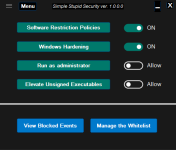
It would have the advantage to be a portable application. I have already the name for it:It is possible to make something even simpler, like CUP with only SRP Level 1 and predefined (not configurable) Hardening Rules for disabling remote access and SMB1 protocol. Anyway, there should be still some configurable Hardening Rules like disabling/enabling
* Run as administrator *, * Elevate Unsigned Executables*, and * Documents Anti-Exploit *.
I would replace the "stupid" because of language.Simple Stupid Security![]()
I would replace the "stupid" because of language.