
Andy Ful
From Hard_Configurator Tools
Verified
Honorary Member
Top Poster
Developer
Well-known
Forum Veteran
Most students usually do this.How does a teacher handle the student who neglects to read or study?



Open MalwareTips from your Home Screen or desktop. Follow discussions, find answers and pick up where you left off.
If you cannot find an install option, update your browser or use its bookmark option to keep MalwareTips close.
After installation, open the app and sign in. Enable push notifications in Preferences if you want alerts. On iPhone and iPad, push requires a Home Screen web app and iOS or iPadOS 16.4 or later.
Sign in to manage notificationsInstallation is optional. Your notification settings stay under your control.
 Thread starter
Andy Ful
Thread starter
Andy Ful
Most students usually do this.How does a teacher handle the student who neglects to read or study?

It has never been for Windows 10 only. As you can see in the help files it is for Windows Vista, 7, and 8+.H_C is for Win 10 only ?
because I'm on Win 11
Ok it is an another french NAS forum which someone said me that...It has never been for Windows 10 only. As you can see in the help files it is for Windows Vista, 7, and 8+.
Please read the "What_is_new.txt" (it is displayed after installing H_C) for changelog details.
There is no difference in how the H_C works on Windows 10 and 11.
Why ask on forums? Are the H_C website info, H_C help files and manual as bad?Ok it is an another french NAS forum which someone said me that...
Thanks !

Still learning from this thread. I get easily led astray often by 3rd-party capabilities but built-in restrictions are just as if not more effectiveThe H_C thread is also an educational thread, about how to use Windows built-in security.
No, I ask on NAS forum why I don't access at my NAS. And, I have "disable SMB" on "???" H_C settings. And when I was found that, I said that, why. And someone, say me that H_C its only create for Win 10 and that the reason why I demand it there.Why ask on forums? Are the H_C website info, H_C help files and manual as bad?
View attachment 267624
Edit.
I know that many people do not read easily the manuals in English, so it is easier for them to ask someone.
...
I put on ON1 and the issue is resolve.
Yes it is resolve. Because I have put on ON1 and only SMB 2 and 3 are active...Is your NAS problem solved?
If you can see "????" setting then it is a non-standard setting that was not set by the H_C. The H_C just read it from the registry but could not recognize it as the standard one. The H_C Recommended Settings do not change the SMB settings.
You have three options in H_C related to SMB. Start from SMB123 and restart the computer if NAS works then OK. If not then use SMB1 setting. If both do not work then use the OFF setting. If NAS does not work with the OFF setting then the issue is not related to the H_C.
Anyway, you can also Switch OFF the H_C protection (it is simple), restart the computer, and see if NAS works or not. If not, then you have a problem that can be solved on NAS forums.
All SMB protocols can be vulnerable in some way, but SMB 1.0 is the most attacked. Anyway, If your NAS uses SMB 2&3, then these protocols must be enabled.Yes it is resolve. Because I have put on ON1 and only SMB 2 and 3 are active...
Because SMB 1.0 is bad for the ransomware risk...

Do you think that that feature will require a fresh install even in the final version? I doubt that many people will take advantage of it if it requires a fresh install.I have just finished a quick test of Smart App Control on Windows 11 (Insider). It is much more useful than I thought.
After downloading 30 fresh applications from Softpedia it gave slightly fewer false positives compared to Norton 360, Windows SmartScreen, or Defender ASR prevalence rule.
I compiled a fresh & unsigned version of ConfigureDefender to see what will happen:
View attachment 267619
In my test, the digitally signed applications were installed & run without issues (except for two events). A few installations were blocked (some were partially blocked).:
View attachment 267621
The cons (for some people) can be that the blocked installer or application cannot be allowed/whitelisted/excluded by the user. It can be only submitted to Microsoft as a false positive in the Smart App Control category. For now, Smart App Control cannot be temporarily turned off.
It would be interesting to test Defender + Smart App Control in Malware Hub.
It is early-stage in Insider, so everything is possible. The current version is not practical.Do you think that that feature will require a fresh install even in the final version? I doubt that many people will take advantage of it if it requires a fresh install.
The H_C settings are reversible, but SAC is not. After enabling SAC you cannot disable it. We must wait for more improvements.In future versions you could add the option to turn on SAC to H_C, thank you very much.

I don't think this is correct, you can disable SAC but can't re-enable again without reset/reinstall Windows.The H_C settings are reversible, but SAC is not. After enabling SAC you cannot disable it. We must wait for more improvements.
The choices, "ON" and "OFF" are irreversible. It means that you must reset/reinstall Windows to change the setting.I don't think this is correct, you can disable SAC but can't re-enable again without reset/reinstall Windows.


 4sysops.com
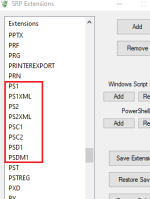
@Andy Ful
I see in the article below:
https://4sysops.com/archives/mitigating-powershell-risks-with-constrained-language-mode/
it mentions to include psm1 as a designated file type when using SRP to enforce PowerShell CLM, but in the H_C file types I don't see that one:
Members who viewed this thread in the last 5 minutes


