


The MalwareTips app
Your community, one tap away.
Open MalwareTips from your Home Screen or desktop. Follow discussions, find answers and pick up where you left off.
- Home Screen access
- Optional push alerts
- Your community
You're ready to explore.Explore what's new
Installation instructions
iPhone & iPad
- Open MalwareTips in Safari and tap Share. You may need to open the Page Menu first.
- Choose Add to Home Screen. If it is not listed, use Edit Actions to add it.
- Keep Open as Web App enabled if shown, then tap Add.
Android
- Open MalwareTips in Chrome or another browser that supports app installation.
- Open the browser menu and look for Install app, Install and create shortcut, or Add to Home screen.
- Choose Install and confirm. Wording varies by browser.
Desktop
- Chrome: use the install icon in the address bar, or the menu under Cast, save and share.
- Edge: open the menu, then More tools, Apps and Install this site as an app.
- Safari on Mac: choose Share or File, then Add to Dock. Firefox on Windows: look for the web apps button in the address bar.
If you cannot find an install option, update your browser or use its bookmark option to keep MalwareTips close.
Keep up with your conversations
After installation, open the app and sign in. Enable push notifications in Preferences if you want alerts. On iPhone and iPad, push requires a Home Screen web app and iOS or iPadOS 16.4 or later.
Sign in to manage notificationsInstallation is optional. Your notification settings stay under your control.
You are using an out of date browser. It may not display this or other websites correctly.
You should upgrade or use an alternative browser.
You should upgrade or use an alternative browser.
New Update Hawk Eye Website Analysis Showcase
- Thread starter Trident
- Start date
Other security for Windows, Mac, Linux
158 Replies
19,124 Views


New version pushed.
-Resolved an issue where low quality unverified hosts weren't blocked in Level 3 but still generated a warning
-Correct warnings for the additional blocks (zero-trust, low-quality host, direct to ip and HTTP unsecure) now appear in the block pages. Previously, they were all showing "unverified hosting".


I agree, Trident is doing the "little things" (touches) that makes his extension stand out from the others.The safety level water bubble animation between switching is so smooth. Adds a touch of flair unfound as such in an extension.
View attachment 293211
Last edited:
Not really trying to make it stand out but I guess the way I do things just does. But the water sphere will appear in HEAT as well. Looks like it is a nice UX element.I agree, Trident is doing the "little things" (touches) that makes his extension stand out from the others.

I hadn't tried the Relaxing Nature theme yet, but yes, it is niceWow, looks great , now i realize that some sites i visit are bad/low reputation .
I like the UI and the Relaxing Nature theme

@Trident something just occurred to me, I don't notice any webpage slow downs using your extension
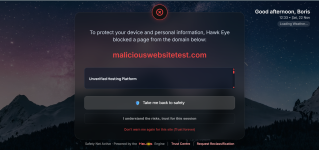
Last edited:
You need to redownload the new extension though, maliciouswebsitetest has another explanation for itI hadn't tried the Relaxing Nature theme yet, but yes, it is nice
@Trident something just occurred to me, I don't notice any webpage slow downs using your extension
View attachment 293219

I guess I'm slow as I have no idea how to use this extension. I've downloaded it, extracted it, opened the heat extension folder, now what, I haven't a clue as I see no way to install or use this??
You need to go to extensions, enable developer mode and there is load unpacked extension button or something of this sort. Just point it to the folder. Till I create the version that can go on Google Web Store.I guess I'm slow as I have no idea how to use this extension. I've downloaded it, extracted it, opened the heat extension folder, now what, I haven't a clue as I see no way to install or use this??
Ok got it, thanks.
For Brave it was Manage extensions, then tick, Load unpacked, the extracted zip file.I guess I'm slow as I have no idea how to use this extension. I've downloaded it, extracted it, opened the heat extension folder, now what, I haven't a clue as I see no way to install or use this??
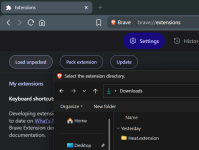

For me the same thing, and is it for chrome or firefox ?I guess I'm slow as I have no idea how to use this extension. I've downloaded it, extracted it, opened the heat extension folder, now what, I haven't a clue as I see no way to install or use this??
I'm using it in Brave if your asking me.For me the same thing, and is it for chrome or firefox ?
"Till I create the version that can go on the Google Web Store"....sweetYou need to go to extensions, enable developer mode and there is load unpacked extension button or something of this sort. Just point it to the folder. Till I create the version that can go on Google Web Store.
No slow downs with extension, in fact I could swear pages open faster now. 
It gives me an error, can not load manifest
Extract it with 7zip , now it works
Its loaded but it ask a Key ?
Extract it with 7zip , now it works
Its loaded but it ask a Key ?
Last edited:
Please see this post for the keyIt gives me an error, can not load manifest
Extract it with 7zip , now it works
Its loaded but it ask a Key ?
Post in thread 'Hawk Eye Website Analysis Showcase'
New Update - Hawk Eye Website Analysis Showcase
You mean this?You need to redownload the new extension though, maliciouswebsitetest has another explanation for it
I uninstalled the other version then installed the new update. Is that how we should do it, or can they be installed on top of each other?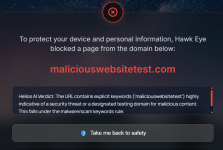
Recently browsing
Members who viewed this thread in the last 5 minutes


