HiBit Uninstaller Thread (changelogs and discussion)

@HiBitSoftware see this alert I got from Firewall (Norton)
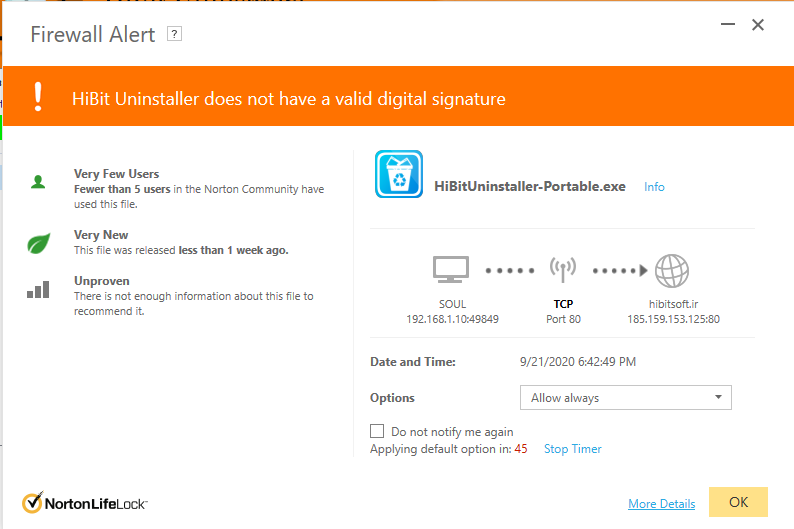
hibit norton alert.png

Also is it possible to have some grey for custom colors? or ability to select a custom color based on a color pallet?
 
@HiBitSoftware see this alert I got from Firewall (Norton)
View attachment 246517
Also is it possible to have some grey for custom colors? or ability to select a custom color based on a color pallet?

I believe the author has already said that he doesn't have the resources to buy a digital signature, because of low value of his currency.
 
HiBit Uninstaller 2.5.35 (2020-09-25)

- Gray color and the ability to select the desired color for the program header added.
- "Windows 10 SlateGray" and "Cobalt XEMedia" themes added.
- Italian language updated.
- Many bugs fixed.
 
HiBit Uninstaller 2.5.35 (2020-09-25)

- Gray color and the ability to select the desired color for the program header added.
- "Windows 10 SlateGray" and "Cobalt XEMedia" themes added.
- Italian language updated.
- Many bugs fixed.

Good to see the feedback was implemented by @HiBitSoftware in a short span of time.
 
Ever since the changes were made internally a few releases a go, I continued to use HiBit Uninstaller, although I don't use it often, I still use it across my devices.

@HiBitSoftware really appreciate you receiving the feedback and suggestions and implementing whenever is possible.

I have one feedback:
In change logs, if you could specify the bugs fixed, this will allow the user better understanding and also transparency.

Thanks!

And yes I am using Grey Color on my main devices and a variation of purple on others.

HiBitUninstaller-Portable_lDnXbIwLR9.png
 
@HiBitSoftware you might want to look at the uptime values and configuration
I have only laptops and every day when im done with it I do a full shut down.

I noticed today after launching when I uninstalled Minecraft Dungeons (because im done with that game), that it showed uptime of 1 day.

HiBitUninstaller-Portable_f1cU2Fn5LA.png


Edit: forgot to mention: laptop is used without battery and plugged to wall socket. every night it is unplugged from socket.
 
Last edited:
taking it with @HiBitSoftware via pm.

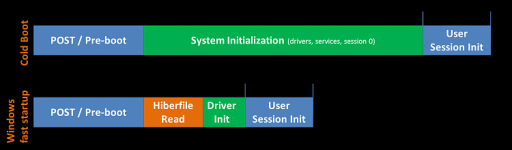
Fast startup is enabled by default

every night i shut down and unplug from wall socket, so if that is the cause of some uptime displaying a day, then technically i would have over a week at least.
 
I wold be interested to know, what this utility shows? :unsure:
would be the same as simply digging into Event Viewer.

TurnedOnTimesView uses the following events to determine the turn off/turn on times:
  • EventID 41 (Microsoft-Windows-Kernel-Power): The system has rebooted without cleanly shutting down first. This error could be caused if the system stopped responding, crashed, or lost power unexpectedly.
  • EventID 42 (Microsoft-Windows-Kernel-Power): The system is entering sleep
  • EventID 1 (Microsoft-Windows-Power-Troubleshooter): The system has resumed from sleep.
  • EventID 1074 (USER32): The process xxx has initiated the xxx of computer xxx on behalf of user xxx for the following reason: xxx
  • EventID 6005 (EventLog): The Event log service was started.
  • EventID 6006 (EventLog): The Event log service was stopped.


Nevertheless, Hibit already confirmed no issues.
all good.
 
HiBit Uninstaller 2.5.40 released
Changelog:
  • German and Swedish languages were added.
  • Chinese language is updated.
  • Improved Installation monitoring function.
  • A bug was fixed in the leftovers search algorithm.
  • Two bugs were fixed in the registry cleaner.
  • Minor bugs fixes.
 
@HiBitSoftware

A feature request: If possible please try to make the comments part editable?

Also a feedback that I've received from many users is that, they don't come to know about the full feature set of HiBit, because most of them are hidden under the Tools menu. It would be nice to see the features related to the uninstaller functionality as tabs/side panels on main window (i.e Force uninstall, Installation monitoring, Windows store apps manager, Program components manager, Windows update manager and Browser extension manager).
 
A feature request: If possible please try to make the comments part editable?
I added an edit option in the new version where you can edit program information like comments.

Also a feedback that I've received from many users is that, they don't come to know about the full feature set of HiBit, because most of them are hidden under the Tools menu. It would be nice to see the features related to the uninstaller functionality as tabs/side panels on main window (i.e Force uninstall, Installation monitoring, Windows store apps manager, Program components manager, Windows update manager and Browser extension manager).
I consider for future versions.
 
HiBit Uninstaller 2.5.60 (2020-11-02)
  • Added "Type" column that specifies whether the program is 64-bit or 32-bit.
  • Added "Edit Info" option on the main menu.
  • Improved Installation monitoring function.
  • Improved scheduler Task Manager performance.
  • GUI improvements and bug fixes.
Download
 

You may also like...