Poll How many extensions have you installed in your browsers, but above all, how many are usually enabled?

How many extensions have you installed in your browsers, but above all, how many are usually enabled

  • 0-3 installed

    Votes: 26 41.3%
  • 3-5 installed

    Votes: 20 31.7%
  • 5-10 installed

    Votes: 10 15.9%
  • +10 installed

    Votes: 4 6.3%
  • 0-3 enabled

    Votes: 6 9.5%
  • 3-5 enabled

    Votes: 7 11.1%
  • 5-10 enabled

    Votes: 5 7.9%
  • +10 enabled

    Votes: 6 9.5%

  • Total voters
    63
If use this feature all saved passwords are gone. Come to MalwareTips and other forums will need to re-sign in everytime

No, passwords do not depend on that setting, and you can also ignore the website settings.
The problem is that deleting data when exiting Chrome settings is not efficient enough.
You need to use a policy to achieve better cleaning, as I wrote in a previous post.
 
  • Like
Reactions: Sorrento
I use Split on Mullvad for Thunderbird as have seven accounts on it & some yet well upset if they are accessed elsewhere, but I haven't for individual websites so its a thought.
Sorry OT.

On edge it is Privacy, search, and services/Clear browsing data/Clear browsing data on close Choose what to clear every time you close the browser.

Select cookies and whitelist the sites you want. It seems to work for me.

Chrome should have the same setting.
 
Last edited:
  • Like
Reactions: Sorrento
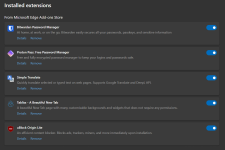
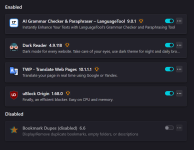
I fall into the category of 3 to 5 in terms of the number of installed and activated add-ons, and these are the add-ons for Microsoft Edge and Firefox browsers:

Screenshot 2025-12-12 002211.pngScreenshot 2025-12-12 002144.png
 
It works, but it translates the entire web page. I use the Simple Translate plugin to translate selected text from a site and get a translation popup, so it's straightforward, easy and very fast.
Edge's translate can translate selected texts also.
edge.gif
 
Is this the official page? It appears HTTP Downloader includes no YouTube or media downloading.

Yeah, that's the official page. But I download from the GitHub which also has a dark mode edition.
Yes, it doesn't have media downloading feature and is unlikely to ever be included.
 
  • Like
  • Thanks
Reactions: Sorrento and rashmi
I'm using for my Ungoogled Chromium browser the following extensions

IDN Safe
Cache Killer
CSS EXfil Protection
Font Fingerprint Defender
uBO Lite
Chrome History Cleaner
Cookie AutoDelete
I still don't care about cookies
IDM Integration Module
Dark Reader
Translate Web Page
Chromium Web Store

I have BitDefender Total Security with features like AV, Cryptomining, Online Threat Prevention, Advanced Threat Defense, Firewall, Ransomware Remediation, Anti-Tracker etc so most online threats are protected against

Later, if Adguard for Windows 8.0 released, I'll remove uBO Lite. The rest I doubt Adguard offers protection. As far as cookies are concerned I don't see filters for cookies doing a good job

So far my flag settings enbled in UG browser are

Handling of extension MIME type requests
Force punycode hostnames
Reduced System Info
Remove Client Hints
Enable get*ClientRects() fingerprint deception
Enable Canvas::measureText() fingerprint deception
Enable Canvas image data fingerprint deception
Disable WebGL
Enable Fingerprinting Protection Blocklist In Regular Browsing
Strict-Origin-Isolation

In my VPN I have enabled block trackers, block malicious sites and block ads
 
Last edited:
I'm using for my Ungoogled Chromium browser the following extensions

IDN Safe
Cache Killer
CSS EXfil Protection
Font Fingerprint Defender
uBO Lite
Chrome History Cleaner
Ping Blocker
Cookie AutoDelete
I still don't care about cookies
IDM Integration Module
Dark Reader
Translate Web Page
Chromium Web Store

I have BitDefender Total Security with features like AV, Cryptomining, Online Threat Prevention, Advanced Threat Defense, Firewall, Ransomware Remediation, Anti-Tracker etc so most online threats are protected against

Later, if Adguard for Windows 8.0 released, I'll remove uBO Lite. The rest I doubt Adguard offers protection. As far as cookies are concerned I don't see filters for cookies doing a good job

So far my flag settings enbled in UG browser are

Handling of extension MIME type requests
Force punycode hostnames
Reduced System Info
Remove Client Hints
Enable get*ClientRects() fingerprint deception
Enable Canvas::measureText() fingerprint deception
Enable Canvas image data fingerprint deception
Disable WebGL
Enable Fingerprinting Protection Blocklist In Regular Browsing

In my VPN I have enabled block trackers, block malicious sites and block ads

Read this:

4.1 Extensions

You could delete it (but of course, it's up to you; I don't want to force your decision):

CSS EXfil Protection

You don't even need Ping Blocker with uBoL, you just need to enter a very simple DNR rule.
If you want, I can teach you how to do it.
Thank you.;)
 
  • Like
Reactions: Sorrento
Read this:

4.1 Extensions

You could delete it (but of course, it's up to you; I don't want to force your decision):

CSS EXfil Protection

You don't even need Ping Blocker with uBoL, you just need to enter a very simple DNR rule.
If you want, I can teach you how to do it.
Thank you.;)

4.1 Extensions are more for FF

As for writing DNR rule I think using an extension is easier than remembering a rule
 
  • Like
Reactions: Sorrento
4.1 Extensions are more for FF

As for writing DNR rule I think using an extension is easier than remembering a rule

It's the same in Chromium-based browsers for the extension I mentioned above.
No need to remember, just enter the DNR rule (I'll write it down for you, you copy/paste it) in uBoL and it works exactly like the extension you use, without the drawbacks of extensions.
Think about it.
Bye, have a nice day.
 
It's the same in Chromium-based browsers for the extension I mentioned above.
No need to remember, just enter the DNR rule (I'll write it down for you, you copy/paste it) in uBoL and it works exactly like the extension you use, without the drawbacks of extensions.
Think about it.
Bye, have a nice day.

Later I'll change to Adguard for Windows when v8.0 released and I'll remove uBoL
 
  • Like
Reactions: Sorrento
It's the same in Chromium-based browsers for the extension I mentioned above.
No need to remember, just enter the DNR rule (I'll write it down for you, you copy/paste it) in uBoL and it works exactly like the extension you use, without the drawbacks of extensions.
Think about it.
Bye, have a nice day.
You don't even need this rule. You simply can enable those two options in the uBlock Origin privacy tab:

Screenshot 2025-12-16 122751.png
 
You don't even need this rule. You simply can enable those two options in the uBlock Origin privacy tab:

View attachment 293833

But not in uBoL because it cannot be done from the extension settings, only with a DNR rule.
In AG for Windows, I assume it is the same as the extension; you need to use a user rule.
However, in both cases, it is perfectly possible.;)
 
  • +Reputation
  • Like
Reactions: Sorrento and Kongo
But not in uBoL because it cannot be done from the extension settings, only with a DNR rule.
In AG for Windows, I assume it is the same as the extension; you need to use a user rule.
However, in both cases, it is perfectly possible.;)
Oh I see. I thought we are talking about uBlock Origin. My bad 👀
 
But not in uBoL because it cannot be done from the extension settings, only with a DNR rule.
In AG for Windows, I assume it is the same as the extension; you need to use a user rule.
However, in both cases, it is perfectly possible.;)

The last time I used AG for Windows I think it cannot block all 3 of them i.e. beacon api/ping/csr report. Can your DNR rule block 3 of them?

If yes, please write here. And where to include in uBoL? Thanks
 
  • Like
Reactions: Sorrento
The last time I used AG for Windows I think it cannot block all 3 of them i.e. beacon api/ping/csr report. Can your DNR rule block 3 of them?

If yes, please write here. And where to include in uBoL? Thanks

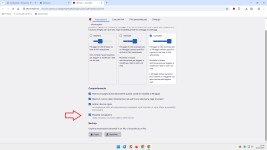
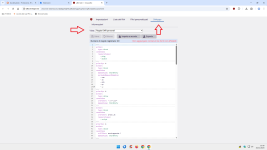
I'll insert two preliminary images.
Then copy/paste the rule, save it, and run the test:

0.png
0a.png

Ping Spotter


Code:
---
action:
  type: block
condition:
  resourceTypes:
    - ping
    - object
    - csp_report
---