How was your first experience with Windows 10 April Update?

Status
Not open for further replies.
Wait are you actually serious? You think they look at these reports and/or will do something about it?
Yes, I am actually serious.

If Microsoft do not find out about the problem and have sufficient information to even consider fixing the problem/be capable of fixing it, how do you expect it to be fixed? They aren't going to magically know that some random person in the world did the update and it caused critical parts of Windows like winlogon.exe or lsass.exe (which is what your BSOD error code suggests) to fail, as well as what the problem was.

As I said, if Microsoft didn't find out about it themselves or some other way like telemetry of crash diagnostics, unless you or someone else at-least notified them of the problem, it'll probably never ever be fixed and work for you. Until they find out about it and can diagnose why it happened.
 
Yes, I am actually serious.

If Microsoft do not find out about the problem and have sufficient information to even consider fixing the problem/be capable of fixing it, how do you expect it to be fixed? They aren't going to magically know that some random person in the world did the update and it caused critical parts of Windows like winlogon.exe or lsass.exe (which is what your BSOD error code suggests) to fail, as well as what the problem was.

As I said, if Microsoft didn't find out about it themselves or some other way like telemetry of crash diagnostics, unless you or someone else at-least notified them of the problem, it'll probably never ever be fixed and work for you. Until they find out about it and can diagnose why it happened.

Ok then, Ima try to update when I have time to restore from acronis, if it fails again I'm gonna send a report to them, just in case you're right about that
 
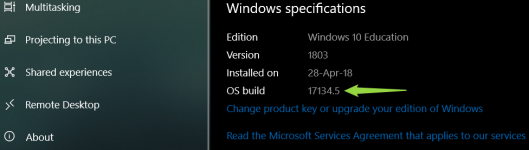
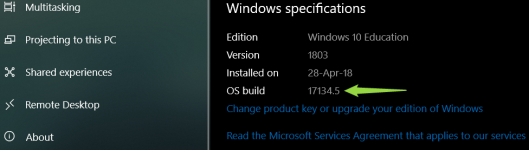
What is the latest noumber of windows build? .... Is it 17134.5 ?
 

Attachments

  • 2018-05-10_11h23_19.png
    2018-05-10_11h23_19.png
    115.8 KB · Views: 351
Well, I wrote earlier saying it runs smoothly. After the upgrade and after the patch, it works worse than in previous versions on my system. Firefox is constantly closing, Chrome shows black windows all the time, programs take a long time to start... I have exactly the same settings as before I upgraded to 1803.
I tried a clean install and nothing has improved. I will download an ISO 1709 or continue with Linux, because the patch has not improved the performance of the system on my computer.

My first feeling was good, thanks again @Spawn , but the second impression is turning out negative. :(
Translated with www.DeepL.com/Translator
 
(y)
I think the reason of .5 is Insider preview which is I stooped it now, If I do clean Windows install I will be .48

If not that is reason, so how come I .5? :oops:
Leave Windows Insider, reboot, disconnect from internet, Uninstall KB4135051 (so you will be back to 17134.1), reboot. Then connect to internet and you will most likely be updated to 17134.48 (don't wait for windows to check just do it manually). This is what I did and it worked at least for me.
 
Okay because Chrome users reporting freezes and timeouts on Chrome after Windows 10 April update.
Chrome Users Reporting Freezes & Timeouts After Windows 10 April Update
Depends on what kind of freezes. I had them.
1. The first one is caused by Hyper-V running. Windows will slow down and eventually come to a freezing halt. The only solution I have found is to disable Hyper-V in BIOS or Windows Features and now it's working fine.

2. Then I had another type of freeze where Chrome freezes, then flashes black and continues. I know the cause of that:
Windows continues to install the old Intel HD graphics driver
-Download the latest graphics driver from here: Downloads for Graphics Drivers
-Delete your Intel HD Graphics driver in Device Manager including all installation files (there should be a checkmark).
-Reboot
-Quickly install this driver before Windows downloads the older driver again via Windows Update.
-From now on only download and install GPU drivers from their original site, do not check for driver updates for Intel HD Graphics. Windows will try to install the older driver.
 
Leave Windows Insider, reboot, disconnect from internet, Uninstall KB4135051 (so you will be back to 17134.1), reboot. Then connect to internet and you will most likely be updated to 17134.48 (don't wait for windows to check just do it manually). This is what I did and it worked at least for me.
Or just download the MSU file from Microsoft Update Catalog and install that (after leaving windows insider of course).
 
Or just download the MSU file from Microsoft Update Catalog and install that (after leaving windows insider of course).
I am not sure if you can update from 17133.5 to 17134.48, cause both are different branches. That's why insiders who were on 17133.5 didn't got the CU to reach 17134.48.
 
(y)
I think the reason of .5 is Insider preview which is I stooped it now, If I do clean Windows install I will be .48

If not that is reason, so how come I .5? :oops:
No need to do a clean install. I received the .48 update (KB4103721) automatically through Windows Update. I was on 17134.5 beforehand. I think it's only those who were on 17133.5 or other Insider builds that need to update manually.
 
Status
Not open for further replies.