

The MalwareTips app
Your community, one tap away.
Open MalwareTips from your Home Screen or desktop. Follow discussions, find answers and pick up where you left off.
- Home Screen access
- Optional push alerts
- Your community
You're ready to explore.Explore what's new
Installation instructions
iPhone & iPad
- Open MalwareTips in Safari and tap Share. You may need to open the Page Menu first.
- Choose Add to Home Screen. If it is not listed, use Edit Actions to add it.
- Keep Open as Web App enabled if shown, then tap Add.
Android
- Open MalwareTips in Chrome or another browser that supports app installation.
- Open the browser menu and look for Install app, Install and create shortcut, or Add to Home screen.
- Choose Install and confirm. Wording varies by browser.
Desktop
- Chrome: use the install icon in the address bar, or the menu under Cast, save and share.
- Edge: open the menu, then More tools, Apps and Install this site as an app.
- Safari on Mac: choose Share or File, then Add to Dock. Firefox on Windows: look for the web apps button in the address bar.
If you cannot find an install option, update your browser or use its bookmark option to keep MalwareTips close.
Keep up with your conversations
After installation, open the app and sign in. Enable push notifications in Preferences if you want alerts. On iPhone and iPad, push requires a Home Screen web app and iOS or iPadOS 16.4 or later.
Sign in to manage notificationsInstallation is optional. Your notification settings stay under your control.
You are using an out of date browser. It may not display this or other websites correctly.
You should upgrade or use an alternative browser.
You should upgrade or use an alternative browser.
Troubleshooting Icons in windows have no image
-
 Thread starter
Overkill
Thread starter
Overkill
- Start date
- 42 Replies
- 13,799 Views

Setup PCPC setup
Did you try this?
1. Click/tap on the download button below to download the file below.
Rebuild_Icon_Cache.bat

2. Save the .bat file to your desktop.
3. Close and save anything that you are working on before proceeding. The next steps will involve killing explorer and restarting the PC.
4. Run the .bat file.
5. If prompted, click/tap on Run to approve. If you like, you can unblock the .bat file to no longer get the Run (Open File - Security Warning) prompt. (see screenshot below)
Press any key to continue, let it finish and restart your system.
1. Click/tap on the download button below to download the file below.
Rebuild_Icon_Cache.bat
2. Save the .bat file to your desktop.
3. Close and save anything that you are working on before proceeding. The next steps will involve killing explorer and restarting the PC.
4. Run the .bat file.
5. If prompted, click/tap on Run to approve. If you like, you can unblock the .bat file to no longer get the Run (Open File - Security Warning) prompt. (see screenshot below)
Press any key to continue, let it finish and restart your system.
Upvote
0
Setup PCPC setup
How about this tool?Yea that didn't do anything
http://www.thewindowsclub.com/downloads/TICR.zip
If it doesn't help run sfc /scannow
Upvote
0
D
Deleted member 2913
You may give a try to tweaking.com Windows repair tool.
It has "Icons" listed as fix But dont know related to your prob or not?
Tweaking.com - Windows Repair Free/Pro
Direct download portable http://www.tweaking.com/files/setups/tweaking.com_windows_repair_aio.zip
It has "Icons" listed as fix But dont know related to your prob or not?
Tweaking.com - Windows Repair Free/Pro
Direct download portable http://www.tweaking.com/files/setups/tweaking.com_windows_repair_aio.zip
Upvote
0

How about this tool?
http://www.thewindowsclub.com/downloads/TICR.zip
If it doesn't help run sfc /scannow
Tried both of your suggestions and system restore and nothing seems to fix this problem

Upvote
0
Didn't helpYou may give a try to tweaking.com Windows repair tool.
It has "Icons" listed as fix But dont know related to your prob or not?
Tweaking.com - Windows Repair Free/Pro
Direct download portable http://www.tweaking.com/files/setups/tweaking.com_windows_repair_aio.zip
Upvote
0
Hey guys, I am so pi$$ed right now....so I had to reformat and everything was fine until MS updates installed and now the same dang thing has happened AGAIN!!! I am going to permanently disable windows updates via services, cause this is ridiculous! Every fix I have tried has failed, so what other options are there? I have to believe it's KB3199986, cause it has created lots of problems for people but I haven't seen my particular issue in any articles, the only other updates installed are security related...
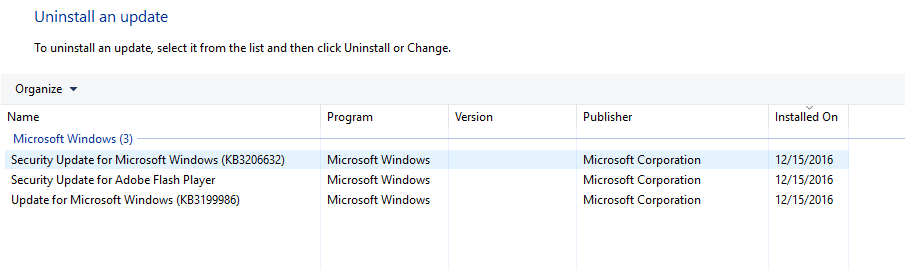
I have no icon images at all in windows, here's my control panel...
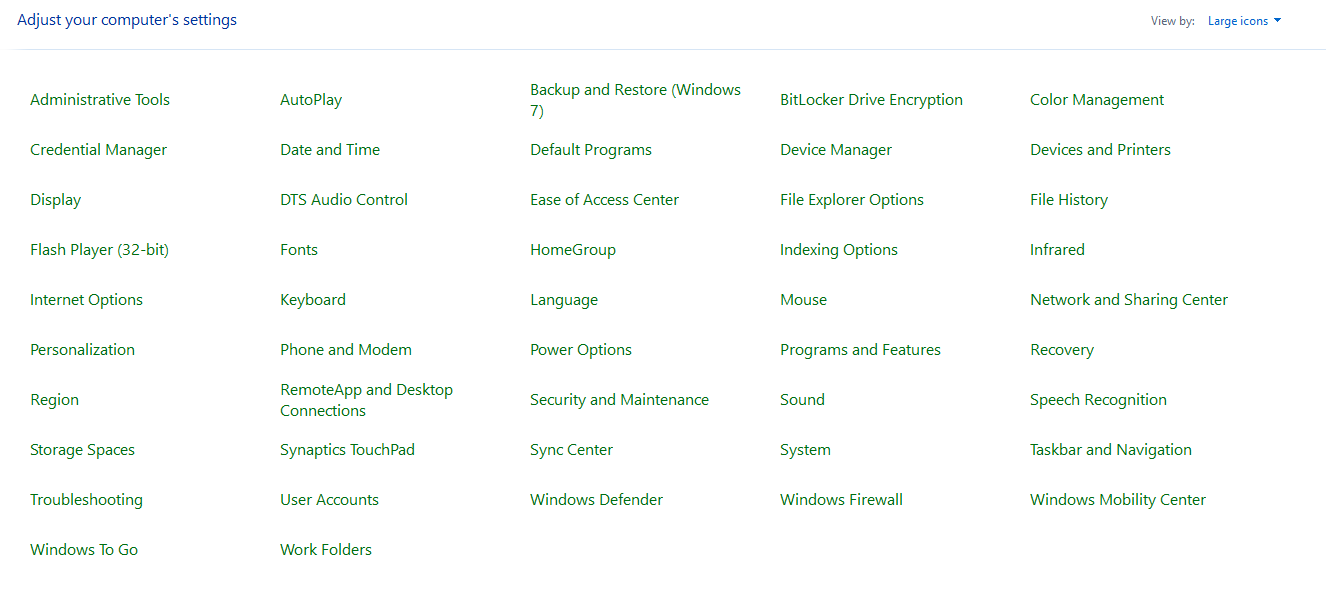
I have no icon images at all in windows, here's my control panel...
Upvote
0

I have never seen this in any operating system.
You would think by now they could get their updates straightened out.
As it is becoming white knuckle ride when you hit the restart button after an update.
You would think by now they could get their updates straightened out.
As it is becoming white knuckle ride when you hit the restart button after an update.
Upvote
0
Setup PCPC setup
I saw something similar in the past, under Windows 7, but usually sfc /scannow repaired broken files... Keeping updates at manual should be smart, maybe it will be fixed upon next update
Upvote
0

That are the good steps, in most cases.Close all programs, and open the command line by running cmd in the Run box, then run into this in turn commands below:
ie4uinit.exe -ClearIconCache
taskkill /IM explorer.exe /F
DEL "%localappdata%\IconCache.db" /A
shutdown /r /f /t 00
This is almost what does the .bat file linked by BoraMurdar (with tests and prompt)
I suppose overkill has run it as admin.
One test to do : create a shortcut, for example from This PC, and look at the properties => change icon if the good dll is used : C:\Windows\System32\imageres.dll
Last edited:
Upvote
0
Could Not Find C:\Users\Owner\AppData\Local\IconCache.dbClose all programs, and open the command line by running cmd in the Run box, then run into this in turn commands below:
ie4uinit.exe -ClearIconCache
taskkill /IM explorer.exe /F
DEL "%localappdata%\IconCache.db" /A
shutdown /r /f /t 00
Upvote
0
When I try to open properties nothing happensThat are the good steps, in most cases.
This is almost what does the .bat file linked by BoraMurdar (with tests and prompt)
I suppose overkill has run it as admin.
One test to do : create a shortcut, for example from This PC, and look at the properties => change icon if the good dll is used : C:\Windows\System32\imageres.dll
Upvote
0
Open Properties of the shortcut (create for example a shortcut of this PC) and click on "change icon" => you must see the dll used, or can browse to the good dll if it not appears.
IconCache.db : hidden file
=> If you want remove it manually, you have to make the folder visible, enter inside, and make the file visible
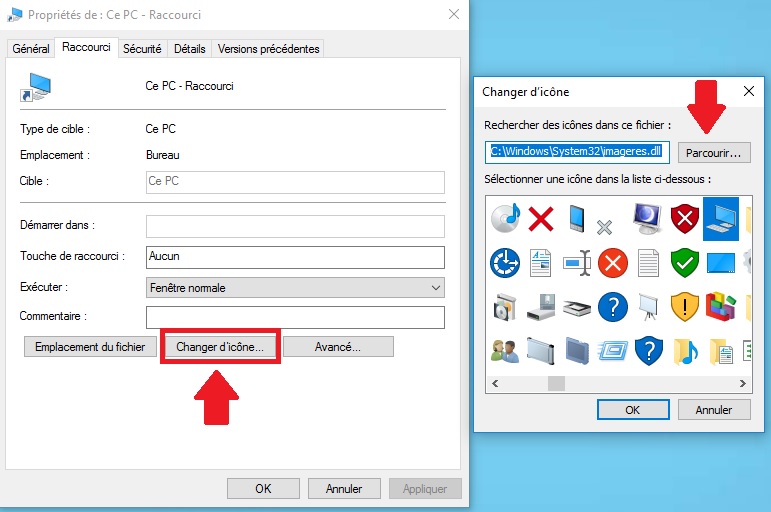
Local : hidden folderCould Not Find C:\Users\Owner\AppData\Local\IconCache.db
IconCache.db : hidden file
=> If you want remove it manually, you have to make the folder visible, enter inside, and make the file visible
When I try to open properties nothing happens
Upvote
0
IconCache.db is gone and properties will not open. I have have put my win 10 laptop away for a few days to see if I can find any other ways to fix this, but if I don't I will reformat and disable updates. The sad thing is, I can't even downgrade to win 7 cause when I try to install drivers they won't even install correctly.
Upvote
0
When IconCache.db is gone, a normal reboot must create it again, that is very strange.IconCache.db is gone and properties will not open. I have have put my win 10 laptop away for a few days to see if I can find any other ways to fix this, but if I don't I will reformat and disable updates. The sad thing is, I can't even downgrade to win 7 cause when I try to install drivers they won't even install correctly.
I think you must disable updates for few weeks, and see if other persons had same problem with their windows update.
the dll I show on my screenshot is the one where icons are, if you can open create a shortcut, then open properties and browse to to the good dll and validate, very strange behavior.
Last edited:
Upvote
0
It never re-created itself...this is the weirdest thing that has ever happened to me with computers. This is a bad bug from MSWhen IconCache.db is gone, a normal reboot must create it again, that is very strange.
I think you must disable updates for few weeks, and see if other persons had same problem with their windows update.
the dll I show on my screenshot is the one where icons are, if you can open create a shortcut, then open properties and browse to to the good dll and validate, very strange behavior.
Upvote
0
Recently browsing
Members who viewed this thread in the last 5 minutes
You may also like...
-

-
 MalwareTips News Windows update fixes exploited download-warning bypass
 -
MalwareTips News Windows update closes two zero-days used in active attacks
-

-