

The MalwareTips app
Your community, one tap away.
Open MalwareTips from your Home Screen or desktop. Follow discussions, find answers and pick up where you left off.
- Home Screen access
- Optional push alerts
- Your community
You're ready to explore.Explore what's new
Installation instructions
iPhone & iPad
- Open MalwareTips in Safari and tap Share. You may need to open the Page Menu first.
- Choose Add to Home Screen. If it is not listed, use Edit Actions to add it.
- Keep Open as Web App enabled if shown, then tap Add.
Android
- Open MalwareTips in Chrome or another browser that supports app installation.
- Open the browser menu and look for Install app, Install and create shortcut, or Add to Home screen.
- Choose Install and confirm. Wording varies by browser.
Desktop
- Chrome: use the install icon in the address bar, or the menu under Cast, save and share.
- Edge: open the menu, then More tools, Apps and Install this site as an app.
- Safari on Mac: choose Share or File, then Add to Dock. Firefox on Windows: look for the web apps button in the address bar.
If you cannot find an install option, update your browser or use its bookmark option to keep MalwareTips close.
Keep up with your conversations
After installation, open the app and sign in. Enable push notifications in Preferences if you want alerts. On iPhone and iPad, push requires a Home Screen web app and iOS or iPadOS 16.4 or later.
Sign in to manage notificationsInstallation is optional. Your notification settings stay under your control.
You are using an out of date browser. It may not display this or other websites correctly.
You should upgrade or use an alternative browser.
You should upgrade or use an alternative browser.
Advice Request is there any software to preserve the life span of my SSD?
- Thread starter Brie
- Start date
Hardware Discussions
51 Replies
13,536 Views
Share practical recommendations that address the author's needs.


Yes, you can disable the page file, but it's not recommended as it can lead to system instability. Instead, try using SSD optimization tools like Samsung Magician or Intel SSD Toolbox. Also, ensure your firmware is up to date, and avoid unnecessary write operations to prolong SSD life.

I believe you can turn off page file, but can't say any more than that. @SeriousHoax @TairikuOkami @brambedkar59 or others could probably help you.

Also, if you have a desktop, "sleeping" also saves to the SSD. Turn the "hybrid" sleep off, if applicable.

You can disable page file but it is not recommended as it might lead to app crash or even windows crash without any blue screen of death & no dump file. It is rare but I don't think disabling it is worth it.
I would disable the hibernation though, with this cmd "powercfg -h off".
I would disable the hibernation though, with this cmd "powercfg -h off".
A SSDs health will aways drop when used, but often SSDs can last longer the manufacturer's estimated life so can keep working when the health reaches zero percent. The SSD health dropping in percentage, does not indicate issues with the drive, it's just a figure based on the manufacturer's estimated life. If it's dropping slowly, it's really nothing worry about as this is normal behaviour. If it's dropping quickly and it is not being used excessively, then that shouldn't be happening. In either case, if you haven't done so already, I recommend running Dell SupportAssist or Command Update and checking for updates. Occasionally Dell will release firmware updates for SSDs and these are delivered via SupportAssist/Dell Update/Dell Command Update. While the actual SSD manufacturer publishes the updates, for the OEM model SSDs included with brand name PCs, the updates can only be obtained from the PC manufacturer. Occasionally there are bugs in a SSD's firmware, which will cause excessive writes, which are fixed with a firmware update.'crystal disk info' says the health of my SSD is 46%. it keeps dropping, monthly.
i have a prebuilt dell. my SSD is 256 gb. can i turn off the PAGE FILE thingy?
thanks in advance.

I disable pagefile since XP and though initially there were some issues, not since Vista.
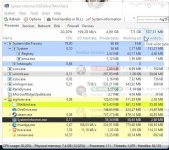
You can use System Informer or perfmon to see, which process causes the most writes.
Disabling superfetch and indexing is basics even by SSD manufacturer's, they use it in their tools.
I have moved browser's cache to ramdisk, but some allow you to set it to 0 and use ram directly.
I use ImDisk Toolkit as ramdisk, it can allocate RAM dynamically, so it will use only as much as needed, currently it uses 1.2GB for 3 browsers.
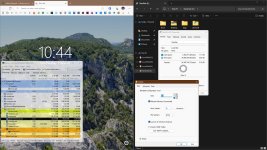
You can use System Informer or perfmon to see, which process causes the most writes.
Disabling superfetch and indexing is basics even by SSD manufacturer's, they use it in their tools.
I have moved browser's cache to ramdisk, but some allow you to set it to 0 and use ram directly.

I use ImDisk Toolkit as ramdisk, it can allocate RAM dynamically, so it will use only as much as needed, currently it uses 1.2GB for 3 browsers.
Code:
rem 1 - Edge User Data Profile Location
reg add "HKLM\Software\Policies\Microsoft\Edge" /v "UserDataDir" /t REG_SZ /d "Z:\Edge\User Data" /f
SSD Fresh, just sets most of changes that Windows still don't such as disabling Hibernate, Indexing & does save time as these are often reset after a major update - It doesn't do anything else to mess your SSD up such as defragging - I find it quite useful, there is a free version with ads but you don't need to use it often.
SSD Fresh
SSD Fresh
I've been using SSD Booster for the last 2 years, and my SSD is still at 99%.


Download SSD Booster .NET Edition 19.10 - MajorGeeks
SSD Booster .NET Edition is a portable utility designed to help boost SSD efficiency and maintain peak performance; it provides you with slider-type options for optimizing and tweaking Windows for SSD. It will come in handy for users that want to get as much as possible from their SSD.
www.majorgeeks.com
Last edited:

Off late I have heard few titles- Raxco PerfectDisk, O&O Disk Defrag, Condusiv Diskeeper Professional or DymaxIO, Abelssoft SSD Fresh. Can someone confirm their usefulness?
There is this video @Brie, you should check. It is from ThioJoe - How Much Longer Will Your SSD Last? How to Tell. Do spare few moments if it looks relevant.
There is this video @Brie, you should check. It is from ThioJoe - How Much Longer Will Your SSD Last? How to Tell. Do spare few moments if it looks relevant.
F
ForgottenSeer 114717
First off, how old is the SSD?'crystal disk info' says the health of my SSD is 46%. it keeps dropping, monthly.
i have a prebuilt dell. my SSD is 256 gb. can i turn off the PAGE FILE thingy?
thanks in advance.
Everything depends upon when you purchased the SSD and what generation it is. Beyond a certain point, no software will assist if the SSD is in its death sprial.


I have questions regarding this topic:
- Is software that read and write to SSD what affect the lifespan?
- What about software that just read without writing?
- Is it better to use software that doesn't use cache or indexing?
Every time data is written to a SSD it reduces its lifespan. However, because brand name SSDs can sustain a very large amount of writes, in my opinion, you really don't need to worry about doing anything to minimise writes. I would just recommend occasionally checking for firmware updates.I have questions regarding this topic:
- Is software that read and write to SSD what affect the lifespan?
- What about software that just read without writing?
- Is it better to use software that doesn't use cache or indexing?
How to check for firmware updates? I'm on Lenovo and check for updates using Lenovo Vantage, is this enough?Every time data is written to a SSD it reduces its lifespan. However, because brand name SSDs can sustain a very large amount of writes, in my opinion, you really don't need to worry about doing anything to minimise writes. I would just recommend occasionally checking for firmware updates.
If it's the drive that came with your computer, then you will get firmware updates from there.How to check for firmware updates? I'm on Lenovo and check for updates using Lenovo Vantage, is this enough?
Yes, it's the drive that came with is, thank you.If it's the drive that came with your computer, then you will get firmware updates from there.

This Toolbox give you all dates of your ssd drives. It´s free and really good.

 www.adata.com
ADATA SSD Toolbox
provides multiple ways for users to obtain disk information and easily change settings. Additionally, it can speed up your SSD and improve its lifespan.
Applicable products
ADATA Solid State Drives series products
Features
Drive Info
The Drive dashboard displays information including Drive Health, Temperature, Remaining Lifespan, Model, Firmware Version, Serial Number, Capacity, TBW, and a “S.M.A.R.T.” button that reveals the S.M.A.R.T. table.
Diagnostics
There are two modes: Quick Diagnostics and Full Diagnostics to diagnose all free and used space of the selected drive to diagnose drive health.
Utilities
There are multiple services on the Utilities screen include Secure Erase, FW update, Toolbox Upgrade, and Export Log.
System Optimization
SSD Optimization provides TRIM service on free space of drive. OS Optimization provides simple settings SSD optimization.
System Info
There are two way to optimize selected SSD:SSD Optimization and OS Optimization.
Benchmark
The Benchmark function allows you to perform read and write tests on ADATA SSDs.
CloneDrive
The CloneDrive function allows for one-click synchronously backup of data in different partitions in the local drive to other drives according to user needs.
Download | ADATA (Global)
www.adata.com
Last edited by a moderator:
Recently browsing
Members who viewed this thread in the last 5 minutes
You may also like...
-

-

-
-
 Advice Request Kaspersky Disk Monitor reporting SSD as 0% Health
 -
 Setup Idea Pretty Good PC Security Regimen