Kaspersky 21.2 is signed! Testing ends.

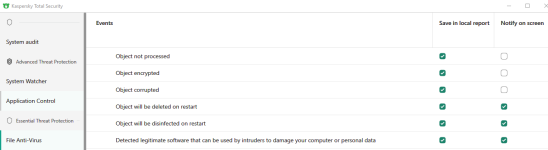
I was testing Kaspersky and one thing I noticed that Kaspersky don't notify for PUP detection. I executed a PUP for which Kaspersky has signatures but even then there was no notification from it. Only if you open the UI there will see that it has turned yellow and there it's waiting for you to choose whether to allow or resolve the PUP.
It's perfectly fine if Kaspersky don't want to delete PUP automatically but it should at least notify the user about the detection and ask what to do. It asks you if you scan PUPs manually but the real time protection doesn't. I don't know if it happens for all types of PUP or if there's a sub-category for it but this is weird and not a pleasant experience I must say.

Kaspersky will block and notify if the program is a threat to the user, if not it will remain silence.

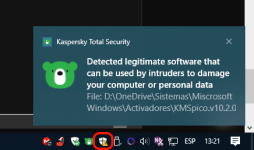
For example, in this case I was creating a Bat file with an office KMS activator, kaspersky warn me:

1606215982681.png
 
Kaspersky will block and notify if the program is a threat to the user, if not it will remain silence.

For example, in this case I was creating a Bat file with an office KMS activator, kaspersky warn me:

View attachment 249724
I was talking about PUP only. It's not notifying me when I execute PUP, for malwares it does.
 
This is not a malware, it's a batch file to activate office, I believe it belong to the group off PUPs.
Then like I suspected there's probably some kind of sub category for PUPs for which Kaspersky don't notify. Still doesn't make sense because I think it should specially after executing.
 
I was testing Kaspersky and one thing I noticed that Kaspersky don't notify for PUP detection. I executed a PUP for which Kaspersky has signatures but even then there was no notification from it. Only if you open the UI there will see that it has turned yellow and there it's waiting for you to choose whether to allow or resolve the PUP.
It's perfectly fine if Kaspersky don't want to delete PUP automatically but it should at least notify the user about the detection and ask what to do. It asks you if you scan PUPs manually but the real time protection doesn't. I don't know if it happens for all types of PUP or if there's a sub-category for it but this is weird and not a pleasant experience I must say.
Also I noticed that when K. detects a PUP a warning is shown in Windows Security icon in taskbar -> asking to take actions:

1606220561955.png
 
Also I noticed that when K. detects a PUP a warning is shown in Windows Security Windows icon in taskbar -> asking to take actions:

View attachment 249727
Yes it does. But I hide this Windows Security icon on tray if using third party AV so I don't see it if I don't click on show hidden icons arrow.
 
I was testing Kaspersky and one thing I noticed that Kaspersky don't notify for PUP detection. I executed a PUP for which Kaspersky has signatures but even then there was no notification from it. Only if you open the UI there will see that it has turned yellow and there it's waiting for you to choose whether to allow or resolve the PUP.
It's perfectly fine if Kaspersky don't want to delete PUP automatically but it should at least notify the user about the detection and ask what to do. It asks you if you scan PUPs manually but the real time protection doesn't. I don't know if it happens for all types of PUP or if there's a sub-category for it but this is weird and not a pleasant experience I must say.
I can confirm this behavior, I have been experiencing it since version 2019 I think, it is a little annoying.

The first time I saw this behavior was with a Nirsoft tool if my memory serves me right.
 
I can confirm this behavior, I have been experiencing it since version 2019 I think, it is a little annoying.

The first time I saw this behavior was with a Nirsoft tool if my memory serves me right.
Hope they change it. Maybe @harlan4096 can ask them about the change since he's a beta tester.
 
Well, probably They won't change this behaviour, since some detections can be "legit" applications, They don't want to remove directly and let the user to decide what to do... so They only warn but not delete...
 
Well, probably They won't change this behaviour, since some detections can be "legit" applications, They don't want to remove directly and let the user to decide what to do... so They only warn but not delete...
But the issue here is, you can only see it if you open the UI. Otherwise the user would have no idea.
 
Well, probably They won't change this behaviour, since some detections can be "legit" applications, They don't want to remove directly and let the user to decide what to do... so They only warn but not delete...

I really prefer that way, I real hate the behavior off other AVs tell me what to do especially if I know that the application is a crack or a KMS activator and is clean, I don't need another voice in my conscience.
Yesterday I was mad with KIS because it blocks the installation off process hacker, with another AV I will have a heart attack.
 
PATCH B release:


Patch B for version 21.2.16.590

Patch B for Kaspersky Internet Security version 21.2.16.590 was released on December 11, 2020.
Patch B:
  • Adds he link to the Privacy Policy in the License Agreement window.
  • Adds the feature for excluding objects from the traffic scan in the Protected Browser.
  • Fixes several application issues.
To install the patch:
  1. Run the database update for Kaspersky Internet Security. See Online Help for instructions.
  2. Restart the computer once the updates have been installed.
The patch will be installed. To check if the patch was installed successfully, open the application window and click the Support icon in the lower-left corner. The information about the application version will be available in the window that opens. The version number will have the letter b added.


1607780813138.png
 
Last edited: