Looking for a Security Product Review? Leave your request here!

Hello I am sure you have heard it before, but I would like a review of Windows Defender for Windows 10:)
 
Full Product Name: Panda Cloud Fee
Version: Latest version for windows
Developers Website: Panda Free Antivirus
Special Testing Requirements (Optional): Detection test

Been hearing good things from a few users over at wilders. was wanting to see what the fuss was about.
https://malwaretips.com/threads/12-2-2018-18.79838/#post-710910

https://malwaretips.com/threads/mixed-threats-09-02-2018-15.79759/#post-710474

https://malwaretips.com/threads/malware-big-pack-02-02-2018-26.79539/#post-708980
Looking for two products this time.

Can someone please test the most recent version of Fortinet Antivirus Free ( all moduals)

and NoVirusThanks OSarmor?
https://malwaretips.com/threads/mixed-threats-16-02-2018-20.79975/#post-711851

https://malwaretips.com/threads/12-2-2018-18.79838/#post-711224
 
Full Product Name: Easy File Locker
Version: 2.2
Developers Website: www.xoslab.com
Special Testing Requirements (Optional): Add documents and desktop folders and test against ransomware (other than boot-time encryptors like Petya). Really would like to know two things:

1. Can EFL be bypassed by ransomware?
2. Is there malware that can shut down EFL? Not sure about self-protection of the program.

It would be great to see once and for all if this program will do under direct pressure of an attack. For all I know it could crumble like a house of cards. Haven't seen any evidence that it won't. Thanks to whoever might take on this challenge and thanks for this thread. First time I have noticed it here.
 
  • Like
Reactions: Windows_Security
I would like to see a review to the free antivirus. I shared one some years ago, it's time to a new one.

Here's a list of free antivirus:

Avast Free Antivirus
AVG Antivirus FREE
Avira Antivirus FREE
Bitdefender Antivirus Free
ClamWin + Clam Sentinel
Comodo Internet Security
FortiClient
Windows Defender
NANO Antivirus
Panda Antivirus Free
360 Total Security
Immunet
Adaware Antivirus Free
SecureAPlus
ZoneAlarm Free Antivirus 2019
Tiranium Anti-Virus 2019
Tencent PC Manager
Kaspersky free
 
Can you be more specific as to what type of malware or web threat you want tested?

Otherwise you can generally find generic tests copied from YouTube posted here Security and Antivirus Videos

A review that tests the performance and general detection of the AV's above. And as you can see (the likes i'm getting) i'm not the only one looking for it.
@stefanos maybe you could do a battle between all the free AV's that i posted above?
 
  • Like
Reactions: stefanos
A review that tests the performance and general detection of the AV's above. And as you can see (the likes i'm getting) i'm not the only one looking for it.
@stefanos maybe you could do a battle between all the free AV's that i posted above?

Everyone has their own opinion. For me the best free solutions is Kaspersky free , Avast free , AVG free , Bitdefender free. See also the link. It has test results from HUB. I do the tests on my laptop but I can't post them because of bad English.
 
Last edited:
Everyone has their own opinion. For me the best free solutions is Kaspersky free , Avast free , AVG free , Bitdefender free. See also the link. It has test results from HUB. I do the tests on my laptop but I can't post them because of bad English.

What's the language you speak?
 
  • Like
Reactions: Venustus
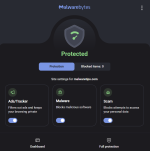
I would love to see a good updated test of Malwarebytes premium. Please also use Malwarebytes browser guard in the test. I feel Malwarebytes has improved greatly now it's time for everyone to see that. You may also want to enable "use expert system algorithms to identify malicious files" this can be found under the security settings in the UI.
 
I would like to see a test of Symantec endpoint protection showing how it protects you against ransomware with the file scanner turned off and unmanaged
 
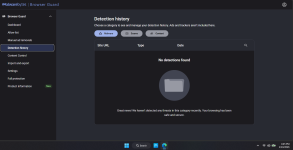
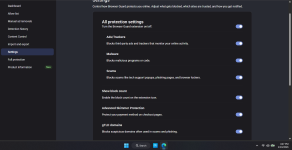
I believe it would be beneficial to conduct another review of the updated Malwarebytes Browser Guard. The latest version introduces numerous new detection patterns and enhanced protection capabilities. These updates can be explored within the Browser Guard settings under the Product Information section, where Malwarebytes details the various detection technologies now in use.


To further enhance detection effectiveness, ensure that gTLD domain protection is enabled in the settings. This feature blocks suspicious domains commonly associated with scams and phishing sites, significantly strengthening overall protection. Reviewing these updates and configuration options would provide valuable insight into howMalwarebytes continues to advance its threat detection capabilities, and the underlying technologies are both impressive and worth highlighting.
 

Attachments

  • Screenshot 2026-01-10 164527.png
    Screenshot 2026-01-10 164527.png
    55.1 KB · Views: 30
  • Screenshot 2026-01-10 164605.png
    Screenshot 2026-01-10 164605.png
    159.4 KB · Views: 30
  • Screenshot 2026-01-10 164745.png
    Screenshot 2026-01-10 164745.png
    177.7 KB · Views: 30
  • Like
Reactions: Andrew999

You may also like...