Troubleshooting Max Free Space Block Parameter in Auslogics Disk Defrag Pro

Pearl96

Level 5
Verified
Hello! I am using Auslogics Disk Defrag Pro and I have done all the recommendations it asked for! Just noticed one issue as seen in the screenshot

Max Free Space Block.PNG

The warning "Parameter is in poor condition and requires attention"

What is this? And how should I fix it?

Thank you in advance
 
Yes! Auslogics Disk Defrag Pro asked me to do optimization by prefetch and free space optimizaton! Is that any wrong? Also ( I am not sure if this info is helpful or not ) I only have on partition "C" 500 GB
 
Upvote 0
Maybe you should delete junk files before running the defrag.
Try using Ccleaner, Windows Disk Cleanup, and possibly delete old restore points if you don't use them.
As @BoraMurdar said, it seems there is not enough free space to properly manage the defrag process.
 
Upvote 0
You could make a test: temporarily download the free portable edition of Auslogics DD running the default disk defragmenter.
If everything works, then the problem is probably due to the algorithm used in the Pro edition.
Choosing another algorithm you might see if the situation changes.
 
Upvote 0
Anyway, I don't think it's a big deal. As I see you are using Windows 10, I see no reason for HDD defrag or file placing optimization. Windows 10 built in Disk Optimization tool is sufficient and you can schedule it. It does defragment and optimize HDDs in few passes with its own algorithms. Differences from using third party tools and Windows 10 Disk Optimizer are far from noticeable in real world use.
 
Upvote 0
You could make a test: temporarily download the free portable edition of Auslogics DD running the default disk defragmenter.
If everything works, then the problem is probably due to the algorithm used in the Pro edition.
Choosing another algorithm you might see if the situation changes.

When I analysed the disk again a green true symbol is placed next the parameter indicating it is in good condition
 
Upvote 0
Anyway, I don't think it's a big deal. As I see you are using Windows 10, I see no reason for HDD defrag or file placing optimization. Windows 10 built in Disk Optimization tool is sufficient and you can schedule it. It does defragment and optimize HDDs in few passes with its own algorithms. Differences from using third party tools and Windows 10 Disk Optimizer are far from noticeable in real world use.

To be honest, I feel a big difference in performance after using Disk Defrag Pro.
 
Upvote 0
Today I have done a clean install of Windows! I don't think there is much junk
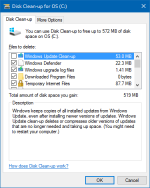
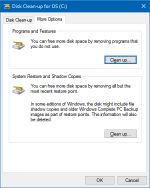
There's always something Disk Clean-up will find. Make sure to Clean up system files to clear more data and to free up space from System Restore points and Shadow Copies.
upload_2017-3-14_21-13-59.png


upload_2017-3-14_21-12-16.png upload_2017-3-14_21-12-22.png

System Restore should be disabled by default, unless a program has turned it on or was triggered by an Update.
 
Upvote 0
Everything seems fine according to these logs,

It's a subjective feeling but if you are satisfied with the program and you feel your system is faster then continue using it. :)

The boot is faster and also accessing files. I was obliged to use such a tool; my HDD get fragmented quickly (22% fragementation) and I feel significant performance impact especially in browsing and accessing files.
 
Upvote 0
The boot is faster and also accessing files. I was obliged to use such a tool; my HDD get fragmented quickly (22% fragementation) and I feel significant performance impact especially in browsing and accessing files.
I was talking about the difference between defragmenting with Windows built in defragmenter and third party defragmenters. HDD is fragmented over time and must be defragmented to keep the system speed at optimum levels, there's no secret in that. Consider that anything bellow 10% of difference is unnoticeable, as you can see by the access time results.
This is a relatively old test but you'll get the point. Consider that Windows 10 defragmenter is better than Windows 7 defragmenter as it has optimization feature
The Big Windows 7 Defragmenter Test - The Benchmarks
 
Upvote 0

Recently browsing

Members who viewed this thread in the last 5 minutes

Back
Top