F


The MalwareTips app
Your community, one tap away.
Open MalwareTips from your Home Screen or desktop. Follow discussions, find answers and pick up where you left off.
- Home Screen access
- Optional push alerts
- Your community
You're ready to explore.Explore what's new
Installation instructions
iPhone & iPad
- Open MalwareTips in Safari and tap Share. You may need to open the Page Menu first.
- Choose Add to Home Screen. If it is not listed, use Edit Actions to add it.
- Keep Open as Web App enabled if shown, then tap Add.
Android
- Open MalwareTips in Chrome or another browser that supports app installation.
- Open the browser menu and look for Install app, Install and create shortcut, or Add to Home screen.
- Choose Install and confirm. Wording varies by browser.
Desktop
- Chrome: use the install icon in the address bar, or the menu under Cast, save and share.
- Edge: open the menu, then More tools, Apps and Install this site as an app.
- Safari on Mac: choose Share or File, then Add to Dock. Firefox on Windows: look for the web apps button in the address bar.
If you cannot find an install option, update your browser or use its bookmark option to keep MalwareTips close.
Keep up with your conversations
After installation, open the app and sign in. Enable push notifications in Preferences if you want alerts. On iPhone and iPad, push requires a Home Screen web app and iOS or iPadOS 16.4 or later.
Sign in to manage notificationsInstallation is optional. Your notification settings stay under your control.
You are using an out of date browser. It may not display this or other websites correctly.
You should upgrade or use an alternative browser.
You should upgrade or use an alternative browser.
New Update Microsoft Edge Developers build info
-
 Thread starter
oldschool
Thread starter
oldschool
- Start date
- 716 Replies
- 173,973 Views
- Status
- Not open for further replies.

I tried to activate only ACG, but I did not try the stack.I got the same result as you.

Gandalf_The_Grey
Level 86
Verified
Honorary Member
Top Poster
Content Creator
Well-known
Forum Veteran
Dev channel update to 100.0.1156.1 is live
 techcommunity.microsoft.com
Hello Insiders, it’s a historic day today! First, we’re releasing build 100.0.1156.1 to the Dev channel, which as you can see, is the first build of version 100! Second, we’re excited to announce that the long-awaited capability to sign into the browser with a work or school account on Linux is now enabled by default! This functionality will be available in Beta and Stable once version 100 hits those channels, as usual.
Community-wise, we’d like to hear from you! Please consider taking our regularly-scheduled survey here to tell us how we’re doing in our engagement with you and how we can do better: Quarterly Survey: February 2022.
We’ve also got an overview of the work we’ve been doing in our extensions download website to improve extension discoverability: https://techcommunity.microsoft.com/t5/articles/microsoft-edge-add-ons-new-features-to-improve-exten.... As well as some new functionality in Dev Tools that lets you un-minify your code for easier debugging: https://blogs.windows.com/msedgedev/2022/02/03/unminifying-function-names-in-devtools-performance-pr....
As for everything else that’s new and exciting in the browser:
Added features:
Since 100 is now in Dev, you should also see 99 in Beta shortly!
- Added info to the Performance Hub about how much savings Sleeping Tabs are providing.
- Enabled by default the Rewards hub.
Dev channel update to 100.0.1156.1 is live | Microsoft Community Hub
Hello Insiders, it’s a historic day today! First, we’re releasing build 100.0.1156.1 to the Dev channel, which as you can see, is the first build of...
techcommunity.microsoft.com
Gandalf_The_Grey
Level 86
Verified
Honorary Member
Top Poster
Content Creator
Well-known
Forum Veteran
Dev channel update to 100.0.1163.1 is live
techcommunity.microsoft.com
Hello Insiders! Today we’re releasing build 100.0.1163.1 to the Dev Channel. In the community this week, we were wondering if you were aware of our Youtube channel at https://www.youtube.com/channel/UCIGx7oT8p6-jUpOfg98yelA/videos. In case it’s been a while since you’ve been there, you may want to catch up on our latest videos, which showcase how to set up IE mode: , and give an overview of what’s new for the F12 Dev Tools in Edge 97: .
Also, in case you missed it last week, please consider taking our regularly-scheduled survey here to tell us how we’re doing in our engagement with you and how we can do better: Quarterly Survey: February 2022. As for what’s new in the product this week:
Added features:
As always, it’s your consistent feedback that keeps us going; we couldn’t do it without you!
- Enabled by default the ability to search through open tabs.
- Enabled by default Image Auto Captioning in Accessibility Settings.
- Enabled by default the availability of the Discover pane. Note that certain entry points into the Discover pane are not yet enabled.
- Mobile: Enabled by default Scrolling Screenshot functionality on Android.
- Developer: Added an API to WebView2 to listen for PermissionRequested events from any iframe in a page. Note that updates to documentation and SDKs may not have occurred yet.
Dev channel update to 100.0.1163.1 is live | Microsoft Community Hub
Hello Insiders! Today we’re releasing build 100.0.1163.1 to the Dev Channel. In the community this week, we were wondering if you were aware of...
techcommunity.microsoft.com


Edge Canary makes it easier for you to install web apps across all your devices
Microsoft Edge Canary has a new feature to make it easier for the users to install web apps on all their devices. It is currently in the testing phase and is rolling out in a phased manner.
 www.neowin.net
As mentioned, the feature is available for Edge Canary users only. However, since it's a "controlled rollout", the feature is not available for all users on the Canary channel.
Microsoft is testing Skype Meet Now integration with Edge
The integration was spotted by eagle-eyed Redditor and regular Neowin news tipster u/Leopeva64-2, who spotted the change in the latest Edge Canary build. Essentially, you now have a new toggle in the Appearance setting that adds a Skype Meet Now button to the Edge omnibar. Clicking on it in the omnibar opens a Skype Meet Now panel directly in Microsoft Edge. A snippet of this can be seen in the image above.
Although the toggle is disabled by default, the latest move by Microsoft will likely once again spark debates about why something like this is directly integrated into the browser and not offered as an extension that users can optionally download. In fact, the change also opens up discussions around what is Microsoft's recommended online communication app considering that Teams has a personal version that essentially competes against the consumer version of Skype too.
All in all, it's not known yet when, or if, this integration will hit the stable release channel. Edge Canary is updated on a nightly basis so we do start to see features appear with more frequency there before they make their way over to Dev, Beta, and eventually Stable. Furthermore, this integration is being made available as a part of Microsoft's "controlled rollout" strategy so not everyone may have it in their Edge build yet.
_story.jpg)
Microsoft is testing Skype Meet Now integration with Edge
Microsoft may be integrating a Skype Meet Now panel directly into its Edge browser, accessible via the omnibar. It is currently toggled off by default in Edge Canary, but can be enabled.
www.neowin.net

I found Material Theme Dark [blue-grey] for Brave that's pretty good as I attempt to transition back from Edge, but I'm like a junkie and keep coming back again - just something about the Edge UI.the latest move by Microsoft will likely once again spark debates about why something like this is directly integrated into the browser and not offered as an extension that users can optionally download


I like this one: Dark Black
Thanks, but too black for me. I'll stick with the dark blue-grey.I like this one: Dark Black

Try this one: DarkThanks, but too black for me. I'll stick with the dark blue-grey.
Gandalf_The_Grey
Level 86
Verified
Honorary Member
Top Poster
Content Creator
Well-known
Forum Veteran
Dev channel update to 100.0.1169.1 is live
techcommunity.microsoft.com
Hello Insiders! Today we’re releasing build 100.0.1169.1 to the Dev channel. Our big news in today’s build is that we’ve finished rolling out two long-requested features: the ability to view thumbnails of the pages of a PDF as a list and use them to navigate through the document in the same way as the Table of Contents, and the ability to set your own custom password for use as the Primary Password that protects all passwords before they’re autofilled into a webpage.
Additionally, for web developers, we’ve got a good writeup of some recent work we’ve done to fix bugs in the F12 Dev Tools that were impacting your ability to find memory allocation bugs with your websites. Read all about it here: Memory tooling improvements in DevTools for Retainers. As for everything else that’s new and noteworthy in the browser this week:
Added features:
Next week is the last scheduled week for version 100 in the Dev channel, so after that it’s on its way to Beta!
- Added support for a textprediction attribute on forms in webpages that allows web developers to enable or disable text prediction similar to the way they can control spellcheck and autocomplete.
- Enabled support for custom text cursors on Windows.
- Added a Setting on Mac to allow the browser to be automatically updated for all device users.
- Added the ability on Android to have Read Aloud work when the tab or app is in the background.
- Enabled a management policy from Chromium to Force the Major Version number To the Minor Position In the User Agent string, which is a temporary policy to freeze the major version number at 99 and place the actual version number in the minor position, for example turning version 101.0.0.0 into 99.101.0.0.
- Developer (Note that these APIs were previously in the “Experimental” status):
- Added an API to WebView2 to hide buttons from the PDF toolbar.
- Added an API to WebView2 to Call Dev Tools Protocol Method For Session, which runs an asynchronous method on a specific WebView session.
- Added an API to WebView2 to control the Exclusive User Data Folder Access property, which prevents other WebViews and browser processes from accessing the user data folder.
- Added an API to WebView2 to Allow External Drop, which controls if objects from outside a WebView application are allowed to be dragged and dropped into it.
Dev channel update to 100.0.1169.1 is live | Microsoft Community Hub
Hello Insiders! Today we’re releasing build 100.0.1169.1 to the Dev channel. Our big news in today’s build is that we’ve finished rolling out two...
techcommunity.microsoft.com
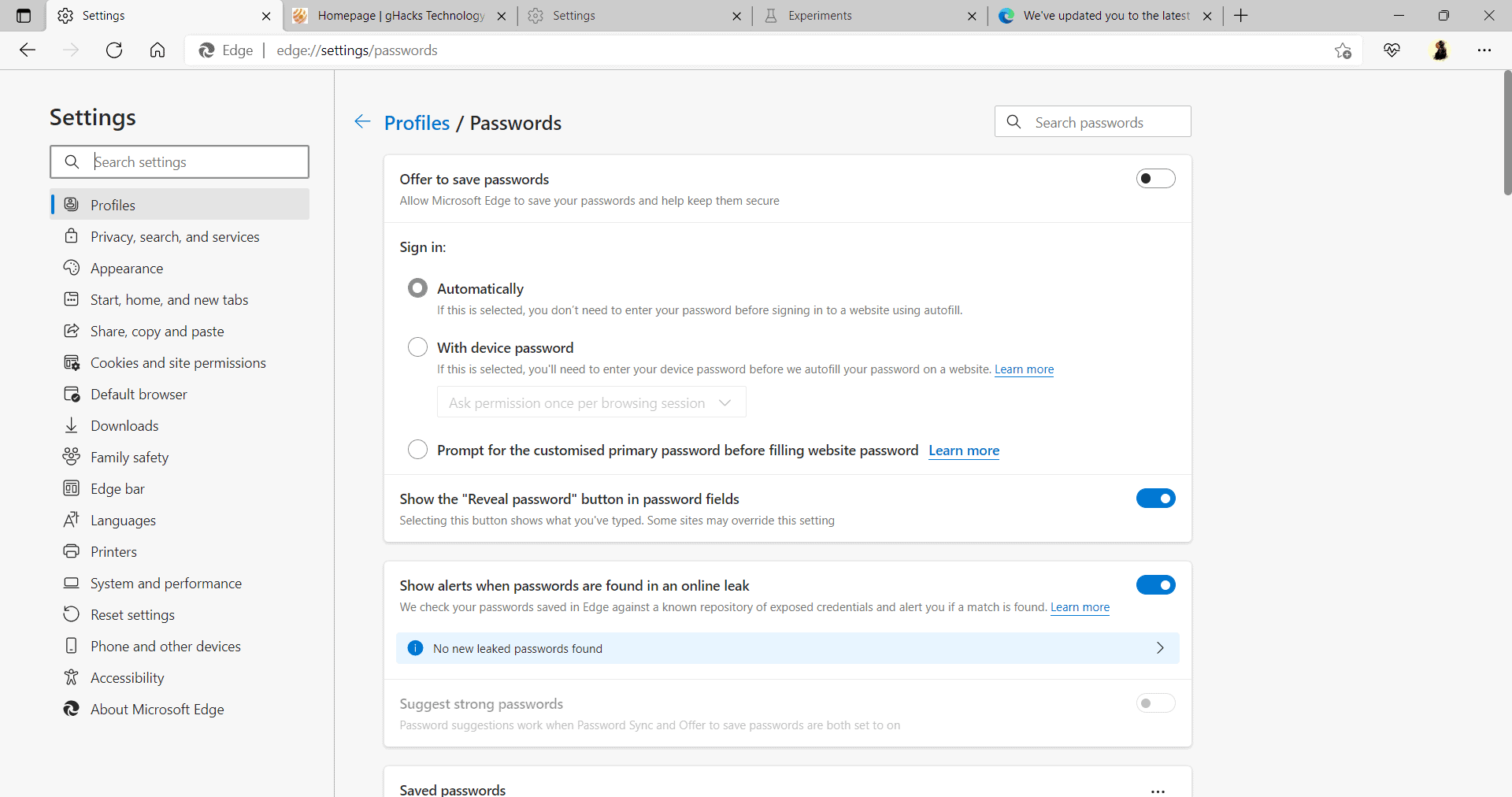
Edge 100 introduces support for a primary password; this is a custom password that may be different from the device password. The primary password is saved locally only, and it needs to be entered to get the browser to fill out password fields on websites.
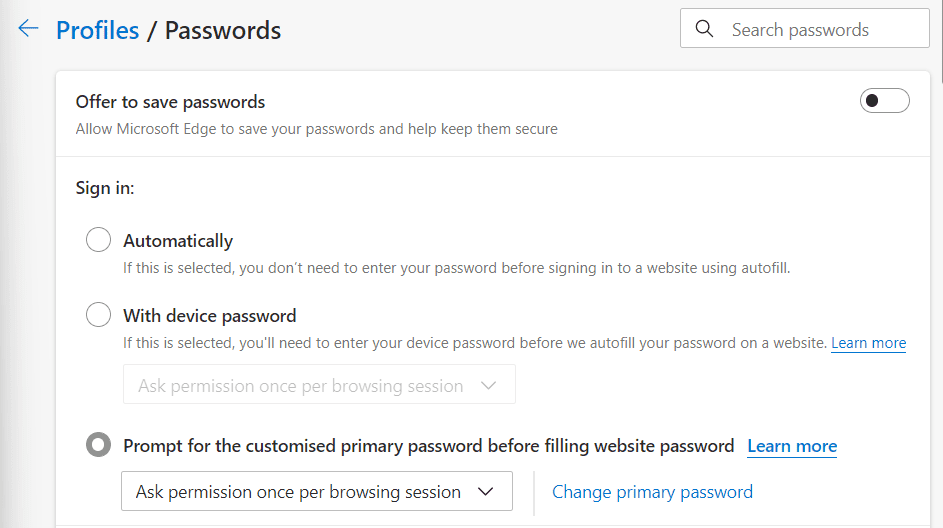
Edge prompts for permission once per browsing session by default, but there is an option to make Edge prompt for permission each time a password can be filled automatically.
Entering the primary password adds the data to the field. Not providing it or clicking on the close icon will abandon the operation. It is still possible to enter the username and password manually on the site then.
The primary password feature of Edge works only with stored passwords. Edge users may disable the requirement to restore one of the two other options for filling out passwords in Edge.
Microsoft Edge 100: primary password support and PDF thumbnail view - gHacks Tech News
Microsoft released a new development build of Microsoft Edge 100 to the Canary channel this week featuring primary password support and PDF thumbnail viewing.
 www.ghacks.net

Would it be better for someone using a password manager like Lastpass?Microsoft Edge 100: primary password support and PDF thumbnail view - gHacks Tech News
Microsoft released a new development build of Microsoft Edge 100 to the Canary channel this week featuring primary password support and PDF thumbnail viewing.
Indeed, it's always highly recommended to choose a standalone password manager with included two-factor authentication. My choice either LastPass or Bitwarden to sync your data around your devices. For users prefers data storing more in a way like offline: KeePass.Would it be better for someone using a password manager like Lastpass?
Latest Microsoft Edge Canary build v100 gets full-screen PDF reader, document properties
The latest Canary build of Microsoft Edge has received a full-screen mode optimized for viewing PDF files. The mode hides even the PDF toolbar. There are other features like document properties too.
www.neowin.net
All the features are currently available in the latest Edge Canary build. As Microsoft is executing a “controlled rollout”, some testers could receive these features before others.
Microsoft is testing a new sidebar for web apps that could appear in the stable version of the Edge browser. The latest Canary build of the Chromium-based web browser has the feature. It is not enabled by default, which means it is still quite experimental.
Microsoft Edge has a section called “Experiments”, where it allows testers to access and activate features that might not be fully ready yet. Microsoft has added a flag for the “Web App Sidebar”. It is off by default, but the feature can be easily enabled for evaluation.
Latest Microsoft Edge Canary build includes new “Web App Sidebar” for quick search
The latest Canary build of Microsoft Edge includes a new Web App Sidebar which offers quick access to the search function. The feature seems to mimic the behavior of Bing and Google Search.
www.neowin.net
Apparently, it needs the flag to be enable. Always flag. eh.Latest Microsoft Edge Canary build includes new “Web App Sidebar” for quick search
The latest Canary build of Microsoft Edge includes a new Web App Sidebar which offers quick access to the search function. The feature seems to mimic the behavior of Bing and Google Search.

All features that need to be enabled by flags usually means that it's not yet ready to be released for general use. Flags are typically for developers and enthusiastic tester to test things out. Flags are also temporary, often have an expiry date and gets renewed/extended if required. eg: Last month or a month before that, chromium devs decided to extend the dark mode flag to version 105 because it's not ready yet.Apparently, it needs the flag to be enable. Always flag. eh.

- Status
- Not open for further replies.
Recently browsing
Members who viewed this thread in the last 5 minutes
You may also like...
-

-
 New Update Microsoft KB5129195 Out-of-band
 -

-

-