Setup PCPC setup
Version 135.0.3179.98
No release note.
No release note.


Open MalwareTips from your Home Screen or desktop. Follow discussions, find answers and pick up where you left off.
If you cannot find an install option, update your browser or use its bookmark option to keep MalwareTips close.
After installation, open the app and sign in. Enable push notifications in Preferences if you want alerts. On iPhone and iPad, push requires a Home Screen web app and iOS or iPadOS 16.4 or later.
Sign in to manage notificationsInstallation is optional. Your notification settings stay under your control.
 Thread starter
eonline
Thread starter
eonline

Release notes are posted:Version 136.0.3240.50
No release notes yet.
Fixed various bugs and performance issues, Dev channel updates, feature updates, policy updates, and web platform release notes.
Stable channel security updates are listed here.
Microsoft Edge Version Date Released Based on Chromium Version 136.0.3240.50 5/1/2025 136.0.7103.49


You must mean "No bug notes yet".Version 136.0.3240.64
No release notes yet.
 They've turned it into a POS. If it's not one bug, it's another.

I actually haven't faced any bug in a long time. Once in a while annoyance like, Set Bing as your default search engine = Of course, Bugs = Can't rememberYou must mean "No bug notes yet".
Now they are posted:Version 136.0.3240.64
No release notes yet.
Fixed various bugs and performance issues.
Fixes
Stable channel security updates are listed here.
- Fixed an issue which prevented Microsoft Editor from working and from offering suggestions for misspelled words.
Microsoft Edge Version Date Released Based on Chromium Version 136.0.3240.64 5/8/2025 136.0.7103.93
It is the same for me, no bugs, small annoyances once in a while.I actually haven't faced any bug in a long time. Once in a while annoyance like, Set Bing as your default search engine = Of course, Bugs = Can't remember
Indeed, plenty of those. This one, "Turn on recommended settings", quite often. I believe after every update .small annoyances once in a while.

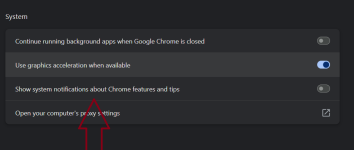
Isn't MS Edge shows features and tips by default with every release?If Google can do this, why can't MS?
View attachment 288549
Pretty much.Isn't MS Edge shows features and tips by default with every release?
Aha, so you want to disable it, not enable it? You have to ask O&O ShutUp10++ for this, not Microsoft.Pretty much.

I have'nt choose any home page shortcuts for Edge.Aha, so you want to disable it, not enable it? You have to ask O&O ShutUp10++ for this, not Microsoft.

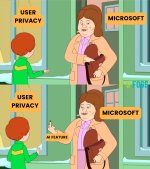
This reminds me of this meme:I have'nt choose any home page shortcuts for Edge.
Microsoft: I'll set you a nice collection of shortcuts to my taste

Yes, it is still there even after I disabled it.Anyone else seeing this stupid button? Even though I have disabled both the options in settings, I am still seeing this.
Don't see it here.Anyone else seeing this stupid button? Even though I have disabled both the options in settings, I am still seeing this.
Members who viewed this thread in the last 5 minutes