Already done previously.As soon as Copilot is available I will be disabling it via GPedit.
I believe you mean "I don't need no stinking AI"!don't need no goddamn AI.



Open MalwareTips from your Home Screen or desktop. Follow discussions, find answers and pick up where you left off.
If you cannot find an install option, update your browser or use its bookmark option to keep MalwareTips close.
After installation, open the app and sign in. Enable push notifications in Preferences if you want alerts. On iPhone and iPad, push requires a Home Screen web app and iOS or iPadOS 16.4 or later.
Sign in to manage notificationsInstallation is optional. Your notification settings stay under your control.
 Thread starter
eonline
Thread starter
eonline
Already done previously.As soon as Copilot is available I will be disabling it via GPedit.
I believe you mean "I don't need no stinking AI"!don't need no goddamn AI.
Yep. They've ruined Edge and it's a POS!New (privacy) issue?
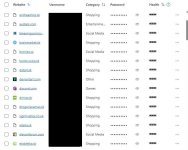
In edge://settings/siteData I see all sites I have recently visited:
View attachment 279102
When removing them they are coming back.
Not something I want
Anybody else seeing the same behavior ?
Being a piece of trash it deserves the @oldschool . Feedback sent for all the good it won't do.
Good point.Yall still using edge? View attachment 279104

I don't seem to have it.Went on to download Chrome using Edge and this "Action center" suddenly popped up from the side.

Nope, can't say I have seen this for a while now.This is either new or was just unknown to me. Went on to download Chrome using Edge and this "Action center" suddenly popped up from the side.
View attachment 279139
I don't seem to have it.
I had enough, finally unpinned Edge from my taskbar and locked down defaults to Chrome. What a journey: former Brave and Edge fan. Firefox now my daily driver.

Fixed various bugs and performance issues.

I'm still seeing this bug or whatever it is. Same cookies show upon restart. Anyone still getting this? Or know of a fix?New (privacy) issue?
In edge://settings/siteData I see all sites I have recently visited:
View attachment 279102
When removing them they are coming back.
Not something I want
Anybody else seeing the same behavior ?

ANWB.nl ???? I thought you were from Gilead?Anyone still getting this? Or know of a fix?
What? Don't know what you're talking about.ANWB.nl ????

Let's do a small test. Go to a site you never visit before using InPrivate mode and check that siteData page again.New (privacy) issue?
In edge://settings/siteData I see all sites I have recently visited:
View attachment 279102
When removing them they are coming back.
Not something I want
Anybody else seeing the same behavior ?

Max90 said:
ANWB.nl ????
What? Don't know what you're talking about.

Thats a website in the netherlands for car trouble, to help you on the road again

Ahhh that explained it, I wondered why @oldschool would look at ANWB, but it was a screen print of @Gandalf_The_GreyHe knows, he just might have looked over the fact that it was Gandalf_The_Gray posting that.

This is beside the point. The problem is with data not being cleared on regular browser (not private window) close when that setting is selectedLet's do a small test. Go to a site you never visit before using InPrivate mode and check that siteData page again.
Fixed various bugs and performance issues.

Fixed various bugs and performance issues.
Feature updates
- Designer (Preview) in the Microsoft Edge sidebar. All Microsoft Edge users with Manifest version 4.8.5 or higher (users can see their version using edge://sidebar-internals), including those that are working on managed devices, can now add the Designer (Preview) app to the Edge sidebar by clicking on the "+" and setting the Designer (Preview) toggle to on. Designer (Preview) allows you to experience the generative AI capabilities offered by Microsoft Designer https://designer.microsoft.com from inside the Edge browser.
Designer is a new AI system from Microsoft that generates visual, customizable designs based on your text description and images. This release will be available in English for the following country/regions: Australia, India, New Zealand, South Africa, and the United States.
Administrators can manage sidebar apps including Designer (Preview) icon by using the policies described in Manage the sidebar in Microsoft Edge. The ID for Designer (Preview) app is 2cb2db96-3bd0-403e-abe2-9269b3761041.

Members who viewed this thread in the last 5 minutes