
Serious Discussion Microsoft Edge Stable (Chromium) Now Available for Download

Chrome is working fine here since yesterday. It seems to be the same old Chrome I remember but the web store has been updated. It still remembered all my settings and bookmarks from the last time I used it and there has been nothing at all like the stuff I have seen lately in Edge. Chrome is not forcing unwanted bloat on me. I have not had any trouble with ad block while watching Youtube videos in Chrome. I am still using Ublock MV2 by itself on default. Youtube is still locked out on Vivaldi but it is working in Firefox. I tried adding filter lists to Ublock on Vivaldi but it did not work. I may just go back to FF as default and use Chrome for the couple of sites that don't work in FF. Edge is definitely out of the question though. I am very tired of playing whack a mole with the bloat.

C.H.
 
I initially missed this by not scrolling down far enough.
@TairikuOkami
NEW SNEAKY BLOATWARE ALERT! --> Users who have the History icon enabled on their toolbar may find the the new switch locked!

You may disable the H icon on toolbar to free the new switch, or
  • click on History icon
  • click on three dots ( ... )
  • click on "Turn off image on hover"
@nickstar1 It's not a privacy issue, rather the lengths MS is going to entrap and confuse users with these hidden settings and feature bloat!
On one system, I have the new screenshot option, but on another system, I don't. Both systems have the History icon disabled. I tried to disable the new option but couldn't. Then, I enabled the History icon and chose "Turn off image on hover", which disabled the new option. I could disable the History icon again with no problems. @oldschool, Thanks for sharing the trick!
 
On one system, I have the new screenshot option, but on another system, I don't. Both systems have the History icon disabled. I tried to disable the new option but couldn't. Then, I enabled the History icon and chose "Turn off image on hover", which disabled the new option. I could disable the History icon again with no problems. @oldschool, Thanks for sharing the trick!
You're welcome. New features often are offered through staged rollouts, thus the difference between systems.
 
I see that after restarting the browser a few minutes ago, Edge has moved my handsome little face from the right side beside the extension icon to the top left corner.
Edge version is as same as before: 120.0.2210.61. Has this already happened for any other users here?
1702414455158.png
 
Last edited:
I see that after restarting the browser a few minutes ago, Edge has moved my handsome little face from the right side beside the extension icon to the top left corner.
Edge version is same as before: 120.0.2210.61. Has this already happened for any other users here?
View attachment 280239
Yeah, not a fan of it. Thankfully it can be disabled.

1702414868472.png
 
Look for a bug coming to you in the near future.
This happened to me twice this year, last time a week ago after the update, it reported that a crashed extension and all cookies were gone. I use cookieautodelete, so it might not to be related.
Edge has moved my handsome little face from the right side beside the extension icon to the top left corner.
Thanks for mentioning it, I tried it before, but I did not like it, but password manager is there now and I use it daily and since I can not see the right side, this is more practical for me.
 
Version 120.0.2210.77: December 14, 2023
Fixed various bugs and performance issues.

Stable channel security updates are listed here.
Microsoft has released the latest Microsoft Edge Stable Channel (Version 120.0.2210.77) which incorporates the latest Security Updates of the Chromium project. For more information, see the Security Update Guide.

This update contains the following Microsoft Edge-specific update:
What is the version information for this release?

Microsoft Edge VersionDate ReleasedBased on Chromium Version
120.0.2210.7712/14/2023120.0.6099.109
 
Version 120.0.2210.89: December 20, 2023
Fixed various bugs and performance issues.

Feature updates
  • Microsoft Edge Workspaces improvements for offline functionality. Any workspace previously opened on a device is cached locally and can be opened on that device from that cache even if it fails to connect. Changes persist on that device and are resolved into the synced version when a connection can finally be made. Note: This feature is a controlled feature rollout. If you don't see this feature, check back as we continue our rollout.
 
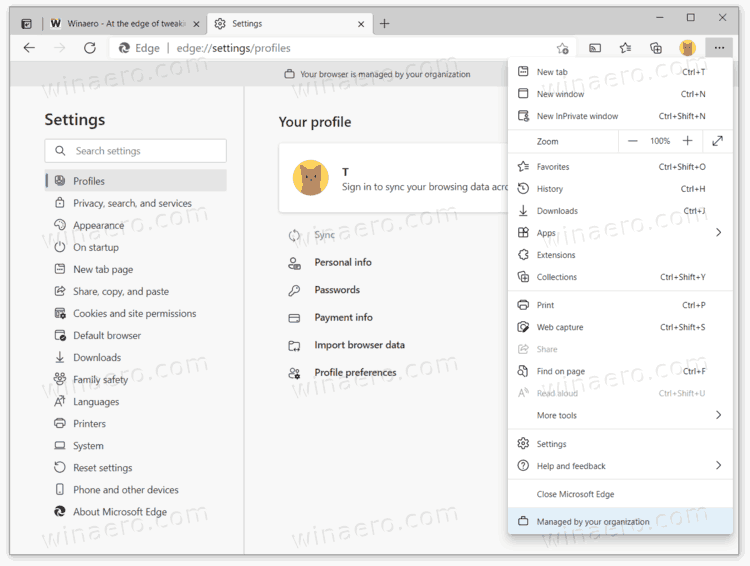
Any incite what Edge means, posts on top when updating "Your browser is managed by your organization" Chrome doesn't say anything, both browsers always seem to have a update st the same time?
I used to get that Edge "organization" message, annoying. 😡I just don't recall specifics of how I got rid of it, but keep googling, you should find answer(s). IIRC it was more than 1 click or 1 thing...
 
  • Like
Reactions: brambedkar59
Any incite what Edge means, posts on top when updating "Your browser is managed by your organization" Chrome doesn't say anything
Indeed, this has happened to me multiple times through no action of my own. It's some weird MS Edge bug which I've never experienced with Chrome. The fix requires a short trip into Registry Editor and is a piece of cake. This link will guide you.
both browsers always seem to have a update st the same time?
Not unusual at all, as Chrome is the 'leader' with bug fixes, feature updates (or bloatware updates in the case of Edge), etc. and all other Chromium forks follow on at their own pace. Edge usually follows quickly after Chrome, then the others ...
 
Version 120.0.2210.91: December 21, 2023

Fixed various bugs and performance issues for Stable release.
Microsoft has a fix for CVE-2023-7024 to Microsoft Edge Stable Channel (Version 120.0.2210.91), which has been reported by the Chromium team as having an exploit in the wild. For more information, see the Security Update Guide.
