

The MalwareTips app
Your community, one tap away.
Open MalwareTips from your Home Screen or desktop. Follow discussions, find answers and pick up where you left off.
- Home Screen access
- Optional push alerts
- Your community
You're ready to explore.Explore what's new
Installation instructions
iPhone & iPad
- Open MalwareTips in Safari and tap Share. You may need to open the Page Menu first.
- Choose Add to Home Screen. If it is not listed, use Edit Actions to add it.
- Keep Open as Web App enabled if shown, then tap Add.
Android
- Open MalwareTips in Chrome or another browser that supports app installation.
- Open the browser menu and look for Install app, Install and create shortcut, or Add to Home screen.
- Choose Install and confirm. Wording varies by browser.
Desktop
- Chrome: use the install icon in the address bar, or the menu under Cast, save and share.
- Edge: open the menu, then More tools, Apps and Install this site as an app.
- Safari on Mac: choose Share or File, then Add to Dock. Firefox on Windows: look for the web apps button in the address bar.
If you cannot find an install option, update your browser or use its bookmark option to keep MalwareTips close.
Keep up with your conversations
After installation, open the app and sign in. Enable push notifications in Preferences if you want alerts. On iPhone and iPad, push requires a Home Screen web app and iOS or iPadOS 16.4 or later.
Sign in to manage notificationsInstallation is optional. Your notification settings stay under your control.
You are using an out of date browser. It may not display this or other websites correctly.
You should upgrade or use an alternative browser.
You should upgrade or use an alternative browser.
Serious Discussion Microsoft Edge Stable (Chromium) Now Available for Download
- Thread starter eonline
- Start date
- Featured
Microsoft Edge
3,075 Replies
643,466 Views


Gandalf_The_Grey
Level 86
Verified
Honorary Member
Top Poster
Content Creator
Well-known
Forum Veteran
Version: 141.0.3537.92 October 21, 2025
Fixed various bugs, and performance issues.

Microsoft Edge release notes for Stable Channel
Microsoft Edge release note for Stable Channel
learn.microsoft.com

Version: 141.0.3537.99
No changelog yet.
Microsoft Edge release notes for Stable Channel
Microsoft Edge release note for the Stable Channel
learn.microsoft.com
Maybe this update was related to this? Copilot mode got an update following the release of OpenAI's Atlas browser and Perplexity's Comet browser prior to that. I haven't tried yet though.Version: 141.0.3537.99
Microsoft Edge release notes for Stable Channel
Microsoft Edge release note for the Stable Channellearn.microsoft.com

Maybe this update was related to this? Copilot mode got an update following the release of OpenAI's Atlas browser and Perplexity's Comet browser prior to that. I haven't tried yet though.
I have my Edge copilot turned off all the time; cannot discover new features added for.
I haven't used Copilot mode but used Edge's Copilot itself quite a lot. There have been situations when I needed some answers based on what I have on the page. So it was useful in those cases.I have my Edge copilot turned off all the time; cannot discover new features added for.
Me too; I use this one to the right.I haven't used Copilot mode but used Edge's Copilot itself quite a lot. There have been situations when I needed some answers based on what I have on the page. So it was useful in those cases.
Gandalf_The_Grey
Level 86
Verified
Honorary Member
Top Poster
Content Creator
Well-known
Forum Veteran
Changelog is now posted:Version: 141.0.3537.99
Microsoft Edge release notes for Stable Channel
Microsoft Edge release note for the Stable Channellearn.microsoft.com
Fixed various bugs, and performance issues.

Gandalf_The_Grey
Level 86
Verified
Honorary Member
Top Poster
Content Creator
Well-known
Forum Veteran
Version 142.0.3595.65: November 6, 2025
Microsoft Edge release notes for Stable Channel
Microsoft Edge release note for Stable Channel
learn.microsoft.com

Clearing cookies on exit bug still not fixed. I have cookies going back to 15th of October.Version 142.0.3595.65: November 6, 2025
I will wait for 143, if not fixed, I will use WDC to exclude cookies, it is tedious, but what can I do?
I have something like that after exit:Clearing cookies on exit bug still not fixed. I have cookies going back to 15th of October.
I will wait for 143, if not fixed, I will use WDC to exclude cookies, it is tedious, but what can I do?
Yes, size does not matter, it is there and that is that.Is it considered left behind cookies (0 bytes)?
Attachments
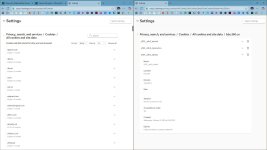
It cannot be deleted even manually.Yes, size does not matter, it is there and that is that.

I have something like that after exit:
View attachment 292752Is it considered left behind cookies (0 bytes)?
Go to site permissions and see if you have changed a permission for zoho.com.
Delete the change and the cookie should be deleted.
Already performed what you have recommended, but still undeletable.Go to site permissions and see if you have changed a permission for zoho.com.
Delete the change and the cookie should be deleted.
Have you tried manually deleting all the data?Already performed what you have recommended, but still undeletable.
Anyway, even though I used Edge with Windows 10, after switching to Windows 11 I preferred to use Chrome.
I had too many stupid problems.
Yes, this works, but I have to log out of all my accounts; not convenient.Have you tried manually deleting all the data?

Edge has become scareware and is totally unusable. Firefox, Brave and Chrome are the only suitable options.Clearing cookies on exit bug still not fixed. I have cookies going back to 15th of October.
I will wait for 143, if not fixed, I will use WDC to exclude cookies, it is tedious, but what can I do?

Speaking of which, I just started using Brave today, so far so good. I find it loads web pages much faster then Firefox.Edge has become scareware and is totally unusable. Firefox, Brave and Chrome are the only suitable options.
Recently browsing
Members who viewed this thread in the last 5 minutes
You may also like...
-

-
-

- S
-