
Nothing really there... only O&O's disable user feedback.Open regedit, navigate to this registry key: Computer\HKEY_LOCAL_MACHINE\SOFTWARE\Policies\Microsoft\Edge


Open MalwareTips from your Home Screen or desktop. Follow discussions, find answers and pick up where you left off.
If you cannot find an install option, update your browser or use its bookmark option to keep MalwareTips close.
After installation, open the app and sign in. Enable push notifications in Preferences if you want alerts. On iPhone and iPad, push requires a Home Screen web app and iOS or iPadOS 16.4 or later.
Sign in to manage notificationsInstallation is optional. Your notification settings stay under your control.
 Thread starter
eonline
Thread starter
eonline
Nothing really there... only O&O's disable user feedback.Open regedit, navigate to this registry key: Computer\HKEY_LOCAL_MACHINE\SOFTWARE\Policies\Microsoft\Edge

FWIW ~ on my new Edge with O&O 1.7.1408Interesting that I see this now in Edge Settings

It's not present under Chrome (and I'm the sole user here... no "org").



 threatpost.com

Did you try to restore the default Edge settings? (Settings >> Settings Menu >> Reset settings). You should also reset to default the tweaked settings via Edge://flags (use 'Reset All' in Edge://flags).Just to follow-up on my post earlier to get speechtexterDOTcom working on Edge, I did the following...
As for SpeechTexter... no go. I quit
- returned O&O ShutUp to Windows defaults, rebooted... no success
- returned Configure Defender to Windows defaults, rebooted... no success
- reset Edge to defaults, rebooted... no success
- uninstalled Edge, rebooted reinstalled Edge, no extensions activated, no success
- ran mic test on Edge here... success
And it was...Got an update to version 80.0.361.62 today.
No changelog yet.
Hope it's an update for:
Google Patches Chrome Browser Zero-Day Bug, Under Attack
Google patches zero-day bug tied to memory corruptions found inside the Chrome browser's open-source JavaScript and Web Assembly engine, called V8.
| Microsoft Edge Version | Date Released | Based on Chromium Version | Chrome Release Blog | Highest Severity Fix in Release | CVEs |
|---|---|---|---|---|---|
| 80.0.361.62 | 2/25/2020 | 80.0.3987.122 | Chrome Releases Blog | High | CVE-2020-6407, CVE-2020-6418 * |
I reset Edge settings without effect. I missed "flags"... Though I just did this and still no relief.Did you try to restore the default Edge settings? (Settings >> Settings Menu >> Reset settings). You should also reset to default the tweaked settings via Edge://flags (use 'Reset All' in Edge://flags).


 blogs.windows.com
I just wanted to post the same...Protecting users from potentially unwanted applications in Microsoft Edge
Our customer feedback tells us that when users search for free versions of software, they often find applications with a poor reputation being installed on the machine at the same time. This pattern indicates that the user has downloaded an application which shows offers (or bundles) for...
IMO this is a good move from MS. 
Chromium-based Edge doesn't run in the background if you change the setting "Continue running background apps when Microsoft Edge is closed" in edge://settings/system like all other chromium-based browsers.A question.
You have Prevent Edge from running in background?
But does the setting work or do you have to resort to Debotnet?
Chromium-based Edge doesn't run in the background if you change the setting "Continue running background apps when Microsoft Edge is closed" in edge://settings/system like all other chromium-based browsers.
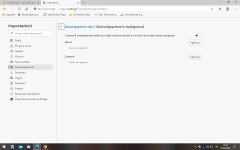

That was great information as the non chromium Edge sadly does, but O&O added an option to kill that and it works perfect.Chromium-based Edge doesn't run in the background if you change the setting "Continue running background apps when Microsoft Edge is closed" in edge://settings/system like all other chromium-based browsers.

 malwaretips.com
That setting on or off doesn't make a difference for me. There is no running in the background on my system.
Those options are not in the recommended settings of O&O ShutUp10 and not needed when changing the setting I mentioned here:That was great information as the non chromium Edge sadly does, but O&O added an option to kill that and it works perfect.
O&O ShutUp10 v1.7.1408 | MalwareTips
1.7.1408 – released February 24, 2020 NEW: Deactivate automatic saving and filling of credit card data NEW: Deactivate the start of Microsoft Edge in the...
malwaretips.com

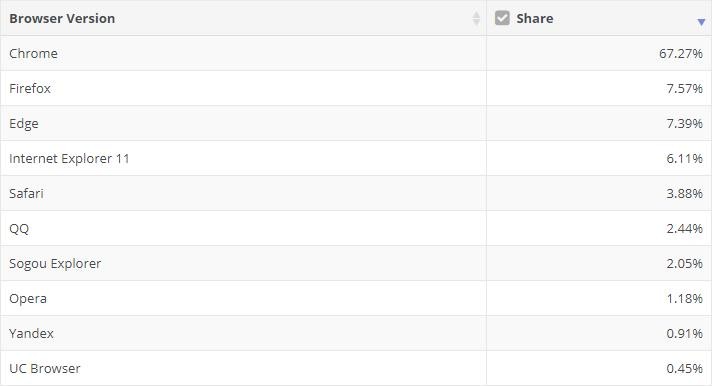
The adoption of the new Microsoft Edge browser keeps improving as more users consider the Chromium-based version a worthy alternative to the likes of Google Chrome and Mozilla Firefox.
But according to new data provided by NetMarketShare for the month of February, it looks like Firefox is the one that’s the most affected by the arrival of the new Edge, as its market share fell substantially in the last few weeks.
In other words, Microsoft Edge is now very close to becoming the world’s second most-used desktop browser, with Firefox likely to drop to third place as soon as the next month.
Members who viewed this thread in the last 5 minutes


