

The MalwareTips app
Your community, one tap away.
Open MalwareTips from your Home Screen or desktop. Follow discussions, find answers and pick up where you left off.
- Home Screen access
- Optional push alerts
- Your community
You're ready to explore.Explore what's new
Installation instructions
iPhone & iPad
- Open MalwareTips in Safari and tap Share. You may need to open the Page Menu first.
- Choose Add to Home Screen. If it is not listed, use Edit Actions to add it.
- Keep Open as Web App enabled if shown, then tap Add.
Android
- Open MalwareTips in Chrome or another browser that supports app installation.
- Open the browser menu and look for Install app, Install and create shortcut, or Add to Home screen.
- Choose Install and confirm. Wording varies by browser.
Desktop
- Chrome: use the install icon in the address bar, or the menu under Cast, save and share.
- Edge: open the menu, then More tools, Apps and Install this site as an app.
- Safari on Mac: choose Share or File, then Add to Dock. Firefox on Windows: look for the web apps button in the address bar.
If you cannot find an install option, update your browser or use its bookmark option to keep MalwareTips close.
Keep up with your conversations
After installation, open the app and sign in. Enable push notifications in Preferences if you want alerts. On iPhone and iPad, push requires a Home Screen web app and iOS or iPadOS 16.4 or later.
Sign in to manage notificationsInstallation is optional. Your notification settings stay under your control.
You are using an out of date browser. It may not display this or other websites correctly.
You should upgrade or use an alternative browser.
You should upgrade or use an alternative browser.
Serious Discussion Microsoft Edge Stable (Chromium) Now Available for Download
- Thread starter eonline
- Start date
- Featured
Microsoft Edge
3,075 Replies
643,455 Views


Problem solved:
Error code 0x80070679
I unintentionally applied strict CFG to Edge in Exploit protection settings.
BTW: The above link is a great source for identifying error codes.
Error code 0x80070679
FACILITY_WIN32 Error List - Provides a way to handle error codes from functions in the Win32 API as an HRESULT. (Error codes in 16 - bit OLE that duplicated Win32 error codes have also been changed to FACILITY_WIN32) - HRESULT.infoThe specified image file was blocked from loading because it does not enable a feature required by the process: Control Flow Guard.
I unintentionally applied strict CFG to Edge in Exploit protection settings.
BTW: The above link is a great source for identifying error codes.

Version 98.0.1108.62: February 24
 msrc.microsoft.com
Release notes for Microsoft Edge Security Updates
Release notes for Microsoft Edge Security Updates
Security Update Guide - Microsoft Security Response Center
msrc.microsoft.com
No new bloat or flags that I'm aware of.Version 98.0.1108.62: February 24

Gandalf_The_Grey
Level 86
Verified
Honorary Member
Top Poster
Content Creator
Well-known
Forum Veteran
No, only the usual:

Fixed various bugs and performance issues for Stable and Extended Stable release.
Microsoft Edge release notes for Stable Channel
Microsoft Edge release note for the Stable Channel
docs.microsoft.com

I feel like MS is actively trying to be as annoying as possible. Got another pop-up
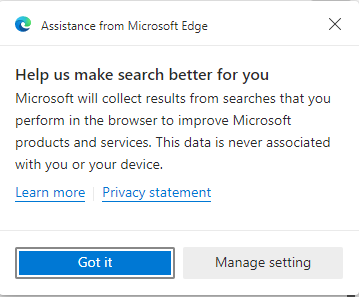

Got another pop-up
It's nothing. The data is never associated with you or your device. Edge is just offering its assistance

Version 99.0.1150.30: March 03
Feature updates
- Upcoming three-digit version number in user agent string. Starting with version 100, Microsoft Edge will send a three-digit version number in the User-Agent header, for example "Edg/100". Starting with Microsoft Edge 97, site owners can test this upcoming agent string by enabling the #force-major-version-to-100 experiment flag in edge://flags to ensure their User-Agent parsing logic is robust and works as expected.
- Personalize multi-profile experiences with profile preferences for sites. Users can personalize their multi-profile experience with the ability to create a customized list of sites for automatic profile switching in Microsoft Edge.
- Navigate PDF documents using page thumbnails. You'll now be able to navigate through your PDF document using thumbnails that represent the pages. These thumbnails will appear in the pane on the left side of the PDF reader.
- Configure the list of domains for which the password manager User Interface (UI) for Save and Fill will be disabled. Use the PasswordManagerBlocklist policy to configure the list of domains (HTTP/HTTPS schemas and hostnames only) where Microsoft Edge should disable the password manager. This means that Save and Fill workflows will be disabled, which ensures that passwords for those websites can’t be saved or auto filled into web forms.
- Custom primary password. The browser already has the capability where users can add an authentication step before saved passwords are auto filled in web forms. This adds another layer of privacy and helps prevent unauthorized users from using saved passwords to log on websites. Custom primary password is an evolution of that same feature, where users will now be able to use a custom string of their choice as their primary password. After it's enabled, users will enter this password to authenticate themselves and have their saved passwords auto filled into web forms.
Microsoft Edge release notes for Stable Channel
Microsoft Edge release notes for Stable Channel
docs.microsoft.com
Release notes for Microsoft Edge Security Updates
Release notes for Microsoft Edge Security Updates
Security Update Guide - Microsoft Security Response Center
msrc.microsoft.com

Microsoft Edge 99 is here with custom primary passwords and preparations for v100
Microsoft is also prepping for the imminent release of Microsoft Edge version in this release, with the company noting that:
Starting with version 100, Microsoft Edge will send a three-digit version number in the User-Agent header, for example "Edg/100". Starting with Microsoft Edge 97, site owners can test this upcoming agent string by enabling the #force-major-version-to-100 experiment flag in edge://flags to ensure their User-Agent parsing logic is robust and works as expected.
_story.jpg)
Microsoft Edge 99 is here with custom primary passwords and preparations for v100
Microsoft has released version 99 of its Edge browser to the Stable channel. The latest build packs support for custom primary passwords, PDF enhancements, and preparations for version 100.
 www.neowin.net
Gandalf_The_Grey
Level 86
Verified
Honorary Member
Top Poster
Content Creator
Well-known
Forum Veteran
Version 99.0.1150.36: March 7
Fixed various bugs and performance issues.
Microsoft Edge release notes for Stable Channel
Microsoft Edge release note for the Stable Channel
docs.microsoft.com

I really do not know why every 2 or 3 days all settings are restarted and a welcome message arrives !
There is no problem with cookies !
I thought there was a problem with the profile and sign out !But again the same problem ...
I completely deleted the browser and reinstall but again after 1 day everything was reset
There is no problem with cookies !
I thought there was a problem with the profile and sign out !But again the same problem ...
I completely deleted the browser and reinstall but again after 1 day everything was reset
Looks like your user profile is might be corrupted, just try to create a new Edge user profile, that may helps!?I really do not know why every 2 or 3 days all settings are restarted and a welcome message arrives !
There is no problem with cookies !
I thought there was a problem with the profile and sign out !But again the same problem ...
I completely deleted the browser and reinstall but again after 1 day everything was reset
Version 99.0.1150.39: March 10
Fixed various bugs and performance issues.
Microsoft Edge release notes for Stable Channel
Microsoft Edge release notes for Stable Channel
docs.microsoft.com
Efficiency mode is designed to help extend battery life. It minimizes power usage by reducing resource usage (CPU usage) through modifying certain tab activity on tabs you’re not interacting with and putting inactive background tabs to sleep after 5 minutes or less.
Efficiency mode comes with a number of preferences that users may change to customize the feature. In fact, all settings can be modified even if efficiency mode is not enabled.
- Save resources with sleeping tabs -- The feature unloads inactive tabs to free up memory and improve performance.
- Fade sleeping tabs -- All sleeping tabs are displayed faded for better identification-
- Put inactive tabs to sleep after the specified amount of time -- 5 minutes by default and fixed to that period if efficiency mode is enabled. With efficiency mode disabled, other periods may be selected.
- Never put these sites to sleep -- Add sites to the exclusion list to never have them put to sleep by Edge.
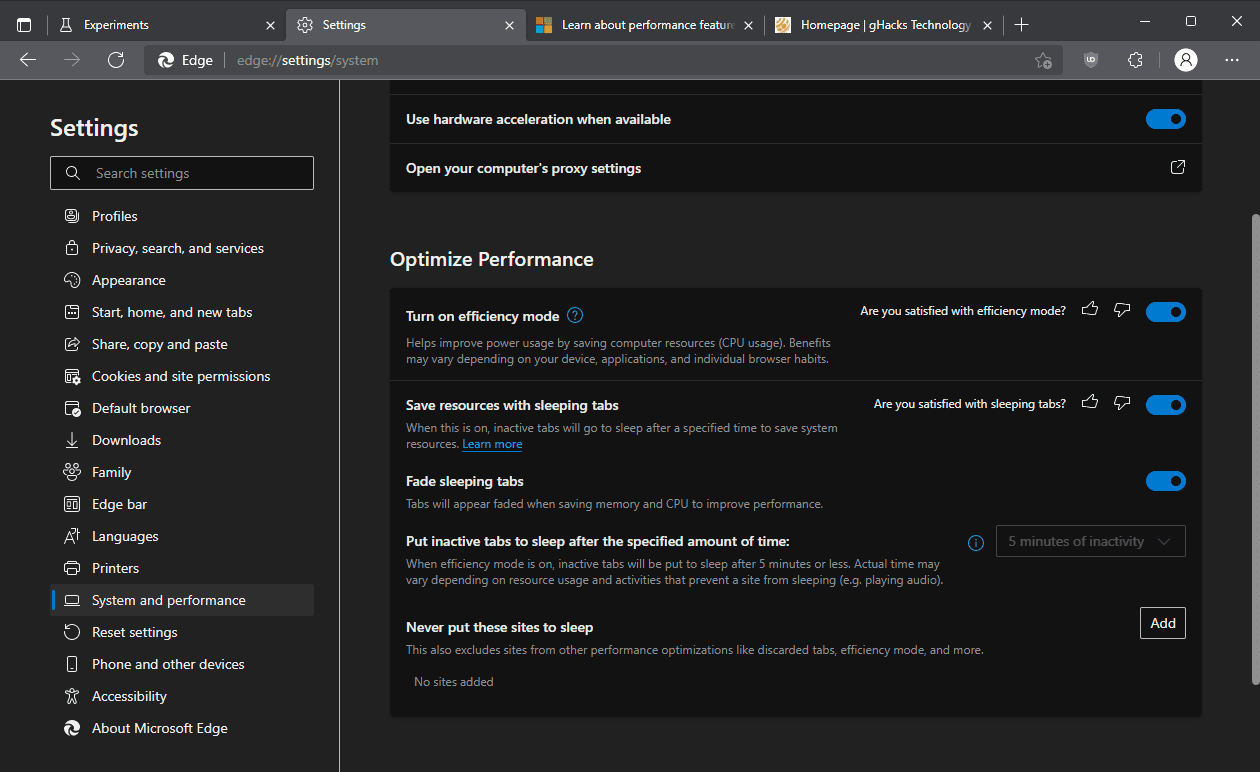
Improve Microsoft Edge power usage and performance by turning on Efficiency Mode - gHacks Tech News
Microsoft Edge users who use the browser on mobile or low-performance devices may enable efficiency mode to improve the browser's performance.
 www.ghacks.net

Microsoft announces auto-generated captions for images in Edge
Microsoft announced a new accessibility feature for its browser. Edge users who rely on assistive technologies and screen readers now can utilize auto-generated captions for unlabeled images.
www.neowin.net
If you want to try auto-generated captions in Microsoft Edge, update your browser to the latest version and navigate to Settings > Accessibility, then toggle on the "Get image descriptions from Microsoft for screen readers" feature. For now, it is available in Microsoft Edge for Windows, Linux, and macOS.
Version 99.0.1150.46: March 17
Microsoft Edge release notes for Stable Channel
docs.microsoft.com
Gandalf_The_Grey
Level 86
Verified
Honorary Member
Top Poster
Content Creator
Well-known
Forum Veteran
Version 99.0.1150.46: March 17
Microsoft has released the latest Microsoft Edge Stable Channel (Version 99.0.1150.46), which incorporates the latest Security Updates of the Chromium project. For more information, see the Security Update Guide.
This update contains the following Microsoft Edge-specific update:
Microsoft Edge Version Date Released Based on Chromium Version 99.0.1150.46 3/17/2022 99.0.4844.74
Gandalf_The_Grey
Level 86
Verified
Honorary Member
Top Poster
Content Creator
Well-known
Forum Veteran
An annoying bug in the current stable version:
 techcommunity.microsoft.com
How Do I Arrange My Extensions?
I have many extensions/add-ons. I need to have the ones most used to the left so they do not disappear when I resize my browser horizontally, for example, Lastpass. I can find no mention of arranging them but when I left click and drag an extension, it changes to an insertion and the other "icons" seem to move to make room. But when I release the drag, the one I was dragging has not moved, but is now a blank space. If I hover over it, it is still there but invisible.
How Do I Arrange My Extensions? | Microsoft Community Hub
I have many extensions/add-ons. I need to have the ones most used to the left so they do not disappear when I resize my browser horizontally, for...
techcommunity.microsoft.com
Refreshing the page corrects it, but still a bug.An annoying bug in the current stable version:
How Do I Arrange My Extensions? | Microsoft Community Hub
I have many extensions/add-ons. I need to have the ones most used to the left so they do not disappear when I resize my browser horizontally, for...

Microsoft Edge gets a bunch of new PDF Features
Microsoft is carrying on its good work to make PDF Viewer/Reader in the new Microsoft Edge better or equal with Edge Legacy. Till now the company has brought most of the requested PDF features, now it is adding more such as Document properties, Presentation mode, Thumbnail view, and more...
 techdows.com
Recently browsing
Members who viewed this thread in the last 5 minutes
You may also like...
-

-
-

- S
-