

The MalwareTips app
Your community, one tap away.
Open MalwareTips from your Home Screen or desktop. Follow discussions, find answers and pick up where you left off.
- Home Screen access
- Optional push alerts
- Your community
You're ready to explore.Explore what's new
Installation instructions
iPhone & iPad
- Open MalwareTips in Safari and tap Share. You may need to open the Page Menu first.
- Choose Add to Home Screen. If it is not listed, use Edit Actions to add it.
- Keep Open as Web App enabled if shown, then tap Add.
Android
- Open MalwareTips in Chrome or another browser that supports app installation.
- Open the browser menu and look for Install app, Install and create shortcut, or Add to Home screen.
- Choose Install and confirm. Wording varies by browser.
Desktop
- Chrome: use the install icon in the address bar, or the menu under Cast, save and share.
- Edge: open the menu, then More tools, Apps and Install this site as an app.
- Safari on Mac: choose Share or File, then Add to Dock. Firefox on Windows: look for the web apps button in the address bar.
If you cannot find an install option, update your browser or use its bookmark option to keep MalwareTips close.
Keep up with your conversations
After installation, open the app and sign in. Enable push notifications in Preferences if you want alerts. On iPhone and iPad, push requires a Home Screen web app and iOS or iPadOS 16.4 or later.
Sign in to manage notificationsInstallation is optional. Your notification settings stay under your control.
You are using an out of date browser. It may not display this or other websites correctly.
You should upgrade or use an alternative browser.
You should upgrade or use an alternative browser.
Microsoft looks ready to launch Windows 11
-
 Thread starter
SeriousHoax
Thread starter
SeriousHoax
- Start date
- 214 Replies
- 49,143 Views

Windows Store apps can be sideloaded easily so probably the same would happen for Android apps sooner or later though it won't be recommended I believe.
[/QUOTE] You will have to get an amazon account to use android apps on windows because they will come from the amazon app store.
hxxps://www.youtube.com/watch?v=VaSstf9VJGQ
[/QUOTE] You will have to get an amazon account to use android apps on windows because they will come from the amazon app store.
hxxps://www.youtube.com/watch?v=VaSstf9VJGQ


upgrading is tempting thoughI'm sticking with Win 10 for at least another 3 years....!!

Setup PCPC setup
Ooooo, this is getting ugly. What the heck is the mad rush, MS? Hmmm? I just got kicked out of the Insiders Beta program. What's more, it was done completely in the background, I never knew it was happening. Wow!!
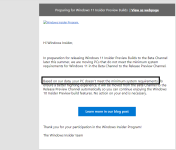
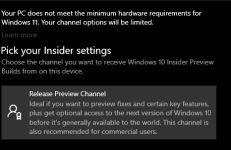
I'm smelling a rat, Microsoft has historically NEVER moved so quickly on anything. Not even some CVs.
What's more, it was done completely in the background, I never knew it was happening. Wow!!I'm smelling a rat, Microsoft has historically NEVER moved so quickly on anything. Not even some CVs.

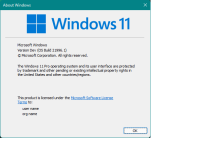

Going to boyscott Microsoft for the turn on tpm to run Windows 11 requirement. I wonder what kind of backdoor Microsoft is hiding.
F
ForgottenSeer 85179
Really? Conspiracy theories?Going to boyscott Microsoft for the turn on tpm to run Windows 11 requirement. I wonder what kind of backdoor Microsoft is hiding.
TPM is a standard and isn’t created by Microsoft.

What the ****! This is disgusting, awful. Refusing to update is one thing but simply kicking you out of the beta channel is horrible.Ooooo, this is getting ugly. What the heck is the mad rush, MS? Hmmm? I just got kicked out of the Insiders Beta program.
I'm smelling a rat, Microsoft has historically NEVER moved so quickly on anything. Not even some CVs.
But no problem. You have ordered your TPM module, right? So you'll be able to join again when it arrives and even install 11 from the upcoming ISO.

I think they wants a security like AppleGoing to boyscott Microsoft for the turn on tpm to run Windows 11 requirement. I wonder what kind of backdoor Microsoft is hiding.


The only way to do that is to sell windows as a set with a Microsoft pc.I think they wants a security like Apple
I think it's a big advantage of Apple that the body and mind are provided together. Microsoft offers only the mind. This time 11 is that you were asked for the function of a young body called tpm.
By 2025, I'm guessing there could be an additional OS for older hardware, such as the limited functionality 11s.
Setup PCPC setup
What the ****! This is disgusting, awful. Refusing to update is one thing but simply kicking you out of the beta channel is horrible.
But no problem. You have ordered your TPM module, right? So you'll be able to join again when it arrives and even install 11 from the upcoming ISO.
Awww, thank you for the support, SeriousHoax, it was quite a surprise and not a pleasant one.

I posted an update to that in the other Windows 11 thread. Turns out someone helped me locate the TPM 2.0 in the BIOS so I was able to not only get reinstated (not that it matters anymore) but install Windows 11. It's not up to the hype, imo. It's OK, though, a side-upgrade from 10 in my opinion, with mainly cosmetic changes. The new Start Menu is nice.
Now I'm reading about scalpers and TPMs already. Human nature at its finest!

What? he ordered it? why hurry up? lets see what happens once Windows 11 final outWhat the ****! This is disgusting, awful. Refusing to update is one thing but simply kicking you out of the beta channel is horrible.
But no problem. You have ordered your TPM module, right? So you'll be able to join again when it arrives and even install 11 from the upcoming ISO.
By 2025, I'm guessing there could be an additional OS for older hardware, such as the limited functionality 11s.
I feel like that Older CPUs users make a thread in Microsoft community about TPM maybe Microsoft CEO change his mind and remove TPM or something like this
Setup PCPC setup
It seems there's an additional service that starts up when you have TPM enabled. I found this via msconfig--it wasn't in the Task Manager list of Services.
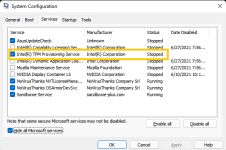
I guess with the TPM requirement, this Intel (or AMD) service must be kept enabled. Also found out Paint (Just Paint) is no longer in the right-click context menu but I still got it by searching and pinning it to taskbar.
Yes, SHE did. SHE will install it when it arrives later this week. Shouldn't be difficult.
I guess with the TPM requirement, this Intel (or AMD) service must be kept enabled. Also found out Paint (Just Paint) is no longer in the right-click context menu but I still got it by searching and pinning it to taskbar.
What? he ordered it?
Yes, SHE did. SHE will install it when it arrives later this week. Shouldn't be difficult.
I'm not seeing any extra service on my AMD system (Windows 10). Maybe it's an Intel-related thing or something new in Windows 11.It seems there's an additional service that starts up when you have TPM enabled. I found this via msconfig--it wasn't in the Task Manager list of Services.
View attachment 259359
I guess with the TPM requirement, this Intel (or AMD) service must be kept enabled. Also found out Paint (Just Paint) is no longer in the right-click context menu but I still got it by searching and pinning it to taskbar.
Yes, SHE did. SHE will install it when it arrives later this week. Shouldn't be difficult.
Surprised that paint is absent there. But keep in mind, you installed an early build that is incomplete and missing features. Even design-wise it doesn't have some features the official one will have. So we will have to wait till the insider build comes out to fully experience all the changes. Even then I read somewhere that features like installing Android apps might not be present in the insider build.
F
ForgottenSeer 85179
On AMD there isn't such a thing.It seems there's an additional service that starts up when you have TPM enabled. I found this via msconfig--it wasn't in the Task Manager list of Services.
View attachment 259359
I guess with the TPM requirement, this Intel (or AMD) service must be kept enabled. Also found out Paint (Just Paint) is no longer in the right-click context menu but I still got it by searching and pinning it to taskbar.
Guess it's from some OEM package you installed. TPM is hardware and extra software isn't needed to use it.
Setup PCPC setup
I'm not seeing any extra service on my AMD system (Windows 10). Maybe it's an Intel-related thing or something new in Windows 11.
Surprised that paint is absent there. But keep in mind, you installed an early build that is incomplete and missing features.
You're right about the build--it's so easy to forget that this is only the beginning and things will change. However, maybe it's Paint 3D you're thinking of? MS did relegate that to Store app only but it's still in my Start menu. So it's gonna take time to straighten things out, it's too early. I use the regular Paint much more often so it's nice to see it's still there, just not as accessible.
I've had the three Intel Services in the last build of Windows 10 but they were disabled by me because they impeded shutdown on here. However, with the TPM requirement and Windows 11, I'm choosing to keep the Provisioning service enabled. It's a risk when you install leaked builds like this and I'm willing to take the risk.
I'm thinking it's a by-product of the Intel Management Engine Interface or something like that. my TPM was likewise enable in the BIOS, no problems.Guess it's from some OEM package you installed. TPM is hardware and extra software isn't needed to use it.
Recently browsing
Members who viewed this thread in the last 5 minutes

