
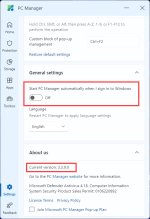
Do you have a direct download link?I have a copy of PC Manager from the Microsoft Store. Today, it was automatically updated to 3.3.9.0.


Open MalwareTips from your Home Screen or desktop. Follow discussions, find answers and pick up where you left off.
If you cannot find an install option, update your browser or use its bookmark option to keep MalwareTips close.
After installation, open the app and sign in. Enable push notifications in Preferences if you want alerts. On iPhone and iPad, push requires a Home Screen web app and iOS or iPadOS 16.4 or later.
Sign in to manage notificationsInstallation is optional. Your notification settings stay under your control.
Do you have a direct download link?I have a copy of PC Manager from the Microsoft Store. Today, it was automatically updated to 3.3.9.0.
Just go to your Microsoft Store and type PC Manager....This version seems to be a stable one...Do you have a direct download link?

It seems to me that they have just lumped together all the functions that have been normally available and made them easier to use.
I think it would have been a bit of a buzz if we had incorporated a registry cleanup.

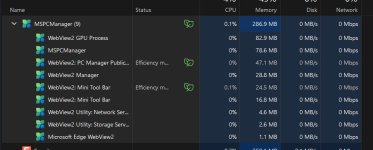
But at least now we have that as an option.Why does it delete prefetch? Isn't prefetch's job is to make things load a bit faster?
How do you disable the Microsoft periodic scanning it enables? i have tried to manually open windows security to disable it and it still shows up every time i restart L0L. unticking the setting is not working.
They got rid of the ability to make the UI dark Themed my eyes are burning every time i open the GUI lol.You're right, nice catch @nickstar1. It will only stay disabled if you uninstall PC Manager. It probably has to stay on, enabled, to allow the scan. I couldn't find a way to disable it in the PC Manager settings, either.
lol...I submitted that very thing from the Feedback tab. To make it the same as the Windows theme, or a dark mode option.They got rid of the ability to make the UI dark Themed my eyes are burning every time i open the GUI lol.

What a waste of time. I got tired of the BS and uninstalled it..I submitted that very thing from the Feedback tab.

If it's as smart as some cleaning tools out there, it will delete prefetch files from software you uninstalled only. I haven't really tested it so I don't know if that's the case.Why does it delete prefetch? Isn't prefetch's job is to make things load a bit faster?
We'll see how long I last with itWhat a waste of time. I got tired of the BS and uninstalled it.
I meant the Feedback Hub, just to make sure we're on the same page.We'll see how long I last with it
Thank you for your thoughtfulness in posting thatI meant the Feedback Hub, just to make sure we're on the same page.


 www.neowin.net



the link you provided opens to a blank blue page here, or is being blockedMicrosoft PC Manager 3.3.14.0
Download from Microsoft Store: Microsoft PC Manager - Official app in the Microsoft Store
Homepage: Antivirus, Cleanup PC, protection for your computer | Microsoft PC Manager
running msDefender+ WHHL
Running Defender and WHHL here and both pages work for me, must be something else on your end.the link you provided opens to a blank blue page here, or is being blocked
thanks, I'll dig a little deeper and try another browser...Running Defender and WHHL here and both pages work for me, must be something else on your end.
Using Chrome I must add.thanks, I'll dig a little deeper and try another browser...
Members who viewed this thread in the last 5 minutes

