Basic Security Moonhorse Security Config 2022

Last updated
Jan 1, 2022
Main use of this computer
For sharing
Operating system
Linux
OS version and support details
Pop OS!
On-device encryption
Device sign-in security
Security updates
Allow security updates and latest features
Smart App Control
Network firewall
Real-time protection
None
Device firewall
Custom security settings
None
Periodic malware scanners
ClamTK
Malware sample testing
I do not participate in malware testing
Browsers and extensions
Brave browser
- Bitwarden

Brave search
Secure DNS
Cloudflare DNS
Desktop VPN
None
Password and passkey manager
Bitwarden
Maintenance tools
None
File and photo backups
None yet
System recovery
None yet
Usage and exposure
    • Working from home
    • Visiting familiar websites
    • Logging into my bank account
    • Gaming
Computer specs
Asus m5a97 R2.0
amd fx 6300
Geforce gtx 970
Feedback preference

Only essential issues, please

Moonhorse

Level 40
Verified
Top Poster
Content Creator
Well-known
Forum Veteran
My starter setup for 2022

Linux distro: Pop OS!
Browser : brave browser
Extensions : bitwarden
Browser search engine: Brave Search

On demand scanner: ClamTK daily scan scheduled

Maybe looking for backupper software , im going to upgrade desktop to windows 11 after linux ( buying new desktop)

Unless i burnout after week and go back to windows 10 :)
 
Two questions
1. Do you use cloudflare 1.1.1.1 or 1.1.1.2 (no-malware)?

2. Why PopOS, would be interesting why you choose this distro?

Thx /K
I use default 1.1.1.1

Pop os is kind of meant for ''gaming'' you can choose if it comes with preinstalled nvidia driver or not

It feels like windows , i have tried mint + elementaryOS ..but the pop os is different somehow

What i have learnt is that im using dual boot, i have both linux + windows installed so i dont have to clean install

I like using linux , it gives mind of peace by being privacy os...but in otherhand my OCD really gets worse as im unsure about using os wich has not antivirus
 
I tried PopOS yesterday evening on USB stick. Everything worked, which is good, because I tried a few distro's which did not recognise my soundbar or did not load (probably due to strange Xeon CPU and a M2 SSD in a PCI-adaptor). PopOS startup of Firefox took 2-3 secs. Do you know whether the 'try it from USB' creates a RAM-disk (some distro's do to make the testdrive blazing fast)?
 
I tried PopOS yesterday evening on USB stick. Everything worked, which is good, because I tried a few distro's which did not recognise my soundbar or did not load (probably due to strange Xeon CPU and a M2 SSD in a PCI-adaptor). PopOS startup of Firefox took 2-3 secs. Do you know whether the 'try it from USB' creates a RAM-disk (some distro's do to make the testdrive blazing fast)?
Unsure about that, but i have broken 2 usb sticks now..by flashing linux on usb stick > then running windows and formatting usb stick makes it not to work anymore, well sticks cost like 3 usd for 32gt but still

I have soundbar, but i dont have tested that, for me the drivers are found itself for everything else
About pop os, first time i tried it i had to unlock 240 hz on about:config @ firefox and run a code for chromium browsers. Nowadays i dont have to do that as it clocks browser speed into 240 hz without tuning

Sorry im not that techy guy like many people here, im just messing with tech and often run into problems :LOL:
 
Last edited:
Unsure about that, but i have broken 2 usb sticks now..by flashing linux on usb stick > then running windows and formatting usb stick makes it not to work anymore, well sticks cost like 3 usd for 32gt but still

I have soundbar, but i dont have tested that, for me the drivers are found itself for everything else
About pop os, first time i tried it i had to unlock 240 hz on about:config @ firefox and run a code for chromium browsers. Nowadays i dont have to do that as it clocks browser speed into 240 hz without tuning

Sorry im not that techy guy like many people here, im just messing with tech and often run into problems :LOL:
You are not the only one who has trouble with usb sticks and Linux:
The solution there is InitDisk:
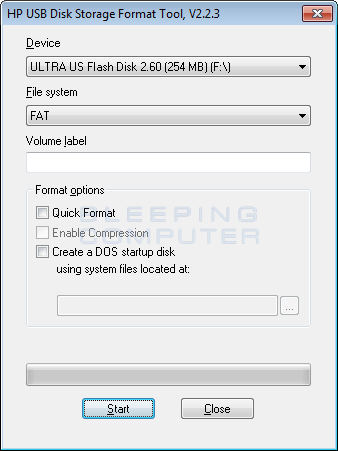
I used the HP USB Disk Storage Format Tool with succes in the past:
 

Recently browsing

Members who viewed this thread in the last 5 minutes

You may also like...

Continue exploring the conversation.

Back
Top