Basic Security Moonhorse's config 2018

Last updated
Dec 11, 2018
Windows Edition
Home
Security updates
Allow security updates and latest features
User Access Control
Always notify
Real-time security
Comodo Cloud Antivirus
Firewall security
Periodic malware scanners
Malwarebytes free
Malwarebytes adwcleaner
Norton power eraser
Zemana antimalware
Roguekiller antimalware
EEK
Malware sample testing
I do not participate in malware testing
Browser(s) and extensions
Chrome :
- Nano adblocker
- Nano defender
- Netcraft
- Bitwarden
Maintenance tools
Geek uninstaller
Bleachbit
Virustotal uploader 2.2
File and Photo backup
External hard drive for pictures etc.
System recovery
Usb
Computer specs
https://malwaretips.com/threads/my-microwave.86080/
@Gandalf_The_Grey i did fast cleanup, i dont need malwaredomains at all, just adblocking. It would be nice if someone here on MT could build optimal adblock filterlist just only for adblocking...not sure do i even need the coinblocker filters since im using malwarebytes extension. I have disabled malwarebytes ad/tracking already. I built this pc around in 2014, 8gt ram, gtx 970, fx 6300, still having hdd. I mainly play old java game and just browse web, i think my cpu is around 30% most of time, ram sitting under 50%, i would like to render everything throught my GPU thought
View attachment 194212
@stefanos cruelsisters cf is all i need, but id like to have atleast bit of av protection or i just could schedule on-demand to run once a week. I could test 360 for fun, also avast/avg + syshardener is one option. Id like to give immunet + cf(cs) another run...Only way i could be infected is throught zero day malware from networking, but cf would kill it.

@Spawn i had it installed for short time, just had fast look what it really contains..im gonna install it now to do bit more research

If i could have browser with everything build in it, i could run it isolated with cf..not very handy but it wouldnt mess up with extensions
I use the AdGuard extension instead of uBlock/Nano with 106296 rules:
adguard filters.PNG

Maybe you van try it and see if it suits you as adblocker.
If you afterwards still want to use uBlock/Nano you can use only AdGuard filters together with the build in uBlock and/or Nano filters.
 
I have installed avg + syshardener on my daughter's PC and I am very impressed. At my pc install 360TS for fun. And now after 2 months i love it
I'd like to have avg + syshardener/avast, but the main idea would be replacing Comodo internet security with lighter opinion, cf + something. default deny everything. @Gandalf_The_Grey it always feels adguard load sites much faster than nano/ublock even its hogging bit more ram than nano does
 
  • Like
Reactions: stefanos
I'd like to have avg + syshardener/avast, but the main idea would be replacing Comodo internet security with lighter opinion, cf + something. default deny everything. @Gandalf_The_Grey it always feels adguard load sites much faster than nano/ublock even its hogging bit more ram than nano does
uBlock/Nano should be faster than AdGuard if you don't use too many filters, but personally I prefer the AdGuard extension.
 
I'd like to have avg + syshardener/avast, but the main idea would be replacing Comodo internet security with lighter opinion, cf + something. default deny everything. @Gandalf_The_Grey it always feels adguard load sites much faster than nano/ublock even its hogging bit more ram than nano does
lighter opinion cf + nothing. Is enough
 
  • Like
Reactions: Moonhorse
avastbrowser.png
Huge vouch @Spawn . Avast browser has built in adblocker with custom lists to enable/disable + ability to have chrome extensions. I think avast browser (netcraft+ bitwarden) is my new friend
 
I know im messing with my conf bit too much, shouldve been trying most softwares longer than day or two

Update:

+ clean install windows ( removed every windows app i could throught powershell) ( privacy tweaks, performance tweaks)
+ Using windows defender with windows firewall ( SysHardener settings to meet evjl rains setup + bit more (max) )
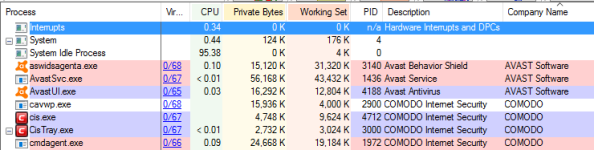
I think windows defender is less inpact for system than cis. Cis were causing constant disk usage(?)

Google chrome;
- nano defender ( only built in filters)
- Malwarebytes extension ( ad/tracker blocking disabled)
- netcraft
- bitwarden


I dont think i can get peace of mind without these extensions, they have been working well for me. No problems with browsing and also they bring basic privacy / security even bit more than that. Just basic setup, not paranoid about privacy.

+ Neustar business protection DNS ( others cant just compete with it + adult filters working better than some softwares)

+ google as search

Should i add anti-exe, anti-exploit?
Product Introduction - CheckMAL
Or malwarebytes anti-exploit beta?
voodooshield is just too heavy.
Might be useless to add, since i have ran SysHardener already

Ps. theres huge difference when opening windows or swapping between, zero inpact from microsoft when comodo had bit of inpacting
 
Last edited:
Oh god. 107000 filters? How's the ram usage?
What? Thats like nothing. Default nano is 87k, i have added few tweaks and disabled malwarebytes built in ad/tracking feature.
 
Update:
+ added comodo antivirus

Replaced windows defender with comodo antivirus. So i dont need any enti-exe. Will keep using Windows firewall + Syshardener with it
 
Antivirus replaced with cloud, default block settings
comodoo1.png


+ also added tunnelbear adblocker back to google chrome ( disabled adblocking, since i have nano already doing it)
 
Last edited:
I'm thinking of whether or not I will be uninstalling VDS. As I have despraxia, it's hard for me to remember certain things. Like setting VDS to disabled install mode when updating or installing software.

~LDogg
 
  • Like
Reactions: stefanos