Advice Request O&O ShutUp10: One setting keeps getting reset automatically?

Please provide comments and solutions that are helpful to the author of this topic.

Morro

Level 21
Thread author
Verified
Top Poster
Well-known
Forum Veteran
Jul 8, 2012
1,034
1
4,303
1,969
56
Netherlands
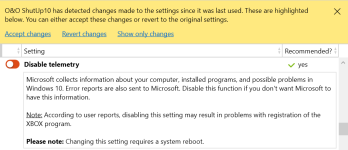
Okay, I started using O&O ShutUp10 today, and after I updated to the latest version ( Who knew, an update just after I start using it. :) ) I started the program to see if something had changed. WELL ... for some reason under the "Security" settings the "Disable Telemetry" was reset automatically some how. I had to set it to green again and restart my computer, but since then I have noticed that so far the "Disable Telemetry" was reset automatically at least 5 times now? Even once after I had reactivated the setting and had restarted my computer and did nothing for about 10 minutes on my computer ... the setting was again reset to red?

From what the program showed when I applied the recommended settings, it is possible that I would have to redo the recommended settings after a Windows update, but there has not been an update today?
 
me too
png_9503.png
1.8.1419 – released March 9, 2021
https://www.oo-software.com/en/shutup10/changelog
 
How long before 'Disable telemetry' toggles red?....
png_9505.png
.....after calling n' closing 1.8.1419 ..#4. I deleted all cfg files...then called 1.8.1419 again and set 'Disable telemetry' green. 19042.804
I'll monitor.....
 
Last edited:
How long before 'Disable telemetry' toggles red?....
View attachment 255199
.....after calling n' closing 1.8.1419 ..#4. I deleted all cfg files...then called 1.8.1419 again and set 'Disable telemetry' green. 19042.804
I'll monitor.....
Try restarting your machine
 
That setting only disables 2 services and one logger, dmwappushservice is used for notifications, so it might be reset by Windows or Defender.

capture_03102021_092834.jpg

By the way, I do not understand, why they even call it disable telemetry, when it does not even touch the basic telemetry setting (AllowTelemetry)? 🤔

Code:
rem Diagnostic and usage data - Select how much data you send to Microsoft / 0 - Security (Not aplicable on Home/Pro, it resets to Basic) / 1 - Basic / 2 - Enhanced (Hidden) / 3 - Full
reg add "HKLM\Software\Microsoft\Windows\CurrentVersion\Policies\DataCollection" /v "AllowTelemetry" /t REG_DWORD /d "0" /f
rem reg add "HKLM\Software\Microsoft\Windows\CurrentVersion\WINEVT\Channels\Microsoft-Windows-Application-Experience/Program-Telemetry" /v "Enabled" /t REG_DWORD /d "0" /f
reg add "HKLM\Software\Policies\Microsoft\Windows\DataCollection" /v "AllowDeviceNameInTelemetry" /t REG_DWORD /d "0" /f
reg add "HKLM\Software\Policies\Microsoft\Windows\DataCollection" /v "AllowTelemetry" /t REG_DWORD /d "0" /f
reg add "HKLM\Software\Policies\Microsoft\Windows\DataCollection" /v "DoNotShowFeedbackNotifications" /t REG_DWORD /d "1" /f
reg add "HKLM\Software\Policies\Microsoft\Windows\DataCollection" /v "MaxTelemetryAllowed" /t REG_DWORD /d "0" /f
reg add "HKLM\Software\Wow6432Node\Microsoft\Windows\CurrentVersion\Policies\DataCollection" /v "AllowTelemetry" /t REG_DWORD /d "0" /f
 
That setting only disables 2 services and one logger, dmwappushservice is used for notifications, so it might be reset by Windows or Defender.

View attachment 255203

By the way, I do not understand, why they even call it disable telemetry, when it does not even touch the basic telemetry setting (AllowTelemetry)? 🤔

Code:
rem Diagnostic and usage data - Select how much data you send to Microsoft / 0 - Security (Not aplicable on Home/Pro, it resets to Basic) / 1 - Basic / 2 - Enhanced (Hidden) / 3 - Full
reg add "HKLM\Software\Microsoft\Windows\CurrentVersion\Policies\DataCollection" /v "AllowTelemetry" /t REG_DWORD /d "0" /f
rem reg add "HKLM\Software\Microsoft\Windows\CurrentVersion\WINEVT\Channels\Microsoft-Windows-Application-Experience/Program-Telemetry" /v "Enabled" /t REG_DWORD /d "0" /f
reg add "HKLM\Software\Policies\Microsoft\Windows\DataCollection" /v "AllowDeviceNameInTelemetry" /t REG_DWORD /d "0" /f
reg add "HKLM\Software\Policies\Microsoft\Windows\DataCollection" /v "AllowTelemetry" /t REG_DWORD /d "0" /f
reg add "HKLM\Software\Policies\Microsoft\Windows\DataCollection" /v "DoNotShowFeedbackNotifications" /t REG_DWORD /d "1" /f
reg add "HKLM\Software\Policies\Microsoft\Windows\DataCollection" /v "MaxTelemetryAllowed" /t REG_DWORD /d "0" /f
reg add "HKLM\Software\Wow6432Node\Microsoft\Windows\CurrentVersion\Policies\DataCollection" /v "AllowTelemetry" /t REG_DWORD /d "0" /f

Well I can not be certain but in my case then, I would point to Windows since I do not use Defender as my AV but KSC Free. Then again I know nothing about stuff like that, hence the post here about it.

I am just glad that I am not the only one who noticed this happening, for a moment I thought I did something wrong.
 
  • Like
Reactions: Cortex and Venustus
I now downloaded the last version of Shutup10, and still, it gets disabled.
 
  • Like
Reactions: upnorth
People using AdGuard Windows can simply turn off telemetry in the Stealth-mode settings. I just wanted to tell, as I know that quite a lot of people are using AdGuard in this community.

View attachment 255216
My AdGuard for Windows after install, had the Stealth Setting off by default, so I didn't bother to turn it on. Because I use VPN.
 
  • Like
Reactions: Kongo and upnorth
My AdGuard for Windows after install, had the Stealth Setting off by default, so I didn't bother to turn it on. Because I use VPN.
Your VPN can encrypt your traffic and change your IP but thats about it. In the Stealth mode settings are many more things to protect your privacy. It can for example block browser API functions and also block tracking parameters in URLs. Give it a try, it will complement your VPN just fine.