Advanced Plus Security oldschool's laptop setup 2020

Last updated
Jan 4, 2020
Windows Edition
Pro
Operating system
macOS 15 Sequoia
Log-in security
Security updates
Allow security updates and latest features
User Access Control
Always notify
Real-time security
Windows Defender
VoodooShield Pro v5.57
OS hardening
Firewall security
Microsoft Defender Firewall
About custom security
ConfigureDefender @ modified High
Periodic malware scanners
Emsisoft Emergency Kit
Hitman Pro (paid)
Malware sample testing
I do not participate in malware testing
Browser(s) and extensions
Brave - hardened + built-in protection + WDBP + Netcraft
Edge Dev Chromium - hardened + µBO + Privacy Badger
Firefox - hardened + µBO + Privacy Badger + eTag Stoppa + MBBG
Maintenance tools
Windows built-in
BleachBit 3.0 - "Hilary uses it!"
RunBySmartscreen
File and Photo backup
Copy/Paste -> Free Agent Drive
System recovery
Windows built-in -> Free Agent drive (monthly)
Risk factors
    • Browsing to popular websites
    • Streaming audio/video content from shady sites
    • Browsing to unknown / untrusted / shady sites
    • Working from home
    • Streaming audio/video content from trusted sites or paid subscriptions
Computer specs
Lenovo L340 i3 8145U CPU @ 2.10 GHz 2.300 GHz 8GB DDR4 RAM 1 TB HDD
I recently gave Firefox another trial run and I just don't like it. I find very few attractive features, e.g. containers, dark mode, etc. Brave is a better option for built-in control of privacy and security for those who may be looking for a good privacy browser option (and aren't willing to go "tin foil" with Tor!). Brave makes it simple while giving you the option to increase security as desired. The Javascript blocking feature is great, giving you granular control of scripts. Put a web filtering extension like Bitdefender, etc. and you're all set. I like Edge Chromium a lot, but Brave compares very favorably!
 
@oldschool sup!

Hey, I didnt have to time to read all messages here, so idk if you already explained, but how exactly did you hardened Brave/Chrome through flags?
ty!
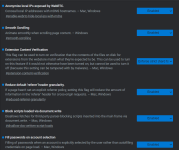
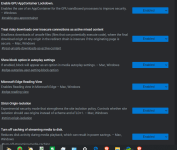
1- type Chrome://flags in omnibox
2- select the desired flag > select the options

read carefully how the flag and description are spelled. Example, if flag is "disable xxx", if you choose "enable" , you will disable the function. ;)
 
@oldschool sup!

Hey, I didnt have to time to read all messages here, so idk if you already explained, but how exactly did you hardened Brave/Chrome through flags?
ty!

Capture.PNGCapture2.PNG
 
Wich DNS are you using btw? Since edge and probably brave already support DOH on :/flags

Yes, both browsers have the flags. I'm currently using my ISP's DNS because it's a trusted local company that has good privacy ethics & net neutrality. I plan on looking into using DoH when I have time.
 
Yes, both browsers have the flags. I'm currently using my ISP's DNS because it's a trusted local company that has good privacy ethics & net neutrality. I plan on looking into using DoH when I have time.
Corrected: If you trust your ISP DoH doesn’t gain you much. (Stupid autocorrect)
 
Last edited:
Yes, on close of browser. I checked today and I am still able to read articles on that site.
So, this is likely related to cookies. As you delete cookies it can't detect whether you visited the site before or not. I use an extension which is set to delete cookies 15 seconds after I close the tab so I'll probably have similar result too.
 
So, this is likely related to cookies. As you delete cookies it can't detect whether you visited the site before or not. I use an extension which is set to delete cookies 15 seconds after I close the tab so I'll probably have similar result too.

Cookie autodelete to the rescue!
 
Did you find what processes are necessary to allow in Windows Firewall? I don't wanna use 3rd party firewalls anymore.
I saw in your early post the NoVirus Thanks connection Viewer and already downloaded. I'm still testing it but it looks like a logging program that helps to identify the connections but it shows the established connections only.
 
Last edited:
Did you find what processes are necessary to allow in Windows Firewall? I don't wanna use 3rd party firewalls anymore.
I saw in your early post the NoVirus Thanks connection Viewer and already downloaded. I'm still testing it but it looks like a logging program that helps to identify the connections but it shows the established connections only.
by default, WF allow all outbound connections, firewalls were never supposed to block outbound connections but only inbound ones.
3rd party security vendors are responsible for those outbound monitoring. They pushed it as a feature.
Personally, after a clean install, and the OS is setup, i block all outbound connections and create rules on the fly, case by case.
 
by default, WF allow all outbound connections, firewalls were never supposed to block outbound connections but only inbound ones.
3rd party security vendors are responsible for those outbound monitoring. They pushed it as a feature.
Personally, after a clean install, and the OS is setup, i block all outbound connections and create rules on the fly, case by case.

Yeah I always wanted to do the same but In native windows firewall setup it was harder. or just for me. :)
I used WFC in whitelist mode (block all outbound and inbound except those...) but I prefer no 3rd party firewall controls.
Now I exported the rules from WFC and imported in Windows Firewall.
It saved me a lot of time to make rules from scratch. It should be easy from now to allow new rules without any firewall control.
 
Yeah I always wanted to do the same but In native windows firewall setup it was harder. or just for me. :)
I used WFC in whitelist mode (block all outbound and inbound except those...) but I prefer no 3rd party firewall controls.
Now I exported the rules from WFC and imported in Windows Firewall.
It saved me a lot of time to make rules from scratch. It should be easy from now to allow new rules without any firewall control.
indeed i also used WFC this way to generate the first batch of rules then import them manually in WF after removing WFC. ;)
 
Changed search engine from StartPage -> Qwant due to privacy questions re: new ownership. Gibiru as another alternative. 👍
 
Last edited: