Thanks!It's fixed. Now you should be able to log in with Facebook.


Open MalwareTips from your Home Screen or desktop. Follow discussions, find answers and pick up where you left off.
If you cannot find an install option, update your browser or use its bookmark option to keep MalwareTips close.
After installation, open the app and sign in. Enable push notifications in Preferences if you want alerts. On iPhone and iPad, push requires a Home Screen web app and iOS or iPadOS 16.4 or later.
Sign in to manage notificationsInstallation is optional. Your notification settings stay under your control.
 Thread starter
Jack
Thread starter
Jack
Thanks!It's fixed. Now you should be able to log in with Facebook.


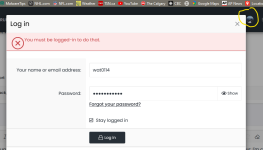
Earlier today I was working on improving the cache system, most likely a file was not correctly cached and this is why it happened.An update. The slow response is no longer happening this mosrning, bu there is other, even more bizarre behaviour; I'm clearly logged in but when I attempted to post something, I'm alerted I need to be logged in.?? Example attached below...

Thank you!Hmm it works fine for me (FF 94.0.2) since Jack fixed it...

Thank you!

Earlier today I was working on improving the cache system, most likely a file was not correctly cached and this is why it happened.
Thank you!


The same thing was happening to me on Firefox last week. Today is the first time I tried to log in since, then and it seems to be working normally.An update. The slow response is no longer happening this mosrning, bu there is other, even more bizarre behaviour; I'm clearly logged in but when I attempted to post something, I'm alerted I need to be logged in.?? Example attached below...

Thanks for bringing FB login and jackuars backThey've added a few extra steps in the app requirements to enable the log in via Facebook. I'll complete all the details later today.

The same thing was happening to me on Firefox last week. Today is the first time I tried to log in since, then and it seems to be working normally.
Yes, the server firewall detected something malicious (FP) and blocked it.Fixed the issue #653 by changing words/phrases in the text.

Is ok, I also like to burn my eye balls.@Jack don't forget your only light theme user

I keep getting the "push notifications" annoyance at the bottom of the page. I have used the Element Picker in uBlock Origin but the rule isn't holding. If I go to another part of the forum, the push notification comes right back. I tried importing specific lists for this and none of them work, not while running Firefox.
Any help or relief for this annoyance? I'm using Firefox v. 95.1. Installed Vivaldi (omG! If you're a customizing geek, this one's for YOU.), and the push notifications bar doesn't return after the Element Picker is used the first time. Is this a Firefox-specific thing?--I noticed this after upgrading to 95.1. Kinda don't want to have to roll back to 95 if at all possible.
Members who viewed this thread in the last 5 minutes