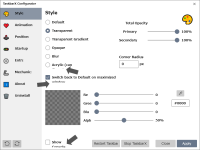
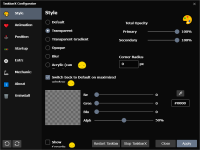
Free or premium?I use nexus dock ...



Open MalwareTips from your Home Screen or desktop. Follow discussions, find answers and pick up where you left off.
If you cannot find an install option, update your browser or use its bookmark option to keep MalwareTips close.
After installation, open the app and sign in. Enable push notifications in Preferences if you want alerts. On iPhone and iPad, push requires a Home Screen web app and iOS or iPadOS 16.4 or later.
Sign in to manage notificationsInstallation is optional. Your notification settings stay under your control.
 Thread starter
upnorth
Thread starter
upnorth
Free or premium?I use nexus dock ...
I couldn't even get it to run. Then I tried it with Rainmeter and had a negative experience. All this probably due to unfamiliarity.This software is almost useless in terms of functionality; it's all about how you like it to look.
For personalization, appearance is very significant.


I couldn't even get it to run. Then I tried it with Rainmeter and had a negative experience. All this probably due to unfamiliarity.
Yes, just harden more your PC and not even windows will run on it.
Only Voodooshield, so I can run anything.IDK what happened with RM. I broke my taskbar with TaskbarX.Negative experience with rainmeter?
I'll try again with a fresh install of RM.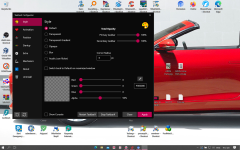
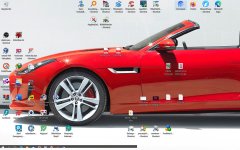
Exactly the same issue I had.TaskbarX seems to have a problem on my laptop (also the previous version)
If stop, the taskbar doesn't revert to full display

 github.com

 github.com
I'm using the TaskbarX Configurator in Win 10@oldschool ,@HarborFront
This may have nothing to do with these issues, but starting with "TaskbarX Configurator.exe" might work. I also ran "TaskbarX.exe" directly several times and failed.
@SeriousHoax
If your PC is an 11, this may be a good idea as well.
GitHub - RoundedTB/RoundedTB: Add margins, rounded corners and segments to your taskbars!
Add margins, rounded corners and segments to your taskbars! - RoundedTB/RoundedTB
I just tried it again with Rainmeter and it's now working. I had to first undo my own changes to taskbar via W10 internal settings (I was using the "Link" feature to center icons), re-start Windows Explorer by signing out and now TaskbarX works: centered icons with full transparency.@oldschool ,@HarborFront
This may have nothing to do with these issues, but starting with "TaskbarX Configurator.exe" might work. I also ran "TaskbarX.exe" directly several times and failed.
Next, I will try TaskbarX without Rainmeter. Stay tuned.
Hopefully, this procedure will solve the problem of @HarborFront . If the problem is solved, I will take today off from work to celebrate.I just tried it again with Rainmeter and it's now working. I had to first undo my own changes to taskbar via W10 internal settings, re-start Windows Explorer by signing out and now TaskbarX works: centered icons with full transparency.

Always used the configurator.exe file for both start and stop.@oldschool ,@HarborFront
This may have nothing to do with these issues, but starting with "TaskbarX Configurator.exe" might work. I also ran "TaskbarX.exe" directly several times and failed.
I finally figured that out after @show-Zi 's comment.Always used the configurator.exe file for both start and stop.
Same here. Seems like a well made app.So far has the latest version 1.7.3.0 worked fine, but I'm also still using Windows 10.
Also, I don't really understand the difference between animation effects.
I don't know if this is the right way to start it because it's my way of using it.
How to run TaskbarX on startup? Once you click apply inside the Configurator

- Check if NewsAndInterests button has a valid handle if not skip it.
- Check if Shell_TrayWnd has been found if not request it separately.
- Check if Shell_SecondaryTrayWnd has been found if not request it separately.
- Add SessionSwitch Event to detect user (sign in, sign out, lock, unlock).
- Update TaskScheduler to 2.9.3
github.com
Members who viewed this thread in the last 5 minutes