Hot Take uBlock Stripped - Dynamic Filtering is available on the webstore

Web Extensions
390 Replies 33,548 Views
Thread details
It is a non-test as posted, see picture
1791204706682.png


1791205464916.png
 
Last edited:
Pushed version 10.1.3 to the Chrome Webstore

Changes
- name change uBlock Dynamic

- replaced sensor block for local network access in Security & Privacy
1791403679431.png


- changed layout of Filter (block) lists
defauts are all safe and directed to adblocking
worry-free directed to additional tracking protection
1791403867533.png


REASON: added South America and South Korea and Japan to the scope.
Also country filter lists combine several sources (e.g. both EL and AG).

Next on the migration list = Turkish, Arabic and Jewish langauge filters plus distribution to Africa and Middle East

Fun fact: the page injection is a tiny tiny bit (theoretical) faster for 5eyes and EU+ because they are smaller scoped (not all as one, but per language)
1791404324406.png
 
Last edited:
uBlock Dynamic, as I understand it, follows AG’s logic and therefore does not block first-party CSP_report.
I’ve discovered that Brave Ad-Shields also follows this logic.;)

So it seems that uBo + uBoL (if configured with an appropriate DNR rule) are the only ones that still rely on this feature.
Although I haven't tested whether the corresponding DNR rule always works or not.
Which I think is obsolete.

Any thoughts you’d like to add?
 
Last edited:
10.1.16 is now available in CWS

1791480181866.png


Google accepted this name change. It is now (besides 5eyes & EU+) also distributed in South America, South Korea and Japan.

I pushed 10.1.17 to CWS which only has a small technical change (which has a 50% smaller scriptlet chunk on average)

Funny to see that I noticed that AdGuard moved from large chunk to small chunk (see post), but also kept the old way organizing stuff. I ran 1.10.16 for some time now it is a bit faster for people living in 5eyes & EU+ because of only their language related stuff is loaded (you won´t notice it because complex page load is only 20 to 40 ms faster).
 
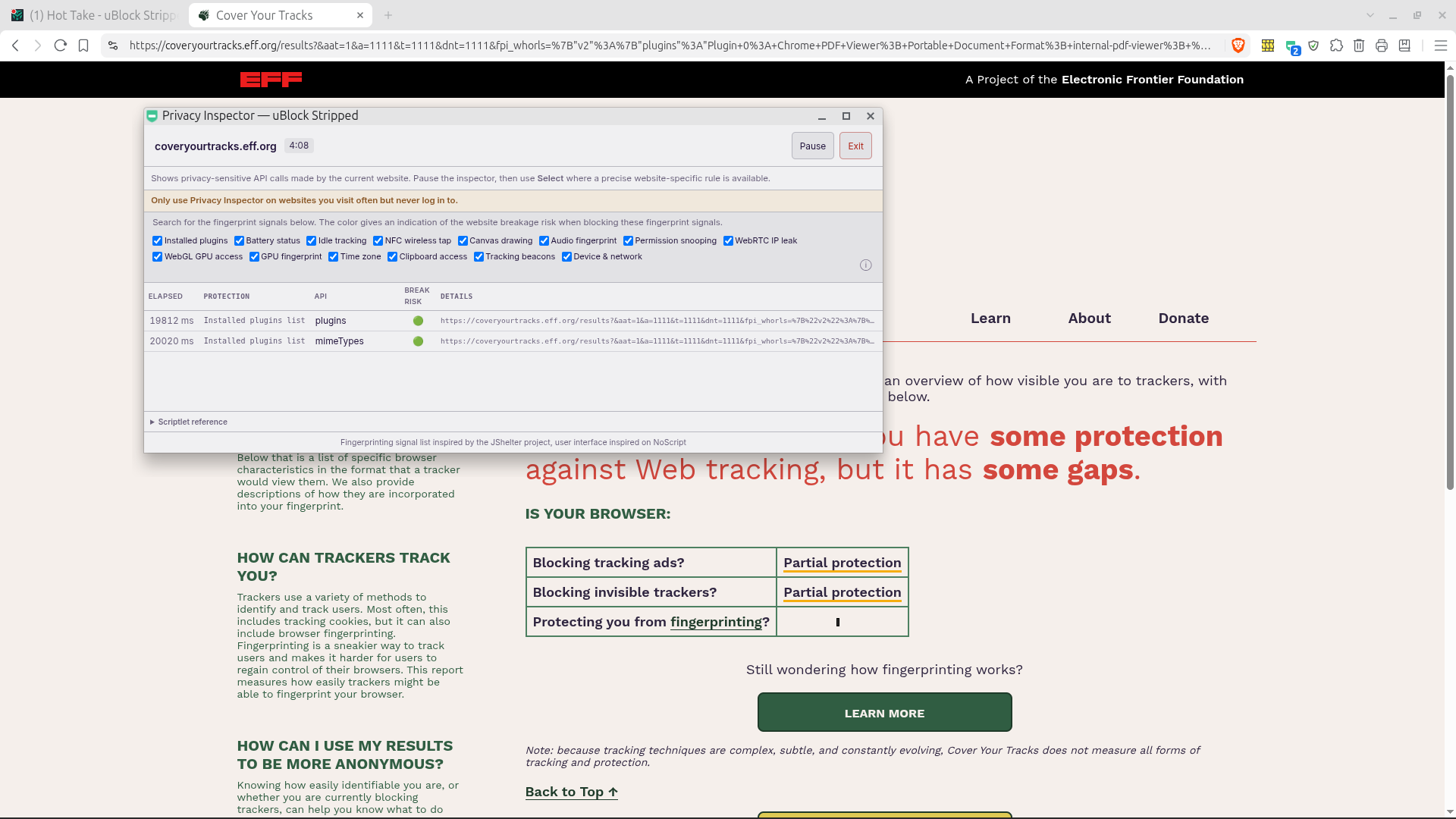
RE: Cover Your Tracks
Please explain again why:
uBO Lite = Our tests indicate that you have strong protection against Web tracking.
uBlock Dynamic = Our tests indicate that you have some protection against Web tracking, but it has some gaps.
 
RE: Cover Your Tracks
Please explain again why:
uBO Lite = Our tests indicate that you have strong protection against Web tracking.
uBlock Dynamic = Our tests indicate that you have some protection against Web tracking, but it has some gaps.
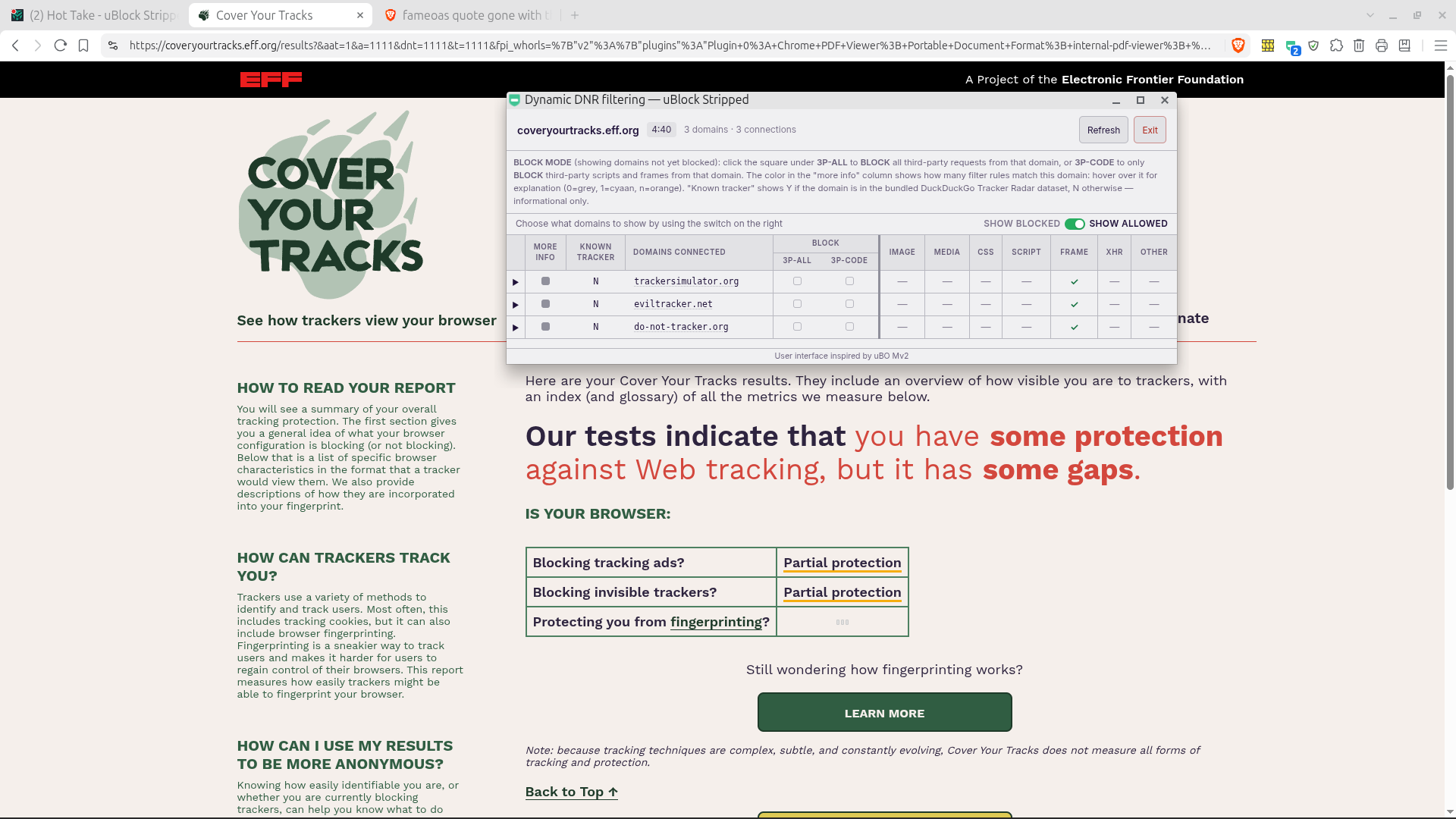
1791485003295.png


The third-party allowed are trackersimulator.org, eviltracker.net and do-not-tracker.org. All three nonsense (and not in the DDG tracker databse as you can see in the column known tracker). WHY? I am not adding nonsense block rules just for the sake of shining in a nonsense test.

I am glad people who are using it, give feedback and help to iron out errors and provide usability suggestions. So for their help in return I am willing to look at options. This led to extra functionality like worry-free's trying to decline cookie prompts (simuiar to Ghostery never consent), Cookie consent clicker (inspired by consent-o-matic to automate your cookie choices), Dynamic DNR filtering (as you see above, inspired by uBO Mv2 Dynamic filtering) and Privacy Inspector (inspired by JShelte project) are evolved.

When I block those 3 using Dynamic DNR filtering (notice that fingerprinting does not finish), I get the YES result, easy as that :cool:
1791485932269.png
 
Last edited:
With uBlock Dynamic -- I see an ad before video on cnn.com
With uBO Lite or AG extension -- I don't see an ad before video on cnn.com
Just me?
 
With uBlock Dynamic -- I see an ad before video on cnn.com
With uBO Lite or AG extension -- I don't see an ad before video on cnn.com
Just me?
No that is not just you. That is for all people (and it is by design and for your safety that it is not possible)

That has something to do with server side ads which are intertwined with the content stream and therefore hard or not at all to pin-point where they (the ad) starts or end. You need trust/user script permission to create scriptlets likes the ones discussed here and here but instead I rather offer extra security protection (see Privacy & Security tab) AG does not use scriptlets as explained in the example, but it also has scriptlets which accept raw javascript (these are used for CNN). When you don't want to see ads in CNN video's better use AdGuard for your safety.

What I can do (like I did for Sampei-san when he showed me some rejected rules in ABP-import) is create more specific SAFE uBS scriptlets. I will have a look at it.

For your info uBLOCK Dynamic drops scriptlets which
a) require trust
b) accept long parameter input
c) accept raw JavaScript

Category A is declined by design (unlike uBOL and AG, uBS does not require user script permission)
Category B and C can potentially be used to misuse browser vulnerabilities. This was flagged when my former neighbor who works for Dutch digital intel service offered to do an security audit (on Download Sentinel for which I used his knowledge in the heuristics) and I asked whether his team could also look at uBS.

EDIT I found the two scrptlets which were dropped, both were generic scriptlets which accepted raw javascript input, I made two new ones.

NEW uBS scriptlet: cnn.com#%#//scriptlet('disable-fave-ssai')
This scriptlet is a one-off (works only for the CNN's video player)
What AdGuard’s rule does: CNN’s video player (called FAVE) has settings that decide whether ads get stitched into the video stream on CNN’s server (SSAI). The rule wraps window.FAVE in a watcher. Whenever CNN’s code writes to FAVE, the rule sets the SSAI switches for clips, live streams for logged-in users and live streams for anonymous users to “off”. It does this for the player settings and for every player instance on the page. CNN’s player therefore asks for the video without stitched-in ads. AdGuard pairs this with a network rule that rewrites CNN’s player script so the same switch is off from the start, and that second part can’t be done in Chrome’s MV3.

NEW uBS scriptlet: cnn.com#%#//scriptlet('stub-window-object', 'AdFuel', 'queueRegistry,destroySlots', '500')
This scriptlet is a new generic scriptlet with three fixed parameters.
What AdGuard’s rule does: it waits until the page has loaded, then 500 ms later replaces CNN’s ad manager (window.AdFuel) with an empty stub. CNN’s own AdFuel script is allowed to load first and is overwritten afterwards. That makes the display-ad slot manager do nothing. It is not video-specific, but it belongs to the same CNN ad stack.

I first have to add these two scriptlets to uBS own safe-scriptlet-library, after that I can add those commands in my badfilter-quickfixes file on Github.So it takes some time before this is working (I also have CNN in my bookmarks, but nearly never watch video's, I read the Articles mostly)
 
Last edited:
No that is not just you. That is for all people (and it is by design and for your safety that it is not possible)

That has something to do with server side ads which are intertwined with the content stream and therefore hard or not at all to pin-point where they (the ad) starts or end. You need trust/user script permission to create scriptlets likes the ones discussed here and here but instead I rather offer extra security protection (see Privacy & Security tab) AG does not use scriptlets as explained in the example, but it also has scriptlets which accept raw javascript (these are used for CNN). When you don't want to see ads in CNN video's better use AdGuard for your safety.
Oh Okay...just now realized (after reading #374) uBlock Dynamic does not have "Allow User Scripts" function.
So, uBO Lite natively allows "scriptlets which accept raw javascript"?
I run uBOL or AG with "Allow User Scripts" off.
 
Last edited:
Oh Okay...just now realized (after reading #374) uBlock Dynamic does not have "Allow User Scripts" function.
So, uBO Lite natively allows "scriptlets which accept raw javascript"?
I run uBOL or AG with "Allow User Scripts" off.

So you are not planning to use uBS, just downplaying it :ROFLMAO:

In AG you are good to go (has trusted and trusted-plus scripts), but for uBO you also have to apply this tweak in uBO
 
Last edited:
@bjm_

I was making, fun. I don´t mind to be challenged. Feedback and critique only helps to improve.
Ironically the major improvements in uBlock Dynamic are from MT-members who use uBO themselves :cool:
  1. Because Jan Willy liked the never consent of Ghostery and I did not want to add an EVAL-bridge between restricted world and main world in Chrome (which basically is an EVAL based escape of the sandbox, so it is against two best practices) I made the Cookie consent clicker to automate your cookie choices, which is as far as I know an unique feature to automate your allow or deny cookies choice on websites you visit often, no other extension offers this!.

  2. Because Jan Willy kept challenging me (for random surfing cookies are a nuisance to) I looked which parts of the DuckDuckGo library (originally developed by Disconnect, made open source, adopted by DDG for its browser and used by Ghostery) I could use in a safe way. Ghostery (and maybe MBAM BrowserGuard now also has this feature) has automatic never consent mechanisms for over 100 Coockie Management Platforms, uBlock Dynamic worry-free "only" has counter measures for the 40 most used CPM's in the America's and Europe. That is why I say worry-free tries to decline cookie prompts (based on prevalence these 40 should take away 60-80% of cookie prompts when you combine it with Cookie consent clicker)

  3. Sampei-san kept nagging me about 20 scriptlet rules which he used in uBO/AG and were rejected by uBD because of long parameter inputs or accepring raw javascript. So I made the refuse long parameter input a bit smarter (which accepted certain parameters with capped length) and created 4 new (generic) SAFE uBlock Dynamic specific scriptlets.

  4. Sampei-kept asking for including cookie block filters (I won´t do that because I had an online payment breaking because of cookie filter in Brave). That is why I investigated the website specific block rules of the AG and EL annoyances filters and decided to only add website specific newsletter, subscription promo's subfilters and as an extra precaution added an internal whitelist for streaming media, gaming, authorization and payment services (which also should override filterlist block rules and the extra privacy and security protections).

  5. You challenged me with CNN. Again and example of a position (or principle) I took based on security (security and website functionality are more important than adblocking IMO), but again while the general principle remins valid (as with example 2 and 3), there is a grey area in which with a little more effort (code checks and balances) and scope narrowing (in regard to parameters) it is possible to find a solution (the second generic SAFE scriptlet I made).

    But (and that is why i write down this explanation), I have CNN also in my bookmarks and had noticed that some (not all) video's had server side in-video ad stitched to the video I wanted to see, so I decided to write a one-off, the cnn.com#%#//scriptlet('disable-fave-ssai'). The only general rule for writing one-off's is that I have to benefit from it personally also.

So TLDR: thanks for challenging me :)
 
Last edited:
There’s also a personal reason for your point 4.
It’s true that UD now accepts long strings.(y);)

But they don’t always work exactly the same way as they do in uBo.

The problem is that I rely on the “consent-cookie” filter lists, but with your extension, it’s not possible to perform an equivalent test.

Therefore, we can conclude that the same rule would have to be written differently in UD than in uBo.

It’s certain that the import doesn’t achieve the desired effect.

Which cases?

Again, it’s not possible to give specific examples in this thread because the content on those websites is inappropriate.
But I’ve noticed that there are some websites where, when age verification and cookie consent overlap, importing a long rule string fails to achieve its purpose.
 
There’s also a personal reason for your point 4.
It’s true that UD now accepts long strings.(y);)

But they don’t always work exactly the same way as they do in uBo.

The problem is that I rely on the “consent-cookie” filter lists, but with your extension, it’s not possible to perform an equivalent test.

Therefore, we can conclude that the same rule would have to be written differently in UD than in uBo.

It’s certain that the import doesn’t achieve the desired effect.

Which cases?

Again, it’s not possible to give specific examples in this thread because the content on those websites is inappropriate.
But I’ve noticed that there are some websites where, when age verification and cookie consent overlap, importing a long rule string fails to achieve its purpose.
When I have the time I will check your 20 rules, I only tested then 1-by-1 not combined. I also checked whether the Cookie clicker worked, so you could try only using the age verification and let the cookie consent clicker handle the cookie prompt. I thought I had tried the bypass age verification and cookie prompt using the cookie consent clicker only.

EDIT
I just used cookie consent clicker to automate cookie prompt and use cookie consent clicker again for the next age verification. It works 100% you don´t even need scriptlets.
 
Last edited:

Recently browsing

Members who viewed this thread in the last 5 minutes

Back
Top