Hi folks,
I use Kaspersky, and I recently enabled webcam protection. Now Kaspersky notifies me when anything wants to use my webcam. On odd occasions, in my web-browser the web-cam notification appears, but not for any sites that use my webcam. The popup also quickly disappears. I am trying to find a solution to prevent my web-browser from using the webcam at all.
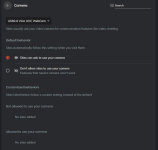
One solution, which has me going into Windows 10 Settings --> Camera, and then Turning "Allow desktop apps to access your camera off" --> Although this solution solves the problem, it then disables webcam for a bunch of apps such as Zoom. Furthermore, there is no option to turn off desktop Camera access PER APP, its either ON or OFF for ALL. Do folks here have any solutions? Below are urls to some screenshots:
brave v7 CUAHxs WY — Postimages
brave y X1ab Fq JGZ Copy — Postimages
I use Kaspersky, and I recently enabled webcam protection. Now Kaspersky notifies me when anything wants to use my webcam. On odd occasions, in my web-browser the web-cam notification appears, but not for any sites that use my webcam. The popup also quickly disappears. I am trying to find a solution to prevent my web-browser from using the webcam at all.
One solution, which has me going into Windows 10 Settings --> Camera, and then Turning "Allow desktop apps to access your camera off" --> Although this solution solves the problem, it then disables webcam for a bunch of apps such as Zoom. Furthermore, there is no option to turn off desktop Camera access PER APP, its either ON or OFF for ALL. Do folks here have any solutions? Below are urls to some screenshots:
brave v7 CUAHxs WY — Postimages
brave y X1ab Fq JGZ Copy — Postimages