Serious Discussion WHHLight - simplified application control for Windows Home and Pro.

No, there I do not have this problem:
I will try to reproduce the issue. Can you do a simple test?
  1. Use version 4.0.0.1 and apply DEFAULT settings + REFRRESH.
  2. Next, use the version 4.0.1.0 and apply HIGH settings + REFRESH
  3. Finally, close ConfigureDefender and rerun version 4.0.1.0.
  4. Post the screenshot of the last few ASR rules.
 
I will try to reproduce the issue. Can you do a simple test?
  1. Use version 4.0.0.1 and apply DEFAULT settings + REFRRESH.
  2. Next, use the version 4.0.1.0 and apply HIGH settings + REFRESH
  3. Finally, close ConfigureDefender and rerun version 4.0.1.0.
  4. Post the screenshot of the last few ASR rules.
Here is the screenshot:
Schermafbeelding 2024-09-06 195239.jpg
 
Hi Andy, I get the following error when clicking refresh with the new ConfigureDefender 4.0.1.0:

View attachment 285375

Thanks for the help.
After some additional tests, I confirmed a bug in ConfigureDefender. The new rules can be enabled one by one without using <HIGH>, <INTERACTIVE>, or <MAX> buttons.
The corrected version will be published next week.
 
New rules currently work on my Windows 11 Home 23H2 (updated). No need to use Windows Insider.:)
I used ConfigureDefender 4.0.1.0 and set new rules by comboboxes (REFRESH and Windows restart required after changing the settings).
The simplest metod of checking if new rules work is as follows:
  1. Copy regedit.exe from C:\Windows to the Desktop
  2. Run regedit.exe from the Desktop (blocked).
  3. Use <Defender Security Log> from ConfigureDefender to see the blocked event:
Event[0]:
Time Created : 07.09.2024 19:45:49
ProviderName : Microsoft-Windows-Windows Defender
Id : 1122
Message : Funkcja Microsoft Defender Exploit Guard wykonała inspekcję operacji, na którą nie zezwala administrator IT.
Aby uzyskać więcej informacji, skontaktuj się ze swoim administratorem IT.
Identyfikator: C0033C00-D16D-4114-A5A0-DC9B3A7D2CEB <------ the ID of ASR rule "Block use of copied or impersonated system tools"
Godzina wykrycia: 2024-09-07T17:45:49.777Z
Użytkownik: -----------------------------------------------------
Ścieżka: -----------------------------------\regedit.exe
Nazwa procesu: C:\Program Files\totalcmd\TOTALCMD64.EXE
Docelowy wiersz polecenia "-----------------------------------\regedit.exe"
Nadrzędny wiersz polecenia: "C:\Program Files\totalcmd\TOTALCMD64.EXE"
Plik, którego to dotyczy:
Flagi dziedziczenia: 0x00000000
Wersja analizy zabezpieczeń: 1.417.553.0
Wersja aparatu: 1.1.24070.3
Wersja produktu: 4.18.24070.5

 
Last edited:
Here is the information related to the ASR rule "Block rebooting machine in Safe Mode":

Event[1]:
Time Created : 07.09.2024 19:52:41
ProviderName : Microsoft-Windows-Windows Defender
Id : 1121
Message : Funkcja Microsoft Defender Exploit Guard zablokowała operację, na którą nie zezwala administrator IT.
Aby uzyskać więcej informacji, skontaktuj się ze swoim administratorem IT.
Identyfikator: 33DDEDF1-C6E0-47CB-833E-DE6133960387 <------ the ID of ASR rule "Block rebooting machine in Safe Mode"
Godzina wykrycia: 2024-09-07T17:52:41.980Z
Użytkownik: ----------------------------------------------
Ścieżka: C:\Windows\System32\bcdedit.exe
Nazwa procesu: C:\Windows\System32\cmd[.]exe
Docelowy wiersz polecenia bcdedit /.......................... <-------- I removed the CmdLine
Nadrzędny wiersz polecenia: "C:\WINDOWS\system32\cmd[.]exe"
Plik, którego to dotyczy:
Flagi dziedziczenia: 0x00000000
Wersja analizy zabezpieczeń: 1.417.553.0
Wersja aparatu: 1.1.24070.3
Wersja produktu: 4.18.24070.5
 
Maybe I need new glasses, but can anyone give me the link to where I can download WHH LIGHT:unsure:

I removed the beta build from the GitHub.

The link to the official build is always updated in the OP of this thread:
 
The WHHLight beta, had a minor issue with ConfigureDefender ver. 4010. That version of ConfigureDefender works well but when using <HIGH>, <INTERACTIVE>, or <MAX> buttons, two new ASR rules are not activated. So those rules must be added via combobox settings.
The new WHHLight version 2011 is finished and will be published in one week.
 
Last edited:
WHHLight vs. ClickFix attacks
https://malwaretips.com/threads/fak...push-infostealing-malware.133286/post-1105071
https://www.mcafee.com/blogs/other-...-social-engineering-tactic-to-deploy-malware/
https://blog.sekoia.io/clickfix-tactic-the-phantom-meet/

A new report from Sekoia, a SaaS cybersecurity provider, notes that ClickFix campaigns have evolved significantly and now use a Google Meet lure, phishing emails targeting transport and logistics firms, fake Facebook pages, and deceptive GitHub issues.

Attack flow (example from McAfee):
phishing email HTML attachment ---> ClickFix abusing Explorer ----> LOLBin (CMD, PowerShell) downloads HTA payload ----> HTA payload executed

1729343884206.png


This attack is blocked by WHHLight default settings even without tools (FirewallHardening, ConfigureDefender, DocumentsAntiExploit).
The payload is dropped into UserSpace, so it can be blocked by SRP restrictions. Many such attacks can be prevented by SRP restrictions, but some would require non-default settings. The best prevention against ClickFix is FirewallHardening. The default "Recommended H_C" BlockList will block the malware delivery via LOLBins.
 
Last edited:
This attack is blocked by WHHLight default settings even without tools (FirewallHardening, ConfigureDefender, DocumentsAntiExploit).
The payload is dropped into UserSpace, so it can be blocked by SRP restrictions. Many such attacks can be prevented by SRP restrictions, but some would require non-default settings. The best prevention against ClickFix is FirewallHardening. The default "Recommended H_C" BlockList will block the malware delivery via LOLBins.
@Andy Ful sorry in advance as I think I ask this question every so often (then get sidetracked into something else): I'm running CyberLock on win10. If you know, does CL provide LOLBins protection that FirewallHardening does, as I don't want muck up by redundant protection and possible incompatibility. win10 also running DeepInstinct. Will FirewallHardening plug a gap or not needed here. Or this would be a great trio???
@danb your insight greatly appreciated too. CL 7.79
 
  • Like
Reactions: Andy Ful
@Andy Ful sorry in advance as I think I ask this question every so often (then get sidetracked into something else): I'm running CyberLock on win10. If you know, does CL provide LOLBins protection that FirewallHardening does, as I don't want muck up by redundant protection and possible incompatibility. win10 also running DeepInstinct. Will FirewallHardening plug a gap or not needed here. Or this would be a great trio???
@danb your insight greatly appreciated too. CL 7.79

Unfortunately, I do not use CyberLock and DeepInstinct. In my opinion, using FirewallHardening would probably make the protection too complex.
I suggest asking someone on the threads dedicated to CyberLock and DeepInstinct. Discussion in this thread will not help those who use CyberLock or DeepInstinct. :)
 
Last edited:
  • +Reputation
Reactions: simmerskool
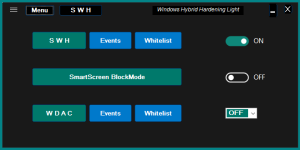
Seriously clueless re WHHL 2001 beta3. I had previously installed ConfigureDefender & FWH and understood them (more or less) running Win10_pro_VM with just MS Defender.
Downloaded WHHL, it said it ran some registry changes and to close WHHL. Then I get the below GUI and it has 5 popup help screens with very small font, and info overload. Also says if you're sua need to be full admin (not run_as_admin) also says "x" is not compatible with "y" etc etc etc... :unsure: -- very easy (for me) to be mostly clueless at this point. Does this GUI represent default setting for WHHL? Is there a more secure config of WHHL, and do I need to logout and login as admin? Did running WHHL reconfig my previously installed CD & FWH? Am I overthinking this??
 

Attachments

  • WHHL_snip1.PNG
    WHHL_snip1.PNG
    10.5 KB · Views: 148