My PC has been crashing a lot lately, and I want to fix that, but I'm not a professional at this. Last time my computer froze was today while playing a game of Town Of Salem on the Microsoft Edge browser. I know that you guys need a crash dump file, but I do not know how to locate it, can someone tell me so I can send it for further help? Please and thank you. Also tell me if you need anything other than the dump file. I'll try to respond as fast as possible.


The MalwareTips app
Your community, one tap away.
Open MalwareTips from your Home Screen or desktop. Follow discussions, find answers and pick up where you left off.
- Home Screen access
- Optional push alerts
- Your community
You're ready to explore.Explore what's new
Installation instructions
iPhone & iPad
- Open MalwareTips in Safari and tap Share. You may need to open the Page Menu first.
- Choose Add to Home Screen. If it is not listed, use Edit Actions to add it.
- Keep Open as Web App enabled if shown, then tap Add.
Android
- Open MalwareTips in Chrome or another browser that supports app installation.
- Open the browser menu and look for Install app, Install and create shortcut, or Add to Home screen.
- Choose Install and confirm. Wording varies by browser.
Desktop
- Chrome: use the install icon in the address bar, or the menu under Cast, save and share.
- Edge: open the menu, then More tools, Apps and Install this site as an app.
- Safari on Mac: choose Share or File, then Add to Dock. Firefox on Windows: look for the web apps button in the address bar.
If you cannot find an install option, update your browser or use its bookmark option to keep MalwareTips close.
Keep up with your conversations
After installation, open the app and sign in. Enable push notifications in Preferences if you want alerts. On iPhone and iPad, push requires a Home Screen web app and iOS or iPadOS 16.4 or later.
Sign in to manage notificationsInstallation is optional. Your notification settings stay under your control.
You are using an out of date browser. It may not display this or other websites correctly.
You should upgrade or use an alternative browser.
You should upgrade or use an alternative browser.
Troubleshooting Windows 10 Many Freezes/Crashes/BSOD In The Past Few Days
Did you try Troubleshooting in Windows 10.
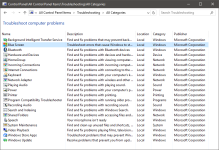
Control Panel method
Start > Type 'Control Panel' > Change "View by: Category" to "View by: Small Icons" > Troubleshooting > Left-side panel "View all" > Blue Screen
Windows Settings method
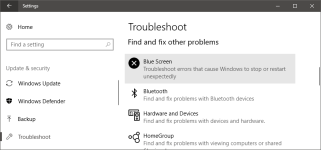
Start > Settings > Update & Security > Troubleshoot > Blue Screen
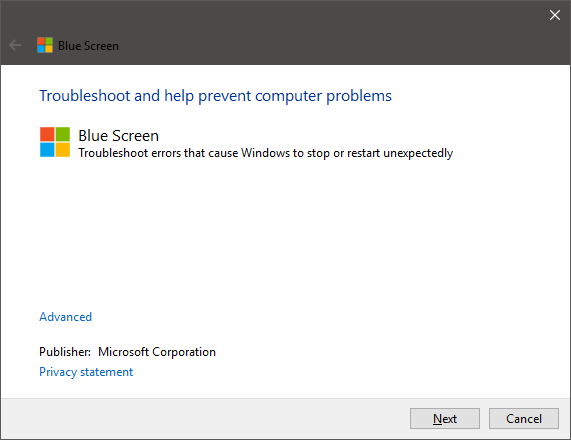
Click on Next to continue. Share any results.
Control Panel method
Start > Type 'Control Panel' > Change "View by: Category" to "View by: Small Icons" > Troubleshooting > Left-side panel "View all" > Blue Screen
Windows Settings method
Start > Settings > Update & Security > Troubleshoot > Blue Screen
Click on Next to continue. Share any results.
Upvote
0


try to post your problems with BSODs in this forum (sysnative.com):
sysnative.com: BSOD, Crashes, Kernel Debugging.
This guys has helped me out with my brand new gaming laptop some months ago: i had BSODs several times while playing games.
Here is another quite good forum for this kind of issues (bleepingcomputer.com):
bleepingcomputer.com: Windows Crashes, BSOD, and Hangs Help and Support
Both forums have a very good reputation: i'm also frequently visiting both forums.
sysnative.com: BSOD, Crashes, Kernel Debugging.
This guys has helped me out with my brand new gaming laptop some months ago: i had BSODs several times while playing games.
Here is another quite good forum for this kind of issues (bleepingcomputer.com):
bleepingcomputer.com: Windows Crashes, BSOD, and Hangs Help and Support
Both forums have a very good reputation: i'm also frequently visiting both forums.
Upvote
0
I'm not gonna turn on my computer for a while until someone finds a solution, or I got to another forum as suggested and check there, as I just got another BSOD which was Driver_IRQL_Not_Less_Or_Equal, I'm guessing it has something to do with my driver, as its in the name of it.
Upvote
0

Hi @The BSOD
Firstly, back up any important data to an USB or External Hard drive as this is crucial to before beginning diagnosing and repair.
Secondly,
Please could you download and run CrystalDiskInfoPortable
Make sure you download standard edition portable and extract the zip. Then run it and tell us the condition of your hard drive or ssd.
Say either Good, Caution or Bad
Then after that, download and install SeaTools For Windows
Once it is installed, run the Short Drive Self Test and let us know the results. It will either say pass or fail
These steps will rule out if your hard drive is going bad.
Firstly, back up any important data to an USB or External Hard drive as this is crucial to before beginning diagnosing and repair.
Secondly,
Please could you download and run CrystalDiskInfoPortable
Make sure you download standard edition portable and extract the zip. Then run it and tell us the condition of your hard drive or ssd.
Say either Good, Caution or Bad
Then after that, download and install SeaTools For Windows
Once it is installed, run the Short Drive Self Test and let us know the results. It will either say pass or fail
These steps will rule out if your hard drive is going bad.
Upvote
0

I had a few issues with BSOD while viewing movies.I'm not gonna turn on my computer for a while until someone finds a solution, or I got to another forum as suggested and check there, as I just got another BSOD which was Driver_IRQL_Not_Less_Or_Equal, I'm guessing it has something to do with my driver, as its in the name of it.
I installed an app called Drivermax and it said that sound driver was out of date.
updated the driver and have not had any problem since.
also try an app called whocrashed.
Upvote
0
Good news, my computer stayed on long enough for me to download whocrashed and analyse. The BSOD that was KMODE_EXCEPTION_NOT_HANDELED was apparently caused by the "following module: wof.sys (Wof+0x2EEDE)" The file path is C:\WINDOWS\system32\drivers\wof.sys. But I'm afraid about the bug check description... I'll skip a line down to say what I'm afraid about. "Possibly this problem is caused by another driver on your system that cannot be identified at this time." I'm not sure if that is useful to you guys though.
Upvote
0
Please could you try my suggestion.Good news, my computer stayed on long enough for me to download whocrashed and analyse. The BSOD that was KMODE_EXCEPTION_NOT_HANDELED was apparently caused by the "following module: wof.sys (Wof+0x2EEDE)" The file path is C:\WINDOWS\system32\drivers\wof.sys. But I'm afraid about the bug check description... I'll skip a line down to say what I'm afraid about. "Possibly this problem is caused by another driver on your system that cannot be identified at this time." I'm not sure if that is useful to you guys though.
Upvote
0

turn on Safe mode in msconfig and restart your PC, it will not load any drivers except essentials.Good news, my computer stayed on long enough for me to download whocrashed and analyse. The BSOD that was KMODE_EXCEPTION_NOT_HANDELED was apparently caused by the "following module: wof.sys (Wof+0x2EEDE)" The file path is C:\WINDOWS\system32\drivers\wof.sys. But I'm afraid about the bug check description... I'll skip a line down to say what I'm afraid about. "Possibly this problem is caused by another driver on your system that cannot be identified at this time." I'm not sure if that is useful to you guys though.
then maybe you can troubleshoot better
Upvote
0
I ran 64, Tempurature is 43 C and Health Status is caution, looks bad, also down below, with the ID:5 and Attribute Name:Reallocated Sectors Count, there's a yellow circle at the side. All the others are blue. I'm trying the other link now. @RECdevicehelper
Upvote
0
Recently browsing
Members who viewed this thread in the last 5 minutes
You may also like...
-

-
S
- Windows 11
- Stephen Lines
- · 0
-

-
 Setup Idea Pretty Good PC Security Regimen
 -
M
- Opera
- Maciej Kocemba
- · 0