Troubleshoot Windows Defender Firewall

  • Thread starter Thread starter ForgottenSeer 69673
  • Start date Start date
F

ForgottenSeer 69673

Thread author
Hello
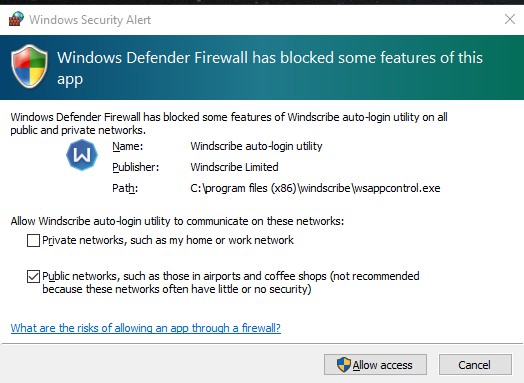
I have been using Windscribe for a little over a month now and got my first popup from Windows Defender Firewall this morning. Only thing different is my Windows insider build updated to 17120 yesterday. I had no even turned on windsscribe this morning when I got the popup. Do you thing it was due to the Windows update?
ScreenHunter_90 Mar. 18 07.37.jpg
 
Last edited by a moderator:
Windscribe VPN may load upon start-up and run to protect your PC at login.

You can Allow Access if you trust the application.

Unable to find any details about wsappcontrol.exe on the web.
 
Upvote 0
Windscribe VPN may load upon start-up and run to protect your PC at login.

You can Allow Access if you trust the application.

Unable to find any details about wsappcontrol.exe on the web.
So you think the windows update caused it since I never saw it before?
 
Upvote 0
short answer is yes
When using Windscribe you should be using beta versions on Insider Previews
As current Windscribe stable is not updated for all the changes in Insider Preview builds,
If u wish to avoid such issues you should go to Windscribe preferances bebug and click on beta channel,
and Windscribe will update to the beta , however betas can have their own issues,
 
Upvote 0
short answer is yes
When using Windscribe you should be using beta versions on Insider Previews
As current Windscribe stable is not updated for all the changes in Insider Preview builds,
If u wish to avoid such issues you should go to Windscribe preferances bebug and click on beta channel,
and Windscribe will update to the beta , however betas can have their own issues,
That is what I have been using all along (BETA).
ScreenHunter_92 Mar. 19 08.32.jpg
 
Upvote 0
I would think it was a one time thing but still wonder what Defender blocked.
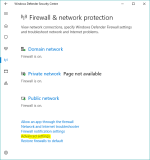
FYI, it's still a Windows Firewall notification. It's only called Windows Defender Firewall, because Microsoft decided to place all security features under one roof - Windows Defender Security Centre.

To configure Windows "Defender" Firewall with Advanced Security, open WDSC > Firewall & Network > Advanced Settings (accept UAC) to see all Inbound/Outbound rules. Here you can add, delete or modify existing rules.

upload_2018-3-19_14-17-25.png

According to Microsoft’s official support forum, usually, this notification requests the user to permit access to a process or a program, however, as soon as the corresponding activity starts, the notifications start appearing repeatedly. It is mostly seen when using a web browser. The most common culprit behind this notification in web browsers is a malicious plugin or a plugin that tries to connect to the internet without the user’s permission. Other causes may include software or apps that try to update themselves in the background without your permission as well as viruses and malware on your computer.

Source: Windows Firewall has blocked some features of this app
 
Upvote 0
Thank you spawn. The firewall does show two inbound block rules. One for TCP and one for UDP. Still not sure if I should set the rule to allow or not. Been using Windscribe for a little over a month now and this was the first warning and it was after the last insider update.
ScreenHunter_93 Mar. 19 09.29.jpg
ScreenHunter_94 Mar. 19 09.30.jpg
 
Upvote 0